
Schedule.so
Schedule.so: A feature-rich scheduling choice for teams that need routing, workflows, and webhooks. Ranked #48 of 135 in Appointment Scheduling Software by our editors (4.9/10); pricing: Free plan; best for teams wanting advanced workflows and webhooks.
At a glance
- Editor score4.9 / 10
- PricingFree plan
- Best forTeams wanting advanced workflows and webhooks
- Free planYes
- Paid from$49/mo
- Calendar syncTwo-way
- Facts checked19 Sep 2026
Where it wins
- Free Starter plan includes unlimited calendars and personal events
- Supports round-robin, collective, group, and team scheduling
- Connects calendars, meeting tools, payment services, workflows, and webhooks
Where it doesn't
- Paid plans start at $49 per month when billed monthly
- The service is available only on the web
- Enterprise pricing is custom rather than listed as a fixed amount
Our verdict on Schedule.so
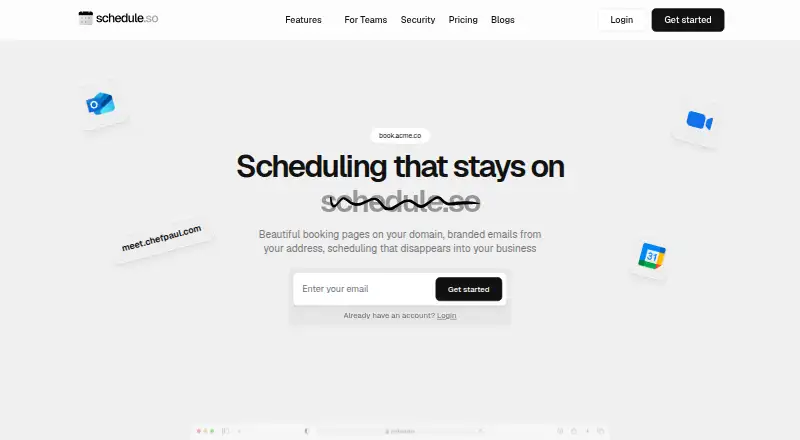
Schedule.so is appointment scheduling software for individuals and teams that need more than a basic booking link. It provides published custom booking pages, availability rules, booking windows, buffer times, real-time two-way calendar synchronization, automated reminders, rescheduling, and team scheduling. Its workflow coverage also includes round-robin assignment, collective and group bookings, meeting links, payment collection, and webhooks, making it suited to businesses coordinating multiple people, meeting types, or booking paths.
Pricing starts with the free Starter plan, which includes unlimited calendars, unlimited personal events, automated reminders, real-time calendar sync, and team scheduling. Essentials costs $49 per month with monthly billing, while Pro costs $99 per month. Enterprise offers custom pricing. The paid plan prices create a meaningful step up from the free option, particularly for teams comparing scheduling costs. The published plan details make Starter the clearest entry point; buyers should compare the paid tiers against the workflows and integrations they require before committing.
Its ecosystem fit is broad for a web-based scheduling service. Schedule.so supports Google Calendar, Outlook Calendar, Apple Calendar, Google Meet, Microsoft Teams, Zoom, Stripe, and Razorpay. Meeting links can be added through the supported video platforms, while Stripe and Razorpay support booking payments. Availability controls, two-way synchronization, team routing, group scheduling, workflows, and webhooks give it a wider operational scope than a narrowly focused appointment page. Choose Schedule.so if advanced scheduling flows and connected booking operations matter. An alternative may suit teams that require a non-web platform or a lower-cost paid starting point.
Your product? Our editors can test Schedule.so in depth and publish a review, labelled as paid · from $149/mo →
Schedule.so pricing
All 4 Schedule.so plans and prices →
Schedule.so fact sheet
| Free plan | Yes |
|---|---|
| Paid from | $49/mo |
| Booking pages | Yes |
| Calendar sync | Two-way |
| Group booking | Yes |
| Round-robin scheduling | Yes |
| Automated reminders | Yes |
| Payment collection | Yes |
| Deployment | Cloud |
| Platforms | Web |
| Integrations | 8 integrations: Google Calendar, Outlook Calendar, Apple Calendar, Google Meet, Microsoft Teams, Zoom … |
| Pricing | Free plan (source) |
| Website | schedule.so |
| Facts checked | 19 Sep 2026 |
Schedule.so integrations
Schedule.so lists 8 integrations on its own site.
- Google Calendar
- Outlook Calendar
- Apple Calendar
- Google Meet
- Microsoft Teams
- Zoom
- Stripe
- Razorpay
Alternatives to Schedule.so
- CalendlyA broad scheduler with strong team routing, payments, reminders, and integrations.9.4
- Cal.comA flexible scheduler with free basics, team routing, payments, and developer tools.9.2
- Zoho BookingsA flexible scheduler with a capable free tier and strong Zoho ecosystem fit.9.1



See all Schedule.so alternatives →
Also Ranked In
Schedule.so is ranked in 2 of our directories.
Used Schedule.so? Be the first to review it
The editor score above is our own research. What this page doesn't have yet is a reader's view — what you used Schedule.so for, what worked and what didn't. No stars are seeded and no review is paid for; an editor reads every one before it appears.
Write a reviewTwo minutes · verified accounts only · read by an editor before it appears
Featured on iTechGuides

Schedule.so is listed in our Appointment Scheduling Software directory. Add the badge to your site — it links back to this page.
<a href="https://www.itechguides.com/products/schedule-so/"><img src="https://www.itechguides.com/best/badge/schedule-so.svg" alt="Featured on iTechGuides" width="230" height="46"></a>
Reviewed by iTechGuides Editors · Editorial team · Updated Sep 2026
Advertiser disclosure: iTechGuides is reader-supported. Vendors can pay for top positions in our rankings and for a place on other products' pages, and we may earn a commission when you click some links. Bought places stand at the number bought; this page and our disclosure say so. Paying vendors may get a fuller, more detailed review from our editors, and that review can change their score. How we rank.
Last updated · How we research and update