Schedule Email
Schedule Email: A focused Gmail scheduler with useful editing controls and a low-cost Premium tier. Ranked #7 of 30 in Email Scheduling Software by our editors (7.6/10); pricing: Free plan; best for simple Gmail scheduling.
At a glance
- Editor score7.6 / 10
- PricingFree plan
- Best forSimple Gmail scheduling
- Free planYes
- Paid from$4.99/user/mo
- Facts checked21 Sep 2026
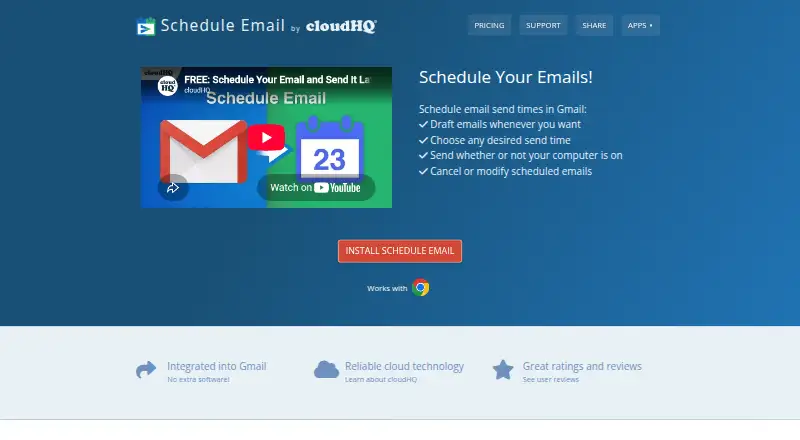
Where it wins
- Schedules Gmail messages with calendar-based timing and presets
- Lets users review, edit, cancel, or discard scheduled emails
- Sends messages while the computer or browser is not running
Where it doesn't
- Available as a Chrome extension rather than a broader platform
- The workflow is centered on Gmail and Google Workspace
- Email and phone support are included only with Premium
Our verdict on Schedule Email
Schedule Email is a Gmail-integrated scheduling tool from cloudHQ LLC for individuals who want to prepare messages now and send them later. It works inside Gmail and Google Workspace, with preset send-time suggestions and calendar-based date and time selection. Users can review, edit, cancel, or discard scheduled messages from Gmail, while scheduled delivery can continue without the computer or browser running. Email Tracker integration adds a related email workflow for users who already use that service.
Pricing is straightforward. Basic is free for one user and includes Gmail integration, scheduled-email review or cancellation, Email Tracker integration, and later delivery. Premium costs $4.99 per user per month when billed monthly and adds email and phone support while retaining the Basic features. This structure makes the product easy to evaluate for individual Gmail scheduling needs, with a low-cost paid tier for buyers who want direct support. Teams should consider the per-user pricing and the Basic plan's one-user scope when selecting an option.
The main trade-off is focus: Schedule Email is distributed as a Chrome extension and is built around Gmail, Google Workspace, G Suite, and Email Tracker. That makes it a practical fit for users whose email work already lives in Google's ecosystem, particularly when browser-based calendar selection and post-scheduling edits matter. Buyers seeking a Gmail-centered scheduler should find the feature set appropriately targeted; organizations looking for broader platform coverage or a less browser-dependent workflow should choose an alternative.
Your product? Our editors can test Schedule Email in depth and publish a review, labelled as paid · from $149/mo →
Schedule Email pricing
All 2 Schedule Email plans and prices →
Schedule Email fact sheet
| Free plan | Yes |
|---|---|
| Paid from | $4.99/user/mo |
| Automated follow-ups | Not verified |
| Recurring emails | Not verified |
| Email snoozing | Not verified |
| Scheduled email limit | Not verified |
| Browser extension | Yes |
| Mobile apps | Not verified |
| Deployment | Cloud, Browser extension |
| Platforms | Chrome extension |
| Support | Email, Phone, Docs |
| Built for | Solo, Small business (editorial estimate) |
| Integrations | 4 integrations: Gmail, Google Workspace, G Suite, Email Tracker |
| Pricing | Free plan (source) |
| Website | schedule-email.com |
| Facts checked | 21 Sep 2026 |
Schedule Email integrations
Schedule Email lists 4 integrations on its own site.
- Gmail
- Google Workspace
- G Suite
- Email Tracker
Alternatives to Schedule Email
- Right InboxA focused Gmail extension for scheduling, engagement tracking, and sales follow-up.8.9
- MailmeteorA flexible choice for scheduled campaigns with tracking, automation, and CRM connections.8.8
- MixmaxA flexible choice for sales sequences, reply detection, personalization, and meetings.8.7



See all Schedule Email alternatives →
Schedule Email vs the competition
- Schedule Email vs Right Inbox
- Schedule Email vs Mailmeteor
- Schedule Email vs Mixmax
- Schedule Email vs Boomerang
- Schedule Email vs FollowUpThen
- Schedule Email vs SendLater

Compare Schedule Email with any tool side by side →
Used Schedule Email? Be the first to review it
The editor score above is our own research. What this page doesn't have yet is a reader's view — what you used Schedule Email for, what worked and what didn't. No stars are seeded and no review is paid for; an editor reads every one before it appears.
Write a reviewTwo minutes · verified accounts only · read by an editor before it appears
Featured on iTechGuides

Schedule Email is listed in our Email Scheduling Software directory. Add the badge to your site — it links back to this page.
<a href="https://www.itechguides.com/products/schedule-email/"><img src="https://www.itechguides.com/best/badge/schedule-email.svg" alt="Featured on iTechGuides" width="230" height="46"></a>
Reviewed by iTechGuides Editors · Editorial team · Updated Oct 2026
Advertiser disclosure: iTechGuides is reader-supported. Vendors can pay for top positions in our rankings and for a place on other products' pages, and we may earn a commission when you click some links. Bought places stand at the number bought; this page and our disclosure say so. Paying vendors may get a fuller, more detailed review from our editors, and that review can change their score. How we rank.
Last updated · How we research and update