
ScanSpeeder
ScanSpeeder: A focused Windows scanner for batch photo processing, with OCR and feeder support in Pro. Ranked #18 of 22 in Scanner Software by our editors (6.5/10); pricing: Paid; best for batch photo and film scanning.
At a glance
- Editor score6.5 / 10
- PricingPaid
- Best forBatch photo and film scanning
- Free planNo
- Paid from$39.95 one-time
- OCR includedYes
- Founded2005 · Ontario, Canada
- Facts checked20 Sep 2026
Where it wins
- Detects, crops, straightens, separates, and enhances photos in batches
- Scans directly from photo album pages
- Pro adds OCR, film scanning, and feeder support
Where it doesn't
- Windows-only platform support
- Film scanning and OCR require the Pro Edition
- Pricing shows one-time prices with annual billing labels
Our verdict on ScanSpeeder
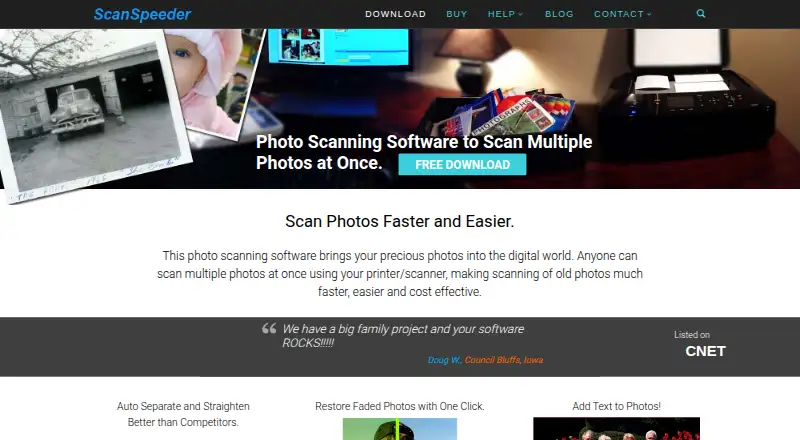
ScanSpeeder is Windows desktop software for digitizing multiple photos, documents, cards, receipts, slides, and negatives with a compatible scanner. It is aimed at individuals and businesses preserving photo collections or processing batches of scanned materials. Its core workflow detects, crops, straightens, separates, enhances, tags, and saves scanned items, with JPEG and TIFF output available.
The two editions are narrowly differentiated. Standard Edition costs $39.95 one-time, with annual billing shown, and includes scanning multiple photos plus batch image processing. Pro Edition costs $49.95 one-time, with annual billing shown, and adds document processing, searchable PDF creation with OCR, and photo and document feeder support. A 10-scan trial is available, while the product is otherwise paid. The pricing presentation makes the billing terms worth reviewing before purchase.
ScanSpeeder’s strongest fit is batch-oriented photo work rather than broad, platform-independent scanning. Automatic detection, cropping, straightening, one-click enhancement, batch correction, tagging, captions, and date metadata support an organized digitization workflow. Pro extends the scope to negatives, slides, film, documents, receipts, searchable PDFs, and feeder-based processing. The Windows-only requirement limits platform choice, and buyers who need OCR, film scanning, or feeder support must select Pro. Choose Standard for repeated photo batches; choose Pro when document workflows or film digitization are part of the project.
Questions about ScanSpeeder
What does ScanSpeeder run on? Windows. It runs as a desktop app.
Does ScanSpeeder offer a money-back guarantee? Yes: 30 days.
Who is ScanSpeeder built for? Solo users and small businesses (our editorial estimate).
Your product? Our editors can test ScanSpeeder in depth and publish a review, labelled as paid · from $149/mo →
ScanSpeeder pricing
All 2 ScanSpeeder plans and prices →
ScanSpeeder fact sheet
| Free plan | No |
|---|---|
| Paid from | $39.95 one-time |
| Supported platforms | windows |
| OCR included | Yes |
| ADF support | Yes |
| Duplex scanning | Not verified |
| Output formats | JPG, TIFF, PDF |
| Cloud destinations | Not verified |
| Money-back guarantee | 30 days |
| Deployment | Desktop |
| Platforms | Windows |
| Support | Email, Community |
| Built for | Solo, Small business (editorial estimate) |
| Pricing | Paid (source) |
| Website | scanspeeder.com |
| Facts checked | 20 Sep 2026 |
Alternatives to ScanSpeeder
- NAPS2A capable free scanner utility for searchable PDFs, batch workflows, and automation.9.4
- ScanSnap HomeA capable free companion for organizing scans across desktop and mobile.9.2
- PaperStream CaptureA capable Windows scanner workflow for batch capture, extraction, checking, and routing.8.9

See all ScanSpeeder alternatives →
Also Ranked In
ScanSpeeder is ranked in 2 of our directories.
Used ScanSpeeder? Be the first to review it
The editor score above is our own research. What this page doesn't have yet is a reader's view — what you used ScanSpeeder for, what worked and what didn't. No stars are seeded and no review is paid for; an editor reads every one before it appears.
Write a reviewTwo minutes · verified accounts only · read by an editor before it appears
Featured on iTechGuides

ScanSpeeder is listed in our Scanner Software directory. Add the badge to your site — it links back to this page.
<a href="https://www.itechguides.com/products/scanspeeder/"><img src="https://www.itechguides.com/best/badge/scanspeeder.svg" alt="Featured on iTechGuides" width="230" height="46"></a>
Reviewed by iTechGuides Editors · Editorial team · Updated Nov 2026
Advertiser disclosure: iTechGuides is reader-supported. Vendors can pay for top positions in our rankings and for a place on other products' pages, and we may earn a commission when you click some links. Bought places stand at the number bought; this page and our disclosure say so. Paying vendors may get a fuller, more detailed review from our editors, and that review can change their score. How we rank.
Last updated · How we research and update