
SARDU MultiBoot Creator
SARDU MultiBoot Creator: A flexible multiboot builder with managed downloads, BIOS/UEFI support, and paid tiers. Ranked #7 of 38 in Bootable USB Software by our editors (8.3/10); pricing: Free plan; best for multiboot media with managed image downloads.
At a glance
- Editor score8.3 / 10
- PricingFree plan
- Best forMultiboot media with managed image downloads
- Free planYes
- Paid from€11.90/yr
- Multiboot supportYes
- Founded2008 · Sanluri, Italy
- Facts checked21 Sep 2026
Where it wins
- Combines antivirus, utility, Linux, and Windows images in one boot menu
- Supports Legacy BIOS and UEFI booting
- Downloads managed ISOs and tests menus with QEMU
Where it doesn't
- The application supports Windows and Linux, not macOS
- The Free plan is limited to personal and non-commercial use
- Managed ISO access and additional tools require paid tiers
Our verdict on SARDU MultiBoot Creator
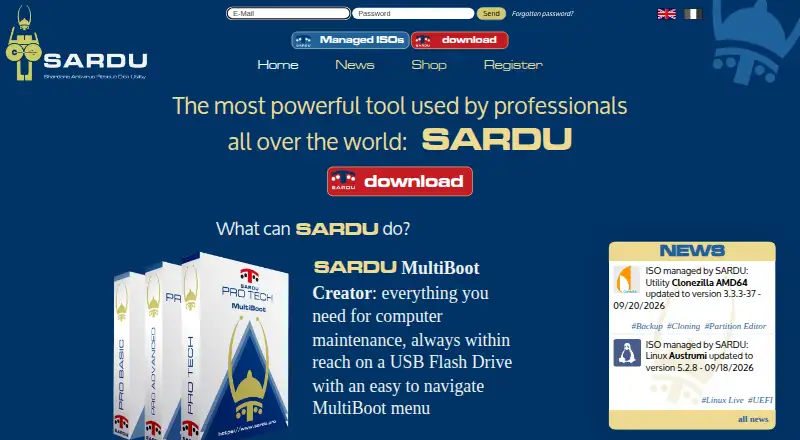
SARDU MultiBoot Creator is portable software for Windows and Linux that builds multiboot USB drives and CD/DVD ISO images. It is aimed at computer enthusiasts, technicians, digital-forensics users, small labs, and IT professionals who maintain or recover PCs. Users can combine antivirus tools, utilities, Linux distributions, Windows installers, and Windows PE environments in a single navigable boot menu. Existing local ISO files can be imported, while Windows and Linux users can also use the integrated ISO downloader.
The product’s main strength is breadth within a focused recovery-media workflow. It supports Legacy BIOS and UEFI booting, lets users add or remove ISO images incrementally from created USB drives, and can test USB or ISO multiboot menus with QEMU. That combination suits people who maintain several boot images and want one organized medium rather than separate drives. It also supports both USB creation and ISO generation, giving technicians options for physical or virtual deployment.
Pricing is structured around a Free plan and six Pro options. Free provides a downloadable version for personal and non-commercial use. Pro Basic Annual costs €11.9 one-time with annual billing and adds managed bootable ISOs, multiboot USB creation, the ISO downloader, and Legacy BIOS and UEFI support. Pro Advanced Annual costs €23.9 one-time with annual billing and adds additional managed ISOs, while Pro Tech Annual costs €47.9 and adds technical and security tools. Lifetime plans cost €49.9, €99.9, and €199.9 for Basic, Advanced, and Tech respectively, with no expiry. SARDU is a strong fit for multi-image maintenance media; users seeking a macOS application should choose another tool.
Your product? Our editors can test SARDU MultiBoot Creator in depth and publish a review, labelled as paid · from $149/mo →
SARDU MultiBoot Creator pricing
All 7 SARDU MultiBoot Creator plans and prices →
SARDU MultiBoot Creator fact sheet
| Free plan | Yes |
|---|---|
| Paid from | €11.90/yr |
| Windows app | Yes |
| macOS app | No |
| Linux app | Yes |
| Multiboot support | Yes |
| Persistent storage | Not verified |
| Image downloads | Both |
| Partition schemes | Not verified |
| Deployment | Desktop |
| Platforms | Windows, Linux |
| Compliance & security | GDPR |
| Support | Email, Tickets, Community, Docs |
| Built for | Solo, Small business, Mid-market (editorial estimate) |
| Pricing | Free plan (source) |
| Website | sardu.pro |
| Facts checked | 21 Sep 2026 |
Alternatives to SARDU MultiBoot Creator
- VentoyA free, open-source multiboot USB utility with broad image and boot-mode support.9.4
- Universal USB InstallerA free, broad USB creation toolkit with multiboot, persistence, downloads, and QEMU testing.9.2
- Easy2BootA free, format-flexible choice for advanced multiboot USB and hard-disk setups.9.1


See all SARDU MultiBoot Creator alternatives →
SARDU MultiBoot Creator vs the competition
- SARDU MultiBoot Creator vs Ventoy
- SARDU MultiBoot Creator vs Universal USB Installer
- SARDU MultiBoot Creator vs Easy2Boot
- SARDU MultiBoot Creator vs YUMI
- SARDU MultiBoot Creator vs Rufus
- SARDU MultiBoot Creator vs WinSetupFromUSB

Compare SARDU MultiBoot Creator with any tool side by side →
Also Ranked In
SARDU MultiBoot Creator is ranked in 2 of our directories.
Used SARDU MultiBoot Creator? Be the first to review it
The editor score above is our own research. What this page doesn't have yet is a reader's view — what you used SARDU MultiBoot Creator for, what worked and what didn't. No stars are seeded and no review is paid for; an editor reads every one before it appears.
Write a reviewTwo minutes · verified accounts only · read by an editor before it appears
Featured on iTechGuides

SARDU MultiBoot Creator is listed in our Bootable USB Software directory. Add the badge to your site — it links back to this page.
<a href="https://www.itechguides.com/products/sardu-multiboot-creator/"><img src="https://www.itechguides.com/best/badge/sardu-multiboot-creator.svg" alt="Featured on iTechGuides" width="230" height="46"></a>
Reviewed by iTechGuides Editors · Editorial team · Updated Oct 2026
Advertiser disclosure: iTechGuides is reader-supported. Vendors can pay for top positions in our rankings and for a place on other products' pages, and we may earn a commission when you click some links. Bought places stand at the number bought; this page and our disclosure say so. Paying vendors may get a fuller, more detailed review from our editors, and that review can change their score. How we rank.
Last updated · How we research and update