
Remo Repair Word
Remo Repair Word: A focused offline utility for recovering content from damaged DOC and DOCX files. Ranked #29 of 33 in File Repair Software by our editors (6.0/10); pricing: Free plan; best for free offline Word document repair.
At a glance
- Editor score6.0 / 10
- PricingFree plan
- Best forFree offline Word document repair
- Free planYes
- Paid fromFree
- Repair categoriesDOC, DOCX
- Founded2011 · Bengaluru, Karnataka, India
- Facts checked20 Sep 2026
Where it wins
- Repairs DOC and DOCX files with text and formatting recovery
- Previews repaired content before saving to a local location
- Read-only offline processing preserves the original file
Where it doesn't
- Supports Windows only, including Windows 11 and earlier versions
- Covers DOC and DOCX rather than other document categories
- Repairs inaccessible files but does not recover deleted documents
Our verdict on Remo Repair Word
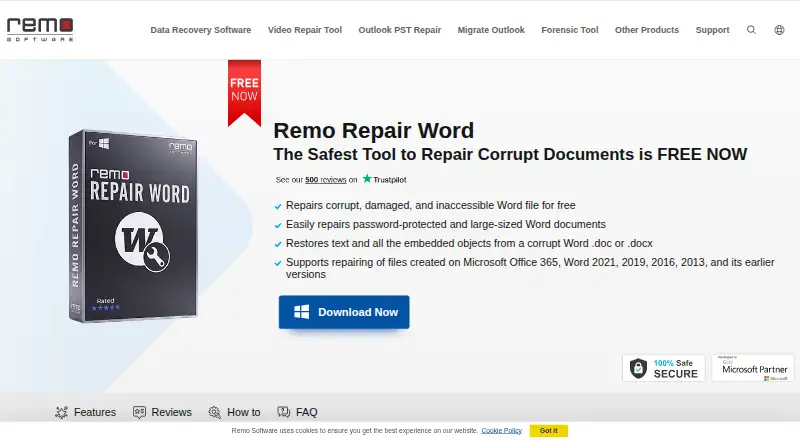
Remo Repair Word is a free Windows desktop utility for repairing corrupt or damaged Microsoft Word DOC and DOCX files. It is intended for people who need to recover usable content from an inaccessible Word document while keeping the original file unchanged. The software extracts text and can recover formatting, OLE objects, fields, and hyperlinks. It also previews the repaired document before saving, giving users an opportunity to review the output before creating a local copy.
Its strongest fit is offline, local repair. The read-only process is designed to preserve the original file, while repaired documents can be saved to a chosen location on the computer. Working offline also suits documents that should remain on a Windows device during the repair process. Support includes Windows 11 and earlier Windows versions, but the product does not extend to macOS or other platforms. There is no paid tier to compare: the product is free, and the published product information describes no file-size limit.
The focus is deliberately narrow. Remo Repair Word handles DOC and DOCX files and targets corruption or damage, rather than deleted-file recovery. That makes it a practical choice when the problem is a Word document that no longer opens or displays correctly and the required files are available locally. Users looking for repair across multiple file categories, recovery of deleted documents, or support beyond Windows should choose a broader file-repair product instead. Users who need a focused, free offline utility for Word documents are the clearest match.
Your product? Our editors can test Remo Repair Word in depth and publish a review, labelled as paid · from $149/mo →
Remo Repair Word pricing
Remo Repair Word fact sheet
| Free plan | Yes |
|---|---|
| Paid from | Free |
| Repair categories | DOC, DOCX |
| Batch repair | Not verified |
| Preview before save | Yes |
| Supported platforms | Windows |
| Maximum file size | Not verified |
| Repair delivery | Local |
| Deployment | Desktop |
| Platforms | Windows |
| Support | Live chat · 24/7 |
| Built for | Solo, Small business (editorial estimate) |
| Pricing | Free plan |
| Website | remosoftware.com |
| Facts checked | 20 Sep 2026 |
Alternatives to Remo Repair Word
- IntactFileBroad file repair with local processing, free diagnosis, and flexible pay-per-repair pricing.9.4
- Wondershare RepairitA broad file-repair suite with batch processing, previews and sample-based repair.9.1
- EaseUS FixoBroad file repair across web, Windows, and macOS, with batch processing and previews.8.9



See all Remo Repair Word alternatives →
Used Remo Repair Word? Be the first to review it
The editor score above is our own research. What this page doesn't have yet is a reader's view — what you used Remo Repair Word for, what worked and what didn't. No stars are seeded and no review is paid for; an editor reads every one before it appears.
Write a reviewTwo minutes · verified accounts only · read by an editor before it appears
Featured on iTechGuides

Remo Repair Word is listed in our File Repair Software directory. Add the badge to your site — it links back to this page.
<a href="https://www.itechguides.com/products/remo-repair-word/"><img src="https://www.itechguides.com/best/badge/remo-repair-word.svg" alt="Featured on iTechGuides" width="230" height="46"></a>
Reviewed by iTechGuides Editors · Editorial team · Updated Oct 2026
Advertiser disclosure: iTechGuides is reader-supported. Vendors can pay for top positions in our rankings and for a place on other products' pages, and we may earn a commission when you click some links. Bought places stand at the number bought; this page and our disclosure say so. Paying vendors may get a fuller, more detailed review from our editors, and that review can change their score. How we rank.
Last updated · How we research and update