
Remap
Remap: A browser-based QMK workflow for editing, building, flashing, and sharing keymaps. Ranked #94 of 105 in Keyboard and Mouse Customization Software by our editors (5.3/10); pricing: Freemium; best for QMK users building, flashing, and sharing keymaps.
At a glance
- Editor score5.3 / 10
- PricingFreemium
- Best forQMK users building, flashing, and sharing keymaps
- Facts checked23 Sep 2026
Where it wins
- Edit keymaps with a physical-layout interface and share or restore them.
- Build QMK firmware in the browser and flash it directly to a keyboard.
- Combine macros, lighting controls, rotary encoder support, and typing practice.
Where it doesn't
- Customization is focused on keyboards using QMK firmware and the VIA protocol.
- Direct flashing depends on a compatible desktop browser and WebHID.
- The listed 10-build package has no stated price.
Our verdict on Remap
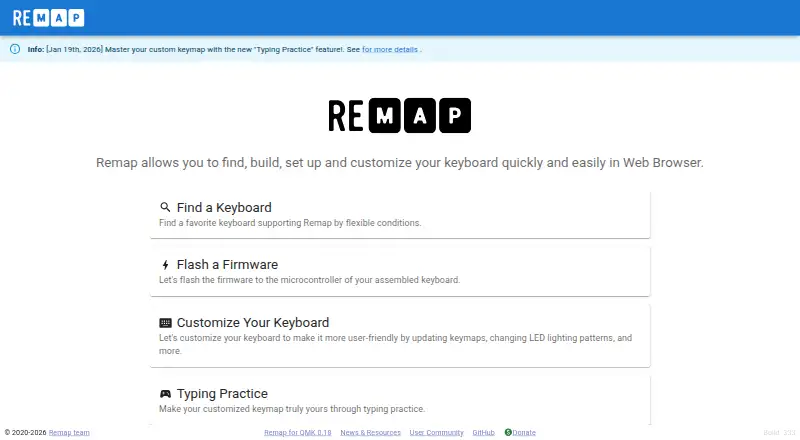
Remap brings keyboard discovery, keymap editing, and firmware work into a browser-based tool for people who build, buy, and customize self-made keyboard kits. Its focus is QMK keyboards using the VIA protocol, rather than broad customization of unrelated keyboards or mice. The physical-layout editor supports assigning keys, while users can save, restore, and share keymaps. Macros, backlight and underglow controls, rotary encoders, and typing practice using a custom keymap extend the workflow beyond simple remapping. It is a better fit for QMK users who want these tasks together than for buyers seeking general-purpose peripheral configuration.
A notable strength is the connection between editing and firmware: Remap provides browser-based QMK builds and direct flashing to a keyboard microcontroller. The WebHID-based interface works through compatible desktop browsers, so the web format does not mean every browser or device will support direct flashing. Google and GitHub accounts are also listed alongside QMK Firmware and the VIA protocol. Remap is open source, with community and documentation support channels; its stated platform is web, and its deployment includes a browser extension. Buyers should consider this browser-and-protocol fit before making it their keymap workflow.
The published plan details show free Workbench builds at no cost, with firmware builds in the browser. A Workbench 10-build package is also listed, but without a price, so the paid option cannot be compared by cost from the stated plan details. That makes the free builds a clear starting point for users who want to explore browser-based firmware work, while people planning repeat builds should check the package terms before relying on it. Choose Remap if your keyboard uses QMK and you want keymap sharing, lighting, macros, and firmware tasks in one focused tool; look elsewhere if you need confirmed support beyond that ecosystem or mouse customization.
Your product? Our editors can test Remap in depth and publish a review, labelled as paid · from $149/mo →
Remap pricing
All 2 Remap plans and prices →
Remap fact sheet
| Free plan | Not verified |
|---|---|
| Paid from | Not verified |
| Supported operating systems | Not verified |
| Macro support | Yes |
| Per-app profiles | Not verified |
| Onboard device memory | Not verified |
| Polling rate control | Not verified |
| Sensitivity controls | Not verified |
| Profile slots | Not verified |
| Deployment | Cloud, Browser extension |
| Platforms | Web |
| Support | Community, Docs |
| Built for | Solo, Small business (editorial estimate) |
| Integrations | 4 integrations: QMK Firmware, VIA protocol, Google account, GitHub account |
| Pricing | Freemium (source) |
| Website | remap-keys.app |
| Facts checked | 23 Sep 2026 |
Remap integrations
Remap lists 4 integrations on its own site.
- QMK Firmware
- VIA protocol
- Google account
- GitHub account
Alternatives to Remap
- Razer SynapseA free Razer-focused hub for remapping, macros, profiles, and Chroma lighting.9.2
- Logi Options+A broad free toolkit for remapping, automation, profiles, and multi-computer control.9.1
- Logitech G HUBA free desktop suite for Logitech G lighting, profiles, and device settings.9.0



Used Remap? Be the first to review it
The editor score above is our own research. What this page doesn't have yet is a reader's view — what you used Remap for, what worked and what didn't. No stars are seeded and no review is paid for; an editor reads every one before it appears.
Write a reviewTwo minutes · verified accounts only · read by an editor before it appears
Featured on iTechGuides

Remap is listed in our Keyboard and Mouse Customization Software directory. Add the badge to your site — it links back to this page.
<a href="https://www.itechguides.com/products/remap/"><img src="https://www.itechguides.com/best/badge/remap.svg" alt="Featured on iTechGuides" width="230" height="46"></a>
Reviewed by iTechGuides Editors · Editorial team · Updated Oct 2026
Advertiser disclosure: iTechGuides is reader-supported. Vendors can pay for top positions in our rankings and for a place on other products' pages, and we may earn a commission when you click some links. Bought places stand at the number bought; this page and our disclosure say so. Paying vendors may get a fuller, more detailed review from our editors, and that review can change their score. How we rank.
Last updated · How we research and update