Recover My Files
Recover My Files: A Windows-only recovery tool with strong camera-card support and paid licenses. Ranked #19 of 54 in SD Card Recovery Software by our editors (7.5/10); pricing: Paid; best for established Windows file and camera-card recovery.
At a glance
- Editor score7.5 / 10
- PricingPaid
- Best forEstablished Windows file and camera-card recovery
- Free planNo
- Paid from$69.95 one-time
- Scan modesQuick_deep
- Founded2001 · Kogarah, New South Wales, Australia
- Facts checked20 Sep 2026
Where it wins
- Recovers deleted, formatted, RAW, and lost files
- Supports camera cards, USB media, drives, and multiple filesystems
- Previews results and offers file carving, filtering, and disk imaging
Where it doesn't
- Windows-only platform support
- No free plan; saving recovered files requires activation
- Professional and Technician tiers cost more for advanced recovery tools
Our verdict on Recover My Files
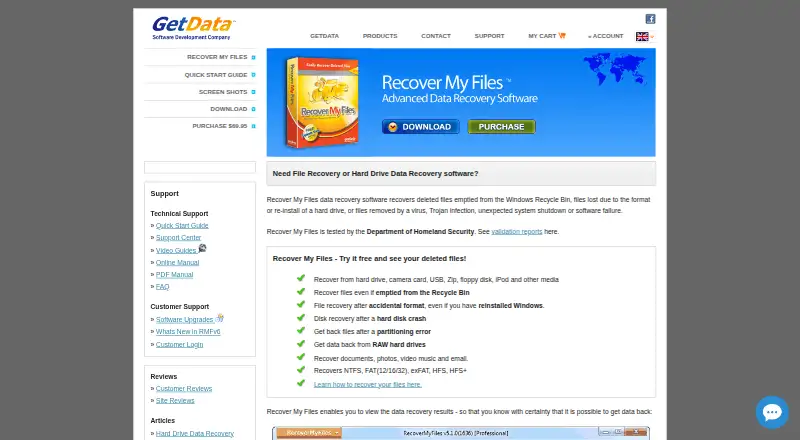
Recover My Files is Windows software for restoring deleted, formatted, RAW, or otherwise lost files from camera cards, USB media, hard drives, and other storage devices. It is positioned for home, business, and nontechnical users, with support for FAT, exFAT, NTFS, HFS, and HFS+. The software offers a fast deleted-file search using file-system metadata and a deeper file-carving search based on file signatures. Users can preview recoverable documents and graphics before activation, then save recovered files after purchasing a license.
The published one-time plans separate everyday recovery from specialist features. Standard costs $69.95 and includes file and drive recovery, previews, gallery view, and a license valid for two PCs. Professional costs $99.95 and adds RAID recovery, HFS/HFS+ recovery, disk-image creation and scanning, and hex view. Technician costs $349.90 and includes Professional features plus a portable USB activation dongle. The evaluation download supports result previews, but activation is required to save recovered files, so this is a paid product rather than a free recovery option.
Its strongest fit is recovery from camera cards and other common storage media, especially when deleted or formatted files require more than a basic search. Gallery view, filtering, validation, search-result folders, file-type and date views, and disk imaging give users several ways to review scan results. The broader filesystem support also suits mixed Windows and Mac storage. However, Windows-only availability rules out users who need native recovery software on another platform. Choose Recover My Files if you want established Windows coverage, camera-card recovery, and deeper file-carving tools; consider an alternative if free recovery, cross-platform support, or a lower-cost advanced tier is essential.
Your product? Our editors can test Recover My Files in depth and publish a review, labelled as paid · from $149/mo →
Recover My Files pricing
All 3 Recover My Files plans and prices →
Recover My Files fact sheet
| Free plan | No |
|---|---|
| Paid from | $69.95 one-time |
| Free recovery limit | Not verified |
| Supported platforms | Windows |
| Scan modes | Quick_deep |
| File preview | Yes |
| Raw file recovery | Yes |
| Bootable recovery media | Not verified |
| Deployment | Desktop |
| Platforms | Windows |
| Support | Email, Live chat, Phone, Tickets, Docs |
| Built for | Solo, Small business (editorial estimate) |
| Pricing | Paid (source) |
| Website | getdata.com |
| Facts checked | 20 Sep 2026 |
Alternatives to Recover My Files
- PhotoRecA free, open-source choice for advanced memory-card recovery across major desktop platforms.9.3
- R-StudioA paid, cross-platform recovery suite for SD cards, disks, images, and RAID work.9.2
- EaseUS Data Recovery WizardBroad Windows recovery coverage, but the free allowance does not apply to SD-card recovery.9.1


See all Recover My Files alternatives →
Used Recover My Files? Be the first to review it
The editor score above is our own research. What this page doesn't have yet is a reader's view — what you used Recover My Files for, what worked and what didn't. No stars are seeded and no review is paid for; an editor reads every one before it appears.
Write a reviewTwo minutes · verified accounts only · read by an editor before it appears
Featured on iTechGuides

Recover My Files is listed in our SD Card Recovery Software directory. Add the badge to your site — it links back to this page.
<a href="https://www.itechguides.com/products/recover-my-files/"><img src="https://www.itechguides.com/best/badge/recover-my-files.svg" alt="Featured on iTechGuides" width="230" height="46"></a>
Reviewed by iTechGuides Editors · Editorial team · Updated Oct 2026
Advertiser disclosure: iTechGuides is reader-supported. Vendors can pay for top positions in our rankings and for a place on other products' pages, and we may earn a commission when you click some links. Bought places stand at the number bought; this page and our disclosure say so. Paying vendors may get a fuller, more detailed review from our editors, and that review can change their score. How we rank.
Last updated · How we research and update