Receipt Scanner
Receipt Scanner: A free mobile receipt tracker with line-item OCR, offline capture, and expense reports. Ranked #15 of 29 in Receipt Scanner Apps by our editors (6.9/10); pricing: Free plan; best for free mobile receipt tracking.
At a glance
- Editor score6.9 / 10
- PricingFree plan
- Best forFree mobile receipt tracking
- Free planYes
- Mobile platformsBoth
- Facts checked20 Sep 2026
Where it wins
- Free iOS and Android receipt scanning
- OCR extracts merchants, dates, totals, and line items
- Offline capture, cloud storage, reports, and currency conversion
Where it doesn't
- The core experience is centered on mobile capture
- The freemium model includes paid access alongside free use
- Its workflow focuses on receipt tracking rather than broad integrations
Our verdict on Receipt Scanner
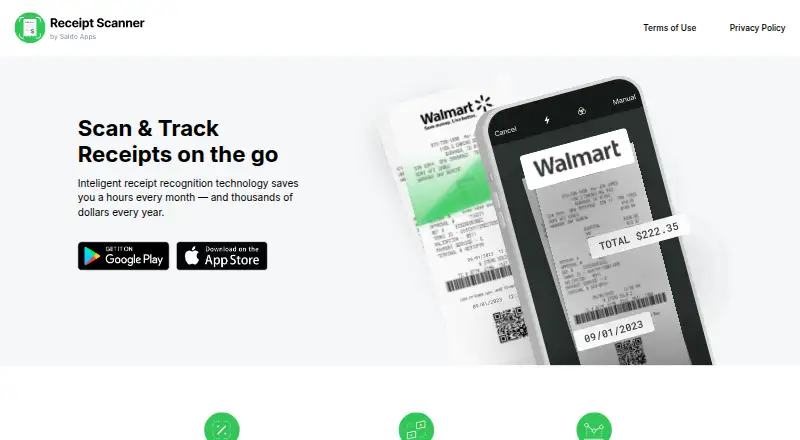
Receipt Scanner is a mobile receipt and expense-tracking app from Saldo Apps. It is designed for self-employed freelancers, contractors, small-business owners, and people managing personal expenses. Users can photograph receipts or import receipt images, while AI-powered OCR extracts the supplier or merchant, date, total, and line items. Custom categories, notes, and manual detail editing help organize records beyond the initial scan.
The free mobile offering covers both iOS and Android and includes receipt scanning, cloud storage, cross-device access, offline capture with later upload, expense reports, PDF sharing, emailing, and printing. Automatic currency conversion also supports expense tracking across currencies. The freemium model includes paid access, but the product's main value for budget-conscious users is the range of receipt and reporting features available without requiring a paid mobile app.
Receipt Scanner's standout strength is the combination of full line-item OCR and practical expense workflows. It can move from image capture to categorized records and shareable reports, making it suitable for personal budgets and small-business administration. Its scope is narrower than a broader finance platform: the experience centers on capturing, storing, organizing, and reporting receipts rather than connecting to a wider software ecosystem. Choose it for straightforward mobile receipt tracking with offline support and detailed extraction. Consider an alternative if your priority is a larger integration-driven workflow.
Your product? Our editors can test Receipt Scanner in depth and publish a review, labelled as paid · from $149/mo →
Receipt Scanner pricing
Receipt Scanner fact sheet
| Free plan | Yes |
|---|---|
| Paid from | Not verified |
| Monthly scan limit | Not verified |
| OCR field coverage | Full line items |
| Line-item OCR | Yes |
| Accounting integrations | Not verified |
| Mobile platforms | Both |
| Export formats | Multiple |
| Deployment | Cloud, Mobile |
| Platforms | iOS, Android |
| Support | |
| Built for | Solo, Small business (editorial estimate) |
| Pricing | Free plan |
| Website | scannerreceipt.com |
| Facts checked | 20 Sep 2026 |
Alternatives to Receipt Scanner
- ShoeboxedA multi-channel receipt service with verified extraction, accounting sync, and paid-only plans.8.8
- AutoEntryA document-capture platform for accounting teams with complex review and coding workflows.8.6
- Affinda Receipt ExtractionA business-focused receipt extraction platform with full line-item OCR and workflow integrations.8.2



See all Receipt Scanner alternatives →
Used Receipt Scanner? Be the first to review it
The editor score above is our own research. What this page doesn't have yet is a reader's view — what you used Receipt Scanner for, what worked and what didn't. No stars are seeded and no review is paid for; an editor reads every one before it appears.
Write a reviewTwo minutes · verified accounts only · read by an editor before it appears
Featured on iTechGuides

Receipt Scanner is listed in our Receipt Scanner Apps directory. Add the badge to your site — it links back to this page.
<a href="https://www.itechguides.com/products/receipt-scanner/"><img src="https://www.itechguides.com/best/badge/receipt-scanner.svg" alt="Featured on iTechGuides" width="230" height="46"></a>
Reviewed by iTechGuides Editors · Editorial team · Updated Oct 2026
Advertiser disclosure: iTechGuides is reader-supported. Vendors can pay for top positions in our rankings and for a place on other products' pages, and we may earn a commission when you click some links. Bought places stand at the number bought; this page and our disclosure say so. Paying vendors may get a fuller, more detailed review from our editors, and that review can change their score. How we rank.
Last updated · How we research and update