rdfind
rdfind: A free, open-source choice for recursive duplicate matching with scripting-friendly control. Ranked #17 of 37 in Duplicate File Finders by our editors (6.9/10); pricing: Free plan; best for open-source users preferring command-line control.
At a glance
- Editor score6.9 / 10
- PricingFree plan
- Best forOpen-source users preferring command-line control
- Free planYes
- Paid fromFree
- Platform coverageCross-platform
- Facts checked25 Sep 2026
Where it wins
- Compares content, not filenames, using staged checks and checksums
- Supports MD5, SHA-1, SHA-256, SHA-512, and xxh128
- Can rank originals, create reports, and replace duplicates with links
Where it doesn't
- Command-line workflow requires comfort with terminal-based tools
- No preview interface for reviewing duplicate groups
- Deletion does not include Recycle Bin handling
Our verdict on rdfind
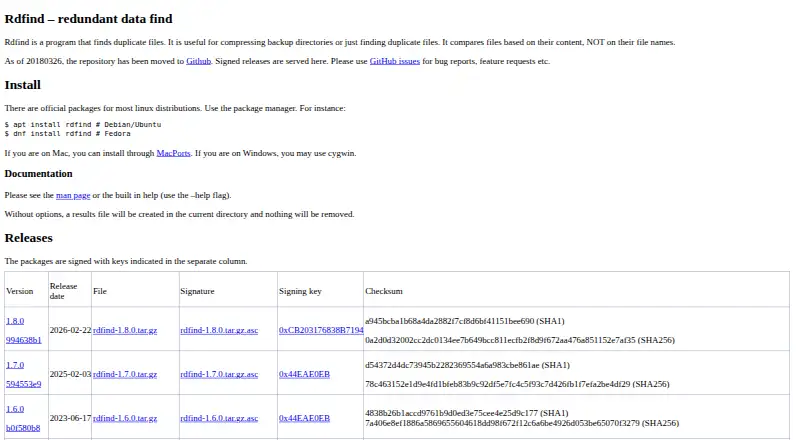
rdfind is a free, open-source command-line utility for finding duplicate files within or across directories. It suits users who want direct control over scans, reports, selection rules, and file actions rather than a graphical review workflow. Recursive searches accept directories and individual files as command-line arguments, and the tool runs on Linux, macOS, and Windows through supported installation or compatibility methods. It has been maintained since 2006, with source compilation available on Unix-like systems.
Its matching process is more deliberate than filename-based comparison. rdfind compares file sizes, checks selected first and last bytes, and then uses checksums to identify equal content. Supported checksum choices include MD5, SHA-1, SHA-256, SHA-512, and xxh128. The tool also handles inode and device identity, ranks matching files to identify an original and duplicates, and writes a results.txt report by default. That combination gives command-line users useful automation for recurring cleanup or scripted workflows. Duplicate files can be deleted, or replaced with symbolic or hard links.
The trade-off is a narrow, terminal-first experience. There is no preview interface, so users who need visual inspection before deciding what to remove should choose a duplicate finder built around graphical review. Deletion also does not use Recycle Bin handling, which makes file-action choices important before running cleanup commands. Linux users can work directly with the command-line utility; macOS installation is described through MacPorts, while the Windows approach uses Cygwin. rdfind is a strong fit for technically comfortable users who value content matching, reports, and link replacement, but less suitable for people seeking guided onboarding or visual file management.
Your product? Our editors can test rdfind in depth and publish a review, labelled as paid · from $149/mo →
rdfind pricing
rdfind fact sheet
| Free plan | Yes |
|---|---|
| Paid from | Free |
| Platform coverage | Cross-platform |
| Scan locations | Specified files and directories; directory contents are scanned recursively. |
| Match methods | File size, first bytes, last bytes, and checksum (configurable checksum algorithms). |
| File preview | No |
| Automatic selection | Yes |
| Recycle Bin / Trash | No |
| Folder exclusions | Not verified |
| Deployment | Self-hosted |
| Platforms | Linux, macOS, Windows |
| Support | Community |
| Built for | Solo, Small business (editorial estimate) |
| Pricing | Free plan |
| Website | rdfind.pauldreik.se |
| Facts checked | 25 Sep 2026 |
Alternatives to rdfind
- AllDupA fully free Windows duplicate finder with broad matching and cleanup controls.9.0
- CzkawkaA free, scriptable duplicate finder for technical users across Windows, macOS, Linux, and Android.8.8
- Wise Duplicate FinderA Windows duplicate finder with free manual cleanup and Pro date-based selection.8.7


Used rdfind? Be the first to review it
The editor score above is our own research. What this page doesn't have yet is a reader's view — what you used rdfind for, what worked and what didn't. No stars are seeded and no review is paid for; an editor reads every one before it appears.
Write a reviewTwo minutes · verified accounts only · read by an editor before it appears
Featured on iTechGuides

rdfind is listed in our Duplicate File Finders directory. Add the badge to your site — it links back to this page.
<a href="https://www.itechguides.com/products/rdfind/"><img src="https://www.itechguides.com/best/badge/rdfind.svg" alt="Featured on iTechGuides" width="230" height="46"></a>
Reviewed by iTechGuides Editors · Editorial team · Updated Oct 2026
Advertiser disclosure: iTechGuides is reader-supported. Vendors can pay for top positions in our rankings and for a place on other products' pages, and we may earn a commission when you click some links. Bought places stand at the number bought; this page and our disclosure say so. Paying vendors may get a fuller, more detailed review from our editors, and that review can change their score. How we rank.
Last updated · How we research and update