RayPack Studio
RayPack Studio: A broad enterprise toolkit for Windows packaging, testing, virtualization and deployment. Ranked #11 of 29 in Software Packaging Tools by our editors (8.1/10); pricing: Pricing on request · 21-day trial; best for enterprise Windows repackaging and virtualization.
At a glance
- Editor score8.1 / 10
- PricingPricing on request · 21-day trial
- Best forEnterprise Windows repackaging and virtualization
- Free planNo
- Output formatsMSI; MST; MSP; MSIX; APPX; App-V; ThinApp; SWV; LAYPKG; Intune
- Founded1999 · Paderborn, Germany
- Facts checked20 Sep 2026
Where it wins
- Supports MSI, MST, MSP, MSIX, APPX and virtual package formats
- Combines validation, compatibility and collision testing with automation
- Connects with Intune, SCCM, RayManageSoft and workflow platforms
Where it doesn't
- Contact-sales pricing provides limited upfront cost visibility
- Its broad enterprise scope may exceed smaller packaging teams’ needs
- The platform is centered on structured Windows application operations
Our verdict on RayPack Studio
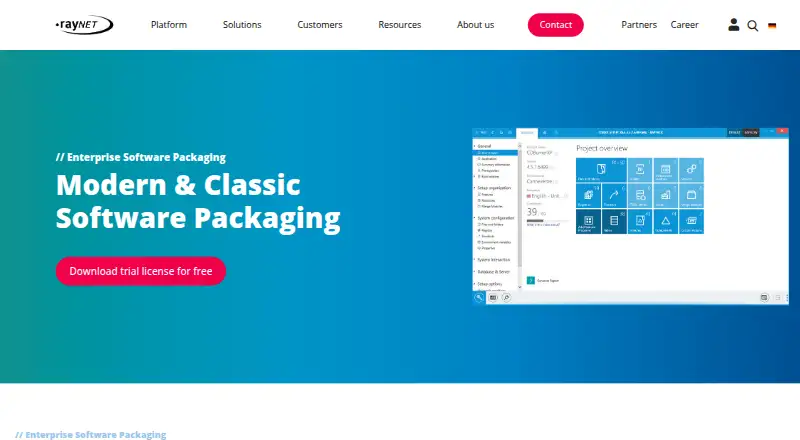
RayPack Studio is an on-premises software packaging and deployment suite from Raynet GmbH. It is designed for enterprise IT teams that package, repackage, virtualize, evaluate, validate and deploy applications across managed Windows environments. The suite includes RayPack, PackBench, RayQC, RayQC Advanced, RayEval and PackLayering, covering application lifecycle and software deployment processes rather than a single packaging task. It supports Windows and macOS platforms, with self-hosted deployment, command-line operation and silent installation capabilities.
Its main strength is breadth across package creation and quality control. Teams can create and edit MSI, MST, MSP, MSIX and APPX packages, capture installation changes for repackaging, and build virtual packages for App-V, ThinApp and SWV. RayPack Studio also creates application wrappers and PowerShell-based deployment packages. Validation, compatibility and collision testing add checks before rollout, while RpCmd.exe and virtual-machine automation support repeatable operations. Integrations include RayFlow, RayManageSofti, RayManageSoft UEM, Microsoft Endpoint Configuration Manager, Microsoft Intune, Jira, HP ALM, SMAX, REST API, SOAP, DLL, PowerShell, FTP(S), SMB and WebDAV.
The commercial model is contact-sales, with a 21-day trial that requires no credit card or payment method. That approach suits organizations evaluating a larger packaging program, especially where deployment, workflow and testing need to work together. Smaller teams seeking a focused repackaging utility or straightforward self-service pricing may find the suite’s enterprise orientation less suitable. Choose RayPack Studio when format coverage, virtualization, validation and deployment integration are central requirements; consider a narrower tool when the need is limited to creating a small number of installer packages.
Questions about RayPack Studio
Is there a free trial of RayPack Studio? Yes: a 21-day free trial; no card is needed.
What does RayPack Studio run on? Windows and macOS. It runs self-hosted and as a desktop app.
What does RayPack Studio integrate with? 15 integrations, including RayFlow, RayManageSofti, RayManageSoft UEM, Microsoft Endpoint Configuration Manager (SCCM) and Microsoft Intune.
Who is RayPack Studio built for? Mid-market companies and enterprises (our editorial estimate).
Your product? Our editors can test RayPack Studio in depth and publish a review, labelled as paid · from $149/mo →
RayPack Studio pricing
RayPack Studio fact sheet
| Free plan | No |
|---|---|
| Paid from | Not verified |
| Target platforms | Windows; macOS |
| Output formats | MSI; MST; MSP; MSIX; APPX; App-V; ThinApp; SWV; LAYPKG; Intune |
| Command-line packaging | Yes |
| Silent installation | Yes |
| Auto-update support | Not verified |
| Delta updates | Not verified |
| CI/CD integration | Yes |
| Free trial | 21 days · no card needed |
| Deployment | Self-hosted, Desktop |
| Platforms | Windows, macOS |
| Support | Email, Docs |
| Built for | Mid-market, Enterprise (editorial estimate) |
| Integrations | 15 integrations: RayFlow, RayManageSofti, RayManageSoft UEM, Microsoft Endpoint Configuration Manager (SCCM), Microsoft Intune, Jira … |
| Pricing | Pricing on request · 21-day trial |
| Website | raynet-inc.com |
| Facts checked | 20 Sep 2026 |
RayPack Studio integrations
RayPack Studio lists 15 integrations on its own site.
- RayFlow
- RayManageSofti
- RayManageSoft UEM
- Microsoft Endpoint Configuration Manager (SCCM)
- Microsoft Intune
- Jira
- HP ALM
- SMAX
- REST API
- SOAP
- DLL
- PowerShell
- FTP(S)
- SMB
- WebDAV
Alternatives to RayPack Studio
- electron-builderA broad Electron release toolkit covering builds, updates, signing, publishing, and CI/CD.9.4
- Advanced InstallerA broad Windows packaging suite for teams managing installers, updates, and deployment automation.9.2
- install4jA capable choice for Java publishers shipping signed installers across major desktop platforms.9.0



See all RayPack Studio alternatives →
Used RayPack Studio? Be the first to review it
The editor score above is our own research. What this page doesn't have yet is a reader's view — what you used RayPack Studio for, what worked and what didn't. No stars are seeded and no review is paid for; an editor reads every one before it appears.
Write a reviewTwo minutes · verified accounts only · read by an editor before it appears
Featured on iTechGuides

RayPack Studio is listed in our Software Packaging Tools directory. Add the badge to your site — it links back to this page.
<a href="https://www.itechguides.com/products/raypack-studio/"><img src="https://www.itechguides.com/best/badge/raypack-studio.svg" alt="Featured on iTechGuides" width="230" height="46"></a>
Reviewed by iTechGuides Editors · Editorial team · Updated Nov 2026
Advertiser disclosure: iTechGuides is reader-supported. Vendors can pay for top positions in our rankings and for a place on other products' pages, and we may earn a commission when you click some links. Bought places stand at the number bought; this page and our disclosure say so. Paying vendors may get a fuller, more detailed review from our editors, and that review can change their score. How we rank.
Last updated · How we research and update