Raspberry Pi Imager
Raspberry Pi Imager: A free, cross-platform imaging tool with strong Raspberry Pi preconfiguration. Ranked #13 of 38 in Bootable USB Software by our editors (7.5/10); pricing: Free plan; best for raspberry Pi and catalog-based imaging.
At a glance
- Editor score7.5 / 10
- PricingFree plan
- Best forRaspberry Pi and catalog-based imaging
- Free planYes
- Paid fromFree
- Founded2012 · Cambridge, United Kingdom
- Facts checked21 Sep 2026
Where it wins
- Free on Windows, macOS, and Linux
- Verifies images and supports local or catalog downloads
- Preconfigures networking, credentials, SSH, and remote access
Where it doesn't
- Primarily designed for Raspberry Pi boot media
- Network installation works only on compatible Raspberry Pi models
- Preconfiguration applies to supported operating systems
Our verdict on Raspberry Pi Imager
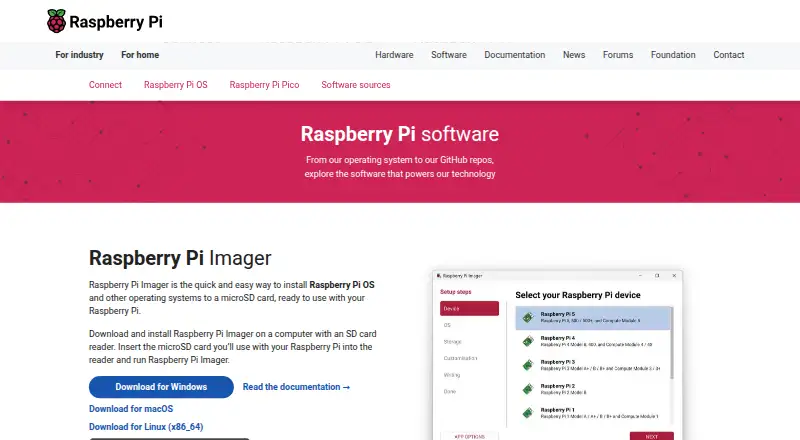
Raspberry Pi Imager is a free, open-source desktop utility for writing operating-system images to microSD cards, USB drives, and other supported storage. It is designed primarily for Raspberry Pi computers, while also supporting other operating-system images through its built-in catalog or locally stored files. Windows, macOS, and Linux users can use the same core workflow, making it suitable for individuals, educators, developers, and teams preparing boot media across desktop platforms.
The tool’s strongest distinction is how much setup it can handle before the first boot. It can preconfigure hostnames, time zones, keyboard settings, usernames, passwords, and Wi-Fi credentials. It also supports SSH and Raspberry Pi Connect remote access configuration. Image verification after writing adds a validation step, while command-line image writing gives technical users an alternative to the graphical interface. Network installation is available on compatible Raspberry Pi models, extending the workflow beyond local image selection.
Its catalog-based approach suits users who want a guided route to compatible operating systems, while local-image support accommodates custom workflows. The main trade-off is its Raspberry Pi focus: buyers seeking a general-purpose boot-media utility for broader device management should look elsewhere. Network installation also depends on compatible Raspberry Pi hardware, and preconfiguration is tied to supported operating systems. Choose Raspberry Pi Imager for Raspberry Pi preparation, catalog discovery, verification, and first-boot configuration; choose an alternative when multiboot, persistent storage, or broader partition-management workflows are central requirements.
Your product? Our editors can test Raspberry Pi Imager in depth and publish a review, labelled as paid · from $149/mo →
Raspberry Pi Imager pricing
Raspberry Pi Imager fact sheet
| Free plan | Yes |
|---|---|
| Paid from | Free |
| Windows app | Yes |
| macOS app | Yes |
| Linux app | Yes |
| Multiboot support | Not verified |
| Persistent storage | Not verified |
| Image downloads | Both |
| Partition schemes | Not verified |
| Deployment | Desktop |
| Platforms | Windows, macOS, Linux |
| Support | Docs |
| Built for | Solo, Small business, Mid-market, Enterprise (editorial estimate) |
| Pricing | Free plan |
| Website | raspberrypi.com |
| Facts checked | 21 Sep 2026 |
Alternatives to Raspberry Pi Imager
- VentoyA free, open-source multiboot USB utility with broad image and boot-mode support.9.4
- Universal USB InstallerA free, broad USB creation toolkit with multiboot, persistence, downloads, and QEMU testing.9.2
- Easy2BootA free, format-flexible choice for advanced multiboot USB and hard-disk setups.9.1


See all Raspberry Pi Imager alternatives →
Used Raspberry Pi Imager? Be the first to review it
The editor score above is our own research. What this page doesn't have yet is a reader's view — what you used Raspberry Pi Imager for, what worked and what didn't. No stars are seeded and no review is paid for; an editor reads every one before it appears.
Write a reviewTwo minutes · verified accounts only · read by an editor before it appears
Featured on iTechGuides

Raspberry Pi Imager is listed in our Bootable USB Software directory. Add the badge to your site — it links back to this page.
<a href="https://www.itechguides.com/products/raspberry-pi-imager/"><img src="https://www.itechguides.com/best/badge/raspberry-pi-imager.svg" alt="Featured on iTechGuides" width="230" height="46"></a>
Reviewed by iTechGuides Editors · Editorial team · Updated Oct 2026
Advertiser disclosure: iTechGuides is reader-supported. Vendors can pay for top positions in our rankings and for a place on other products' pages, and we may earn a commission when you click some links. Bought places stand at the number bought; this page and our disclosure say so. Paying vendors may get a fuller, more detailed review from our editors, and that review can change their score. How we rank.
Last updated · How we research and update