QRcard
QRcard: A low-cost QR card app for offline contact sharing, not full contact management. Ranked #38 of 39 in Contact Management Software by our editors (5.1/10); pricing: Free plan; best for individuals needing simple offline QR cards.
At a glance
- Editor score5.1 / 10
- PricingFree plan
- Best forIndividuals needing simple offline QR cards
- Free planYes
- Paid from$4.99 one-time
- Contact limit3 contacts
- Facts checked20 Sep 2026
Where it wins
- Offline sharing with local on-device data storage
- Custom cards, widgets, and up to six personas
- QR-code and contact-data file exports
Where it doesn't
- No email-account synchronization or contact import
- No reminder features or broader contact-management workflows
- Enterprise Edition supports iOS only
Our verdict on QRcard
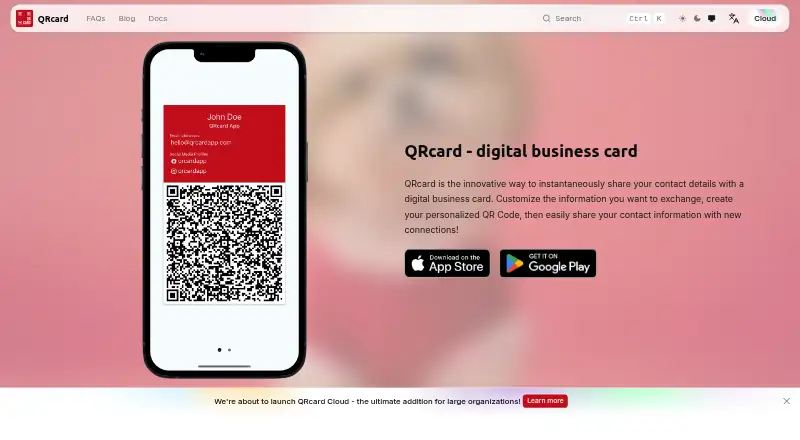
QRcard is a mobile digital business-card app for entrepreneurs, sales professionals, and individuals who want to share contact details through a QR code. Users can create cards with names, company information, roles, departments, phone numbers, email addresses, websites, postal addresses, social profiles, and notes. Custom colors, logos, and card designs support personal or professional presentation, while recipients can scan a card and save its information to their address book.
The pricing structure keeps basic use accessible. The Free plan costs $0 one-time and includes widgets plus iOS and Android support, although cards contain a “Created with QRcard” note. The Premium Version costs $4.99 USD one-time and adds unlimited contact details, an optional note, widgets, and iOS and Android support; additional QRcards are available separately. The Enterprise Edition costs $9.99 USD one-time, includes unlimited contact details and widgets, and adds mobile device management support, but is available on iOS only.
QRcard fits people who need a small set of portable, customizable digital cards that work offline. Local storage, home-screen and lock-screen widgets, multiple personas, and QR-code image export make it suitable for separating personal, company, or role-based details. It is not a conventional contact database: it does not include email-account synchronization, contact import, reminder features, or broader integrations. Choose QRcard for direct QR sharing and offline access; choose another contact-management tool if ongoing contact organization, reminders, synchronization, or integrated workflows are central requirements.
Your product? Our editors can test QRcard in depth and publish a review, labelled as paid · from $149/mo →
QRcard pricing
All 3 QRcard plans and prices →
QRcard fact sheet
| Free plan | Yes |
|---|---|
| Paid from | $4.99 one-time |
| Contact limit | 3 contacts |
| Company contacts | Yes |
| Email sync | Not verified |
| Mobile apps | Both |
| Import sources | Not verified |
| Reminders | Not verified |
| Deployment | Mobile |
| Platforms | iOS, Android, macOS |
| Support | Email, Docs |
| Built for | Solo, Small business, Enterprise (editorial estimate) |
| Pricing | Free plan (source) |
| Website | qrcardapp.com |
| Facts checked | 20 Sep 2026 |
Alternatives to QRcard
- Google ContactsA strong free choice for contact management centered on Google services.9.1
- ContactsPlusA flexible contact hub with strong synchronization, enrichment, and team features.8.8
- ClozeA full contact-and-follow-up CRM with unlimited contacts, email sync, and team tools.8.6


Used QRcard? Be the first to review it
The editor score above is our own research. What this page doesn't have yet is a reader's view — what you used QRcard for, what worked and what didn't. No stars are seeded and no review is paid for; an editor reads every one before it appears.
Write a reviewTwo minutes · verified accounts only · read by an editor before it appears
Featured on iTechGuides

QRcard is listed in our Contact Management Software directory. Add the badge to your site — it links back to this page.
<a href="https://www.itechguides.com/products/qrcard/"><img src="https://www.itechguides.com/best/badge/qrcard.svg" alt="Featured on iTechGuides" width="230" height="46"></a>
Reviewed by iTechGuides Editors · Editorial team · Updated Oct 2026
Advertiser disclosure: iTechGuides is reader-supported. Vendors can pay for top positions in our rankings and for a place on other products' pages, and we may earn a commission when you click some links. Bought places stand at the number bought; this page and our disclosure say so. Paying vendors may get a fuller, more detailed review from our editors, and that review can change their score. How we rank.
Last updated · How we research and update