PyBoy
PyBoy: A developer-focused GB/GBC emulator for scripts, bots, debugging, and research. Ranked #11 of 23 in Game Boy Emulators by our editors (6.2/10); pricing: Free plan; best for developers and researchers using a Python API.
At a glance
- Editor score6.2 / 10
- PricingFree plan
- Best forDevelopers and researchers using a Python API
- Free planYes
- Paid fromNone
- Supported systemsGame Boy, Game Boy Color
- Facts checked20 Sep 2026
Where it wins
- Python API exposes control, memory, screen, and sound data
- Includes save states, rewind, RTC handling, cheats, and debugging
- Runs on Windows, macOS, Linux, and Raspberry Pi OS
Where it doesn't
- Link-cable communication is experimental and limited to local instances
- Netplay over a network is not verified
- External controller support is not verified
Our verdict on PyBoy
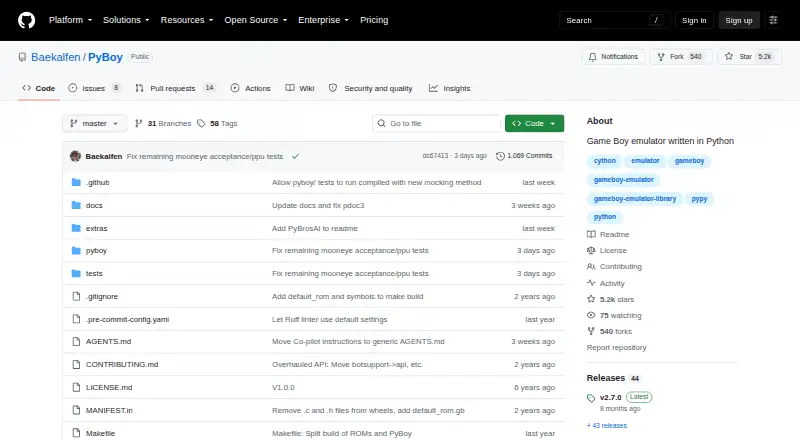
PyBoy is an open-source emulator and Python library for Game Boy and Game Boy Color ROMs. It supports command-line use as well as Python scripts, making it a fit for developers, researchers, and users building bots or AI agents around emulation. Its API provides control over emulation, memory probing, screen and sound data access, and other programmatic operations. It runs on Windows 64-bit, macOS, Linux, and Raspberry Pi OS, and is available at no cost under its open-source model.
The main strength is depth beyond basic ROM playback. PyBoy supports saving and loading emulator states, rewind, real-time clock handling for compatible cartridges, GameShark cheat codes, debugging, and breakpoint support. These features give programmers several ways to inspect, automate, and reproduce emulator behavior. Gymnasium integration also supports projects that connect emulation with reinforcement-learning environments. For users who need a scriptable emulator rather than a controller-first desktop application, this feature set is the central reason to choose PyBoy.
PyBoy is less suitable for users seeking a conventional consumer emulator with broadly documented peripheral support or network multiplayer. Link-cable communication is experimental and documented between two local emulator instances, while network netplay and external controller support are not verified. The project’s narrow focus on Game Boy and Game Boy Color is an advantage for targeted development work but not for users wanting a multi-system emulator. Choose PyBoy for Python-driven experimentation, debugging, automation, and research; choose an alternative if standard multiplayer or external-device support is the priority.
PyBoy pricing
PyBoy fact sheet
| Free plan | Yes |
|---|---|
| Paid from | None |
| Supported systems | Game Boy, Game Boy Color |
| Supported platforms | Windows 64-bit, macOS, Linux, Raspberry Pi OS |
| Save states | Yes |
| Link cable emulation | Yes |
| Netplay | Not verified |
| Real-time clock | Yes |
| Controller support | Not verified |
| Deployment | Self-hosted, Desktop |
| Platforms | Windows, macOS, Linux |
| Support | Community, Docs |
| Built for | Solo, Small business (editorial estimate) |
| Integrations | 1 integrations: Gymnasium |
| Pricing | Free plan |
| Website | github.com |
| Facts checked | 20 Sep 2026 |
PyBoy integrations
PyBoy lists 1 integrations on its own site.
- Gymnasium
Alternatives to PyBoy
- SameBoyAccurate, feature-rich Game Boy emulation across desktop and iOS.8.8
- GearboyA broad, free emulator with strong save, link-cable and debugging features.8.2
- BGBA free Windows emulator with hardware-accurate timing and unusually deep debugging tools.7.7

Used PyBoy? Be the first to review it
The editor score above is our own research. What this page doesn't have yet is a reader's view — what you used PyBoy for, what worked and what didn't. No stars are seeded and no review is paid for; an editor reads every one before it appears.
Write a reviewTwo minutes · verified accounts only · read by an editor before it appears
Featured on iTechGuides

PyBoy is listed in our Game Boy Emulators directory. Add the badge to your site — it links back to this page.
<a href="https://www.itechguides.com/products/pyboy/"><img src="https://www.itechguides.com/best/badge/pyboy.svg" alt="Featured on iTechGuides" width="230" height="46"></a>
Guides on game boy emulators
Reviewed by iTechGuides Editors · Editorial team · Updated Sep 2026
Advertiser disclosure: iTechGuides is reader-supported. We may earn a commission when you click some links. How we rank.
Last updated · How we research and update