Pumba
Pumba: A focused, self-hosted toolkit for injecting container, network, and resource faults. Ranked #17 of 25 in Chaos Engineering Platforms by our editors (7.6/10); pricing: Open source; best for container and network fault injection.
At a glance
- Editor score7.6 / 10
- PricingOpen source
- Best forContainer and network fault injection
- Paid fromFree
- Kubernetes supportYes
- Facts checked20 Sep 2026
Where it wins
- Covers container lifecycle, network, CPU, memory, and I/O faults
- Targets containers by names, labels, regexes, or random selection
- Supports Docker, containerd, Podman, Kubernetes, and OpenShift
Where it doesn't
- Linux-only platform support
- Does not provide cloud failure injection
- Command-line and self-hosted deployment require operational ownership
Our verdict on Pumba
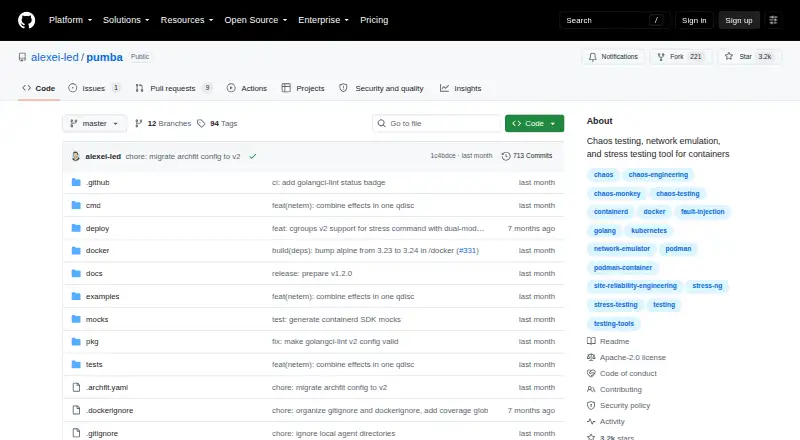
Pumba is an open-source command-line tool for chaos testing, network emulation, and resource stress testing in container environments. It is designed for teams operating Docker, containerd, or Podman workloads that need to introduce controlled failures into containers and networks. Kubernetes DaemonSet and OpenShift deployment options extend its use to orchestrated environments, while container-image delivery supports deployment through Docker images.
Its strongest area is fault coverage within the container and network layer. Pumba can kill, stop, pause, remove, or restart containers; inject network delay and packet loss with netem; and apply network duplication, corruption, and rate limiting. It also supports CPU, memory, and I/O stress testing through stress-ng. Targeting controls include container names, labels, regular expressions, and random selection, giving teams ways to narrow the blast radius. Fixed-interval recurring experiments and dry-run mode add scheduling and review before execution.
Pumba fits a self-hosted Linux environment and connects with Docker, containerd, Podman, Kubernetes, OpenShift, and Slack incoming webhooks. Its open-source model avoids commercial plan selection, but the deployment approach places setup, operation, and maintenance with the adopting team. Pumba is a good choice when the priority is focused container and network fault injection with explicit targeting and repeatable execution. Teams seeking cloud failure injection or a broader experiment platform should consider an alternative with those capabilities.
Questions about Pumba
What does Pumba run on? Linux. It runs self-hosted.
What does Pumba integrate with? 6 integrations, including Docker, containerd, Podman, Kubernetes and OpenShift.
Who is Pumba built for? Small businesses, mid-market companies and enterprises (our editorial estimate).
Your product? Our editors can test Pumba in depth and publish a review, labelled as paid · from $149/mo →
Pumba pricing
Pumba fact sheet
| Free plan | Not verified |
|---|---|
| Paid from | Free |
| Kubernetes support | Yes |
| Cloud fault injection | No |
| Network fault injection | Yes |
| Experiment scheduling | Yes |
| Deployment model | Self_hosted |
| Blast-radius controls | Yes |
| Deployment | Self-hosted |
| Platforms | Linux |
| Support | Community, Docs |
| Built for | Small business, Mid-market, Enterprise (editorial estimate) |
| Integrations | 6 integrations: Docker, containerd, Podman, Kubernetes, OpenShift, Slack incoming webhooks |
| Pricing | Open source |
| Website | github.com |
| Facts checked | 20 Sep 2026 |
Pumba integrations
Pumba lists 6 integrations on its own site.
- Docker
- containerd
- Podman
- Kubernetes
- OpenShift
- Slack incoming webhooks
Alternatives to Pumba
- Chaos ToolkitBroad, low-cost multi-cloud chaos testing with declarative experiments and safeguards.9.3
- Chaos MeshA broad, self-hosted toolkit for controlled Kubernetes fault injection.9.1
- Harness Chaos EngineeringA free hybrid-cloud option with strong experiment controls and broad infrastructure coverage.9.0



Used Pumba? Be the first to review it
The editor score above is our own research. What this page doesn't have yet is a reader's view — what you used Pumba for, what worked and what didn't. No stars are seeded and no review is paid for; an editor reads every one before it appears.
Write a reviewTwo minutes · verified accounts only · read by an editor before it appears
Featured on iTechGuides

Pumba is listed in our Chaos Engineering Platforms directory. Add the badge to your site — it links back to this page.
<a href="https://www.itechguides.com/products/pumba/"><img src="https://www.itechguides.com/best/badge/pumba.svg" alt="Featured on iTechGuides" width="230" height="46"></a>
Reviewed by iTechGuides Editors · Editorial team · Updated Nov 2026
Advertiser disclosure: iTechGuides is reader-supported. Vendors can pay for top positions in our rankings and for a place on other products' pages, and we may earn a commission when you click some links. Bought places stand at the number bought; this page and our disclosure say so. Paying vendors may get a fuller, more detailed review from our editors, and that review can change their score. How we rank.
Last updated · How we research and update