Puma Scan
Puma Scan: C#-focused SAST with IDE diagnostics, configurable rules, and CI scanning. Ranked #21 of 25 in Static Application Security Testing Software by our editors (6.7/10); pricing: Free plan · 30-day trial; best for C# teams seeking IDE-integrated security diagnostics.
At a glance
- Editor score6.7 / 10
- PricingFree plan · 30-day trial
- Best forC# teams seeking IDE-integrated security diagnostics
- Free planYes
- Paid from$299/user/yr
- Analysis targetSource
- Facts checked23 Sep 2026
Where it wins
- Reports C# security findings as IDE diagnostics and build warnings
- Configurable rules, tainted sources, and cleanse methods
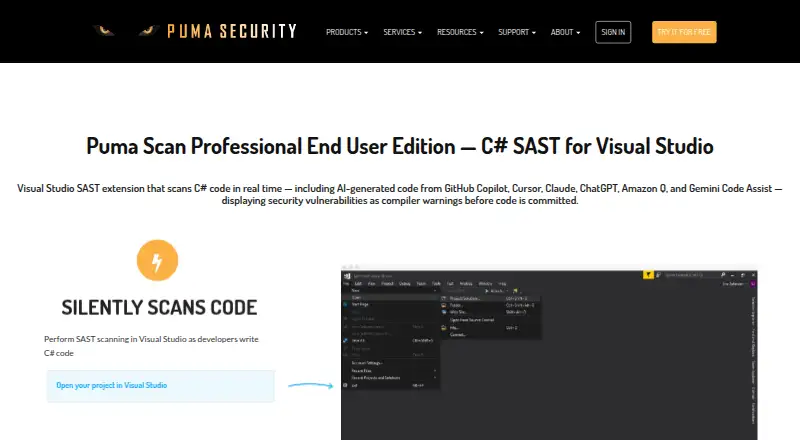
- Supports Visual Studio and CI/CD integrations
Where it doesn't
- Language coverage is limited to C#
- Paid End User licensing starts at $299 per user annually
- Server and Cloud CI plans add substantial annual costs
Our verdict on Puma Scan
Puma Scan focuses on static application security testing for C# and .NET projects. Its analyzers surface vulnerabilities as IDE diagnostics or build warnings, making it a fit for developers who want security findings in their coding and build workflows. The free Community edition is an open-source project; paid options add professional extensions, reporting, and ways to run scans on build infrastructure. Teams working mainly in other programming languages should look for a broader SAST tool.
The plans separate individual developer use from centralized scanning. According to the vendor's pricing page, End User costs $299 per user per year and includes a Professional Visual Studio extension, email support, and vulnerability reporting. Server costs $4,999 per year for command-line scanning and build-server integration. Cloud CI Standard is $5,999 per year and Cloud CI Unlimited is $10,999 per year; both integrate Puma Scan into CI/CD pipelines. These subscriptions renew annually. A 30-day free trial is listed, with no card required. The individual tier is the clearest fit for developers seeking Visual Studio diagnostics, while the higher annual plans suit teams that need pipeline or build-server scanning.
Configuration is a notable strength: teams can adjust security rules, define tainted sources and cleanse methods, and suppress false positives. Findings can be exported in HTML, JSON, CSV, MSBuild, and VSO formats. The listed integrations include Visual Studio, VS Code, GitHub Actions, GitLab CI, and Azure DevOps; optional analysis of vulnerable open-source package references adds a dependency-checking angle alongside source analysis. Choose Puma Scan when C# coverage and workflow-level diagnostics are the priority. Its single-language focus makes it a less suitable choice for organizations that need one scanner across multiple languages.
Your product? Our editors can test Puma Scan in depth and publish a review, labelled as paid · from $149/mo →
Puma Scan pricing
All 5 Puma Scan plans and prices →
Puma Scan fact sheet
| Free plan | Yes |
|---|---|
| Paid from | $299/user/yr |
| Analysis target | Source |
| Supported languages | 1 languages |
| IDE support | Yes |
| CI/CD support | Yes |
| Deployment | Hybrid |
| SCA included | Yes |
| Fix guidance | Yes |
| Free trial | 30 days · no card needed |
| Deployment | Self-hosted, Desktop, Browser extension, Cloud |
| Platforms | Windows, macOS, Linux |
| Support | Email, Phone, Docs |
| Built for | Solo, Small business, Mid-market, Enterprise (editorial estimate) |
| Integrations | 5 integrations: Visual Studio, VS Code, GitHub Actions, GitLab CI, Azure DevOps |
| Pricing | Free plan · 30-day trial (source) |
| Website | pumasecurity.io |
| Facts checked | 23 Sep 2026 |
Puma Scan integrations
Puma Scan lists 5 integrations on its own site.
- Visual Studio
- VS Code
- GitHub Actions
- GitLab CI
- Azure DevOps
Alternatives to Puma Scan
- Semgrep CodeBroad SAST coverage with strong pull-request, IDE, CI/CD, and custom-rule support.9.2
- GitHub CodeQLA strong fit for GitHub teams that want customizable semantic code scanning.8.9
- Veracode Static AnalysisA broad cloud SAST service for enterprises securing mixed application targets.8.7



See all Puma Scan alternatives →
Used Puma Scan? Be the first to review it
The editor score above is our own research. What this page doesn't have yet is a reader's view — what you used Puma Scan for, what worked and what didn't. No stars are seeded and no review is paid for; an editor reads every one before it appears.
Write a reviewTwo minutes · verified accounts only · read by an editor before it appears
Featured on iTechGuides

Puma Scan is listed in our Static Application Security Testing Software directory. Add the badge to your site — it links back to this page.
<a href="https://www.itechguides.com/products/puma-scan/"><img src="https://www.itechguides.com/best/badge/puma-scan.svg" alt="Featured on iTechGuides" width="230" height="46"></a>
Reviewed by iTechGuides Editors · Editorial team · Updated Oct 2026
Advertiser disclosure: iTechGuides is reader-supported. Vendors can pay for top positions in our rankings and for a place on other products' pages, and we may earn a commission when you click some links. Bought places stand at the number bought; this page and our disclosure say so. Paying vendors may get a fuller, more detailed review from our editors, and that review can change their score. How we rank.
Last updated · How we research and update