Ptions+
Ptions+: A focused, free macOS remapper for per-app buttons, shortcuts, and system actions. Ranked #84 of 105 in Keyboard and Mouse Customization Software by our editors (5.3/10); pricing: Free plan; best for mac users needing simple per-app mouse mappings.
At a glance
- Editor score5.3 / 10
- PricingFree plan
- Best forMac users needing simple per-app mouse mappings
- Free planYes
- Paid fromFree
- Supported operating systemsMacos
- Facts checked22 Sep 2026
Where it wins
- Free and open source with signed, notarized macOS releases
- Separate mouse profiles by application and connected mouse
- Records shortcuts and includes 18 preset system actions
Where it doesn't
- Supports macOS only, with macOS 13 Ventura or later required
- No verified sensitivity, onboard memory, or broad macro support
- Community support is best-effort rather than 24/7
Our verdict on Ptions+
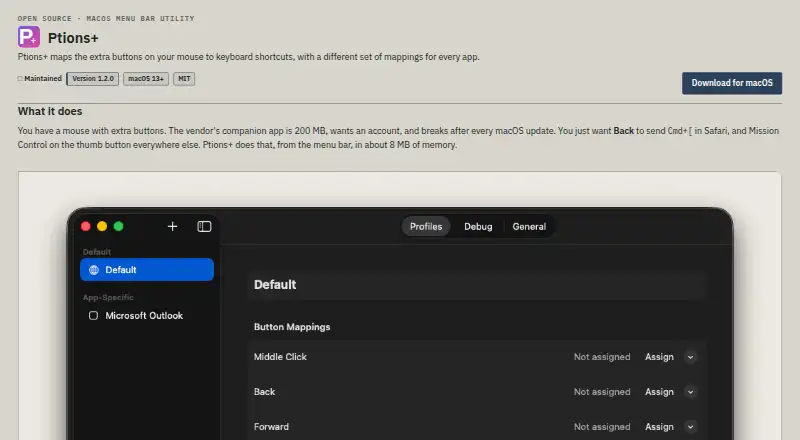
Ptions+ is an open-source macOS menu bar utility for people who want to remap extra mouse buttons without relying on vendor mouse software. It creates separate button profiles for each application, records keyboard shortcuts, and supports different mappings for multiple connected mice. The product is aimed at solo users and small teams on Apple silicon or Intel Macs running macOS 13 Ventura or later. It requires macOS Accessibility permission to intercept input events, so its setup includes an operating-system permission step.
The strongest part of Ptions+ is its focused per-application mapping model. Users can assign mouse buttons to recorded shortcuts or system actions such as Mission Control and Launchpad, with 18 preset actions available. Launch at login keeps the utility available during normal desktop use, while the live raw mouse-event debug monitor provides a way to inspect incoming input events. Signed and notarized macOS releases add a clear distribution and platform-fit signal for Mac users who prefer an open-source desktop utility.
The trade-off is a narrow scope and a single-platform deployment. Ptions+ does not provide verified sensitivity controls, onboard mouse memory, broad macro support, or cross-platform coverage, so it is not a complete replacement for feature-heavy peripheral software. The project is maintained on a best-effort basis and support is community-based. Choose Ptions+ if per-app mouse mappings, shortcuts, system actions, and multiple-mouse profiles are the priority; choose an alternative if hardware-level settings, extensive macros, broader operating-system support, or formal support coverage matter more.
Your product? Our editors can test Ptions+ in depth and publish a review, labelled as paid · from $149/mo →
Ptions+ pricing
Ptions+ fact sheet
| Free plan | Yes |
|---|---|
| Paid from | Free |
| Supported operating systems | Macos |
| Macro support | Not verified |
| Per-app profiles | Yes |
| Onboard device memory | Not verified |
| Polling rate control | Not verified |
| Sensitivity controls | Not verified |
| Profile slots | Not verified |
| Deployment | Desktop |
| Platforms | macOS |
| Support | Community |
| Built for | Solo, Small business (editorial estimate) |
| Pricing | Free plan |
| Website | trsdn.github.io |
| Facts checked | 22 Sep 2026 |
Alternatives to Ptions+
- Razer SynapseA free Razer-focused hub for remapping, macros, profiles, and Chroma lighting.9.2
- Logi Options+A broad free toolkit for remapping, automation, profiles, and multi-computer control.9.1
- Logitech G HUBA free desktop suite for Logitech G lighting, profiles, and device settings.9.0



See all Ptions+ alternatives →
Used Ptions+? Be the first to review it
The editor score above is our own research. What this page doesn't have yet is a reader's view — what you used Ptions+ for, what worked and what didn't. No stars are seeded and no review is paid for; an editor reads every one before it appears.
Write a reviewTwo minutes · verified accounts only · read by an editor before it appears
Featured on iTechGuides

Ptions+ is listed in our Keyboard and Mouse Customization Software directory. Add the badge to your site — it links back to this page.
<a href="https://www.itechguides.com/products/ptions/"><img src="https://www.itechguides.com/best/badge/ptions.svg" alt="Featured on iTechGuides" width="230" height="46"></a>
Reviewed by iTechGuides Editors · Editorial team · Updated Oct 2026
Advertiser disclosure: iTechGuides is reader-supported. Vendors can pay for top positions in our rankings and for a place on other products' pages, and we may earn a commission when you click some links. Bought places stand at the number bought; this page and our disclosure say so. Paying vendors may get a fuller, more detailed review from our editors, and that review can change their score. How we rank.
Last updated · How we research and update