
Projecto Workflow
Projecto Workflow: A focused workflow tool for multi-step departmental approvals and routing. Ranked #97 of 131 in Workflow Automation Tools by our editors (3.0/10); pricing: Pricing on request · 14-day trial; best for departmental approval workflows.
At a glance
- Editor score3.0 / 10
- PricingPricing on request · 14-day trial
- Best forDepartmental approval workflows
- Multi-step workflowsYes
- Facts checked22 Sep 2026
Where it wins
- Conditional branching routes requests by submitted data.
- SLAs, alerts, and escalations support deadline management.
- Electronic signatures include audit trails for approval records.
Where it doesn't
- Workflow-specific pricing requires a custom quote.
- The product is available on the web platform.
- Advanced use cases may require API work with enterprise systems.
Our verdict on Projecto Workflow
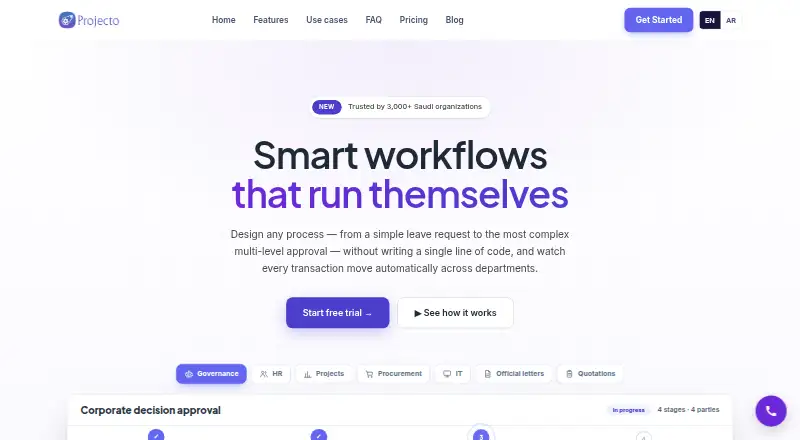
Projecto Workflow is a no-code business-process automation product for organizations digitizing internal procedures and approvals. It is suited to departments that need structured request intake, assigned owners, permissions, automatic routing, and visibility across multi-step processes. Teams can build workflows with drag-and-drop tools, create custom forms with required fields, and route transactions between departments based on request data. Its scope fits internal operations more closely than general-purpose task management.
Its strongest area is approval workflow depth. Conditional branching supports different paths for different request details, while SLA tracking, alerts, and escalation features help teams manage deadlines. Electronic signatures and audit trails add a formal record to approval steps, and workflow performance reporting gives teams a way to monitor process activity. API integrations with enterprise systems can extend the workflows beyond the web application, while optional Saudi-based or private on-premises hosting is available for Enterprise customers.
Projecto Workflow uses a contact-sales pricing model, and a 14-day trial is available for evaluating the product before a purchase discussion. The product is a good fit for departments replacing manual approval procedures with defined forms, routing rules, ownership, signatures, and reporting. It may be less suitable for teams seeking a simple lightweight automation tool, transparent self-service pricing, or a broader platform experience outside internal process management. Organizations choosing it should be comfortable evaluating workflow requirements with the vendor and considering whether web access, API integration, or Enterprise hosting aligns with their operating model.
Your product? Our editors can test Projecto Workflow in depth and publish a review, labelled as paid · from $149/mo →
Projecto Workflow pricing
Projecto Workflow fact sheet
| Free plan | Not verified |
|---|---|
| Paid from | Not verified |
| Native connectors | Not verified |
| Multi-step workflows | Yes |
| Conditional logic | Yes |
| Webhook triggers | Not verified |
| Included task runs | Not verified |
| Minimum run interval | Not verified |
| Free trial | 14 days · no card needed |
| Deployment | Cloud, Self-hosted |
| Platforms | Web |
| Support | Email, Phone, Live chat, Community · 24/7 |
| Built for | Small business, Mid-market, Enterprise (editorial estimate) |
| Pricing | Pricing on request · 14-day trial (source) |
| Website | projecto.app |
| Facts checked | 22 Sep 2026 |
Alternatives to Projecto Workflow
- ZapierA mature no-code automation platform with exceptional app coverage and flexible workflow logic.9.3
- MakeBroad no-code automation with a free plan, 3,000+ apps, and multi-step routing.9.2
- Microsoft Power AutomateA Microsoft-focused automation platform combining cloud flows, desktop RPA, governance, and Copilot.9.0


See all Projecto Workflow alternatives →
Used Projecto Workflow? Be the first to review it
The editor score above is our own research. What this page doesn't have yet is a reader's view — what you used Projecto Workflow for, what worked and what didn't. No stars are seeded and no review is paid for; an editor reads every one before it appears.
Write a reviewTwo minutes · verified accounts only · read by an editor before it appears
Featured on iTechGuides

Projecto Workflow is listed in our Workflow Automation Tools directory. Add the badge to your site — it links back to this page.
<a href="https://www.itechguides.com/products/projecto-workflow/"><img src="https://www.itechguides.com/best/badge/projecto-workflow.svg" alt="Featured on iTechGuides" width="230" height="46"></a>
Guides on workflow automation tools
- Top 5 n8n Alternatives in 2026: Choosing the Right Workflow Automation ToolAug 2026
- 5 Workflow Automation Tools for Professionals: How to ChooseOct 2026
- n8n Workflow Automation Software Review (2026): Powerful, Flexible, and Not for EveryoneAug 2026
Reviewed by iTechGuides Editors · Editorial team · Updated Oct 2026
Advertiser disclosure: iTechGuides is reader-supported. Vendors can pay for top positions in our rankings and for a place on other products' pages, and we may earn a commission when you click some links. Bought places stand at the number bought; this page and our disclosure say so. Paying vendors may get a fuller, more detailed review from our editors, and that review can change their score. How we rank.
Last updated · How we research and update