Pragma
Pragma: A local, open-source workspace for coordinating multiple coding agents and Git workflows. Ranked #56 of 103 in AI Coding Assistants by our editors (3.8/10); pricing: Open source; best for multi-agent project orchestration.
At a glance
- Editor score3.8 / 10
- PricingOpen source
- Best forMulti-agent project orchestration
- Paid fromFree
- Coding agentYes
- Facts checked22 Sep 2026
Where it wins
- Runs multiple agents in isolated Git worktrees
- Combines terminals, diffs, commits, and pull-request workflows
- Supports plugins, automations, and mobile or browser access
Where it doesn't
- Mobile and browser access depends on a local gateway and tunnel
- Workflows are centered on Git worktrees and agent CLIs
- AGPL-3.0 licensing may require organizational review
Our verdict on Pragma
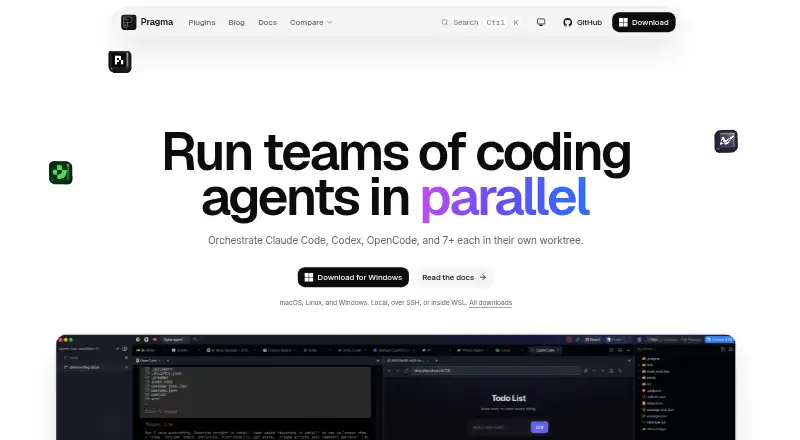
Pragma is a desktop development environment for running multiple coding agents across isolated Git worktrees. It is aimed at solo developers and small to mid-market teams that want one workspace for agent prompts, development commands, project files, and Git review. Pragma runs on macOS, Linux, and Windows, with mobile and browser access through its gateway. It supports agents including Claude Code, Codex, OpenCode, and Cursor, while its supported IDE list includes VS Code, Cursor, Windsurf, Zed, Sublime Text, and IntelliJ IDEA.
Its standout capability is multi-agent orchestration. Developers can launch agents in separate worktrees, use native terminal sessions for agent CLIs, and track prompts on an agent board from draft through completion. Fan-out workflows allow multiple attempts to be compared, while unified diffs, staging, commits, branch review, and GitHub pull-request creation keep the resulting work inside a familiar development flow. Project scripts and event-driven automations extend the workspace beyond individual prompts, and the plugin API supports custom agents, commands, tabs, and themes.
Pragma’s open-source model and local deployment options give teams control over how the workspace is run. The product supports self-hosted, desktop, and mobile deployment, with email, community, and documentation support channels. Its built-in viewers cover code, Markdown, PDF, image, video, and audio files, which broadens project context beyond source files. The trade-off is a workflow designed around Git worktrees, terminals, and agent tools rather than a lightweight chat assistant. Mobile and browser access also relies on a local gateway and tunnel. Choose Pragma when parallel agent work, branch isolation, and extensibility matter; choose another tool if you want a simpler assistant without project orchestration overhead.
Questions about Pragma
What does Pragma run on? Web, Windows, macOS, Linux, iOS and Android. It runs self-hosted, as a desktop app and as a mobile app.
What does Pragma integrate with? 4 integrations: Claude Code, Codex, OpenCode and Cursor.
Who is Pragma built for? Solo users, small businesses and mid-market companies (our editorial estimate).
Your product? Our editors can test Pragma in depth and publish a review, labelled as paid · from $149/mo →
Pragma pricing
Pragma fact sheet
| Free plan | Not verified |
|---|---|
| Paid from | Free |
| Code completion | Not verified |
| Chat assistance | Yes |
| Coding agent | Yes |
| Supported IDEs | VS Code, Cursor, Windsurf, Zed, Sublime Text, IntelliJ IDEA |
| Codebase indexing | Not verified |
| Terminal access | Yes |
| Deployment | Self-hosted, Desktop, Mobile |
| Platforms | Web, Windows, macOS, Linux, iOS, Android |
| Support | Email, Community, Docs |
| Built for | Solo, Small business, Mid-market (editorial estimate) |
| Integrations | 4 integrations: Claude Code, Codex, OpenCode, Cursor |
| Pricing | Open source |
| Website | pragma-app.sh |
| Facts checked | 22 Sep 2026 |
Pragma integrations
Pragma lists 4 integrations on its own site.
- Claude Code
- Codex
- OpenCode
- Cursor
Alternatives to Pragma
- GitHub CopilotA broad coding assistant with a free entry point and agent workflows.9.3
- Claude CodeA strong fit for multi-step coding work across codebases, tools, and pull requests.9.2
- DevinA broad autonomous coding workspace with usage-based plan differences.9.1


Used Pragma? Be the first to review it
The editor score above is our own research. What this page doesn't have yet is a reader's view — what you used Pragma for, what worked and what didn't. No stars are seeded and no review is paid for; an editor reads every one before it appears.
Write a reviewTwo minutes · verified accounts only · read by an editor before it appears
Featured on iTechGuides

Pragma is listed in our AI Coding Assistants directory. Add the badge to your site — it links back to this page.
<a href="https://www.itechguides.com/products/pragma/"><img src="https://www.itechguides.com/best/badge/pragma.svg" alt="Featured on iTechGuides" width="230" height="46"></a>
Reviewed by iTechGuides Editors · Editorial team · Updated Nov 2026
Advertiser disclosure: iTechGuides is reader-supported. Vendors can pay for top positions in our rankings and for a place on other products' pages, and we may earn a commission when you click some links. Bought places stand at the number bought; this page and our disclosure say so. Paying vendors may get a fuller, more detailed review from our editors, and that review can change their score. How we rank.
Last updated · How we research and update