
PlayAbility Adaptive Software
PlayAbility Adaptive Software: A focused Windows mapper for voice, gesture, head-tracking, and adaptive-control setups. Ranked #13 of 27 in Game Controller Mapper Software by our editors (6.8/10); pricing: Free plan; best for adaptive-control users needing voice or gesture input.
At a glance
- Editor score6.8 / 10
- PricingFree plan
- Best forAdaptive-control users needing voice or gesture input
- Free planYes
- Paid from€7.99/mo
- Virtual-controller outputYes
- Founded2023
- Facts checked20 Sep 2026
Where it wins
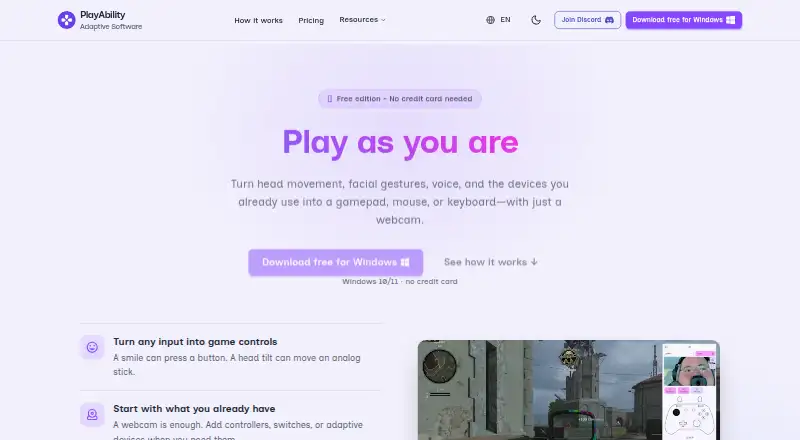
- Maps facial gestures, head movement, and voice to game actions
- Supports virtual Xbox output, keyboard/mouse remapping, and overlays
- Works with Xbox, PlayStation, and Nintendo Switch remote-play setups
Where it doesn't
- Windows-only platform support
- Free Edition limits users to one customizable profile
- Adaptive-control focus may not suit general-purpose mapper needs
Our verdict on PlayAbility Adaptive Software
PlayAbility Adaptive Software is Windows accessibility software for players who need alternatives to traditional controllers. It maps facial gestures, head movement, voice commands, gamepads, switches, pedals, joysticks, adaptive controllers, and keyboard or mouse input to gamepad, keyboard, and mouse actions. The software is aimed at hands-free play, adaptive hardware setups, and players combining alternative inputs with PC or console gaming. It also supports virtual Xbox-controller output and desktop control.
The feature depth centers on combining different input methods. Facial gestures can trigger gamepad, keyboard, or mouse actions, while head tracking supports analog-stick and mouse control. Voice commands can trigger actions in multiple languages. Users can save customizable control profiles, switch profiles through mapped settings actions, and use overlay controls with virtual buttons and joysticks. WebSocket and MCP connectivity extend the software to external applications and AI assistants, while virtual Xbox output supports controller-oriented game compatibility.
Pricing has a free option and two Pro billing choices. The Free Edition includes all control features, one customizable profile, use on one computer, and free updates. Pro costs €7.99 per month or €129 as a one-time purchase. Both Pro options include all features, unlimited profiles, use on all your computers, and priority access to new features; the one-time option also includes all future updates. Integrations include Xbox Remote Play, Xbox Cloud Gaming, Greenlight, PlayStation Remote Play through Chiaki, and Nintendo Switch through PlayAbility Receiver. Choose PlayAbility for adaptive input and hands-free control on Windows. Players needing software beyond Windows or a less accessibility-focused mapper should look elsewhere.
Your product? Our editors can test PlayAbility Adaptive Software in depth and publish a review, labelled as paid · from $149/mo →
PlayAbility Adaptive Software pricing
All 2 PlayAbility Adaptive Software plans and prices →
PlayAbility Adaptive Software fact sheet
| Free plan | Yes |
|---|---|
| Paid from | €7.99/mo |
| Keyboard/mouse output | Yes |
| Virtual-controller output | Yes |
| Profile switching | Yes |
| Per-app profiles | Not verified |
| Platform support | Windows |
| Maximum profiles | Not verified |
| Controller input types | gamepads, adaptive controllers, joysticks, pedals, switches, Xbox Adaptive Controller |
| Deployment | Desktop |
| Platforms | Windows |
| Support | Community, Docs |
| Built for | Solo, Small business (editorial estimate) |
| Integrations | 7 integrations: Xbox Remote Play, Xbox Cloud Gaming, Greenlight, PlayStation Remote Play via Chiaki, Nintendo Switch via PlayAbility Receiver, WebSocket … See all → |
| Pricing | Free plan (source) |
| Website | playability.gg |
| Facts checked | 20 Sep 2026 |
PlayAbility Adaptive Software integrations
PlayAbility Adaptive Software lists 7 integrations on its own site.
- Xbox Remote Play
- Xbox Cloud Gaming
- Greenlight
- PlayStation Remote Play via Chiaki
- Nintendo Switch via PlayAbility Receiver
- WebSocket
- MCP
See all PlayAbility Adaptive Software integrations →
Alternatives to PlayAbility Adaptive Software
- Steam InputA free, mature mapper for per-game controller profiles across Windows, macOS, and Linux.8.6
- DS4WindowsA capable free mapper for PlayStation controllers, limited to Windows PCs.7.9
- JoyShockMapperA free, gyro-focused mapper for Windows and Linux with deep binding controls.7.8

See all PlayAbility Adaptive Software alternatives →
Used PlayAbility Adaptive Software? Be the first to review it
The editor score above is our own research. What this page doesn't have yet is a reader's view — what you used PlayAbility Adaptive Software for, what worked and what didn't. No stars are seeded and no review is paid for; an editor reads every one before it appears.
Write a reviewTwo minutes · verified accounts only · read by an editor before it appears
Featured on iTechGuides

PlayAbility Adaptive Software is listed in our Game Controller Mapper Software directory. Add the badge to your site — it links back to this page.
<a href="https://www.itechguides.com/products/playability-adaptive-software/"><img src="https://www.itechguides.com/best/badge/playability-adaptive-software.svg" alt="Featured on iTechGuides" width="230" height="46"></a>
Reviewed by iTechGuides Editors · Editorial team · Updated Oct 2026
Advertiser disclosure: iTechGuides is reader-supported. Vendors can pay for top positions in our rankings and for a place on other products' pages, and we may earn a commission when you click some links. Bought places stand at the number bought; this page and our disclosure say so. Paying vendors may get a fuller, more detailed review from our editors, and that review can change their score. How we rank.
Last updated · How we research and update