PIXPRO 360 VR Suite
PIXPRO 360 VR Suite: A focused free suite for editing, stitching, and controlling supported PIXPRO 360° cameras. Ranked #7 of 30 in 360 Video Software by our editors (7.5/10); pricing: Free plan; best for free 4K 360 workflows for PIXPRO cameras.
At a glance
- Editor score7.5 / 10
- PricingFree plan
- Best forFree 4K 360 workflows for PIXPRO cameras
- Free planYes
- Paid fromFree
- 360 editingYes
- Facts checked21 Sep 2026
Where it wins
- Free 360° photo and video editing with VR stitching
- Camera control, recording, Wi-Fi live view, and media downloads
- Supports editing and stitching of 4K files on Windows and macOS
Where it doesn't
- Designed around KODAK PIXPRO 360° cameras
- Available only for Windows and macOS
- Latest operating-system compatibility is not guaranteed
Our verdict on PIXPRO 360 VR Suite
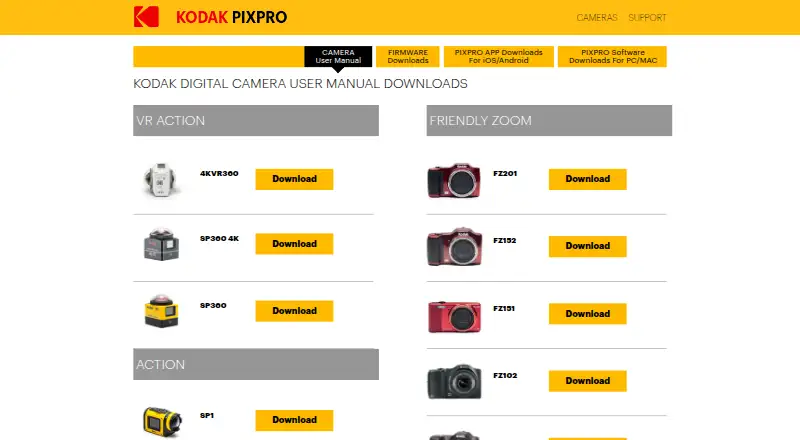
PIXPRO 360 VR Suite is free desktop software for photographers, artists, musicians, and other creators working with KODAK PIXPRO SP360, SP360 4K, ORBIT360 4K, and 4KVR360 cameras. It combines 360° photo and video editing with VR stitching, camera control, recording, Wi-Fi live view, camera-file browsing, media downloads, playback, and sharing. The result is a focused workspace for creators who want to manage and refine footage from supported PIXPRO cameras on a computer.
The published Free plan includes the full listed feature set rather than separating core editing from paid upgrades. That covers 360° photo and video editing, 360° VR stitching, Wi-Fi live view, and camera control and recording. The suite also supports editing and stitching of 4K files, giving PIXPRO users a no-cost option for working with higher-resolution 360° material. Its strongest value is the combination of camera access and post-production in one desktop application.
Platform and camera fit are the main considerations. PIXPRO 360 VR Suite is available for Windows and macOS, and its workflow is built around the listed KODAK PIXPRO camera models rather than a broad, camera-independent 360° ecosystem. The download page lists regional software versions and notes that compatibility with the latest operating-system releases is not guaranteed. Choose it if you own a supported PIXPRO camera and need free 4K-capable editing, stitching, and camera control. Choose another 360° tool if you need wider camera support or a platform beyond Windows and macOS.
Your product? Our editors can test PIXPRO 360 VR Suite in depth and publish a review, labelled as paid · from $149/mo →
PIXPRO 360 VR Suite pricing
All 1 PIXPRO 360 VR Suite plans and prices →
PIXPRO 360 VR Suite fact sheet
| Free plan | Yes |
|---|---|
| Paid from | Free |
| 360 editing | Yes |
| 360 stitching | Yes |
| 360 stabilization | Not verified |
| VR preview | Not verified |
| Max export resolution | 4k |
| Desktop platforms | Windows and macOS |
| 360 camera import | Yes |
| Deployment | Desktop |
| Platforms | Windows, macOS |
| Support | Docs |
| Built for | Solo, Small business (editorial estimate) |
| Pricing | Free plan (source) |
| Website | kodakpixpro.com |
| Facts checked | 21 Sep 2026 |
Alternatives to PIXPRO 360 VR Suite
- Garmin VIRB EditA focused, no-cost choice for Garmin 360 editing, stitching and telemetry overlays.8.8
- GoPro PlayerA capable free option for 8K 360 reframing, playback, and batch export.8.4
- GoPro QuikA strong mobile and web option for reframing 360 footage, especially from GoPro cameras.7.9



See all PIXPRO 360 VR Suite alternatives →
PIXPRO 360 VR Suite vs the competition
- PIXPRO 360 VR Suite vs Garmin VIRB Edit
- PIXPRO 360 VR Suite vs GoPro Player
- PIXPRO 360 VR Suite vs GoPro Quik
- PIXPRO 360 VR Suite vs Mistika VR
- PIXPRO 360 VR Suite vs VideoStitch Studio
- PIXPRO 360 VR Suite vs QooCam Studio


Compare PIXPRO 360 VR Suite with any tool side by side →
Used PIXPRO 360 VR Suite? Be the first to review it
The editor score above is our own research. What this page doesn't have yet is a reader's view — what you used PIXPRO 360 VR Suite for, what worked and what didn't. No stars are seeded and no review is paid for; an editor reads every one before it appears.
Write a reviewTwo minutes · verified accounts only · read by an editor before it appears
Featured on iTechGuides

PIXPRO 360 VR Suite is listed in our 360 Video Software directory. Add the badge to your site — it links back to this page.
<a href="https://www.itechguides.com/products/pixpro-360-vr-suite/"><img src="https://www.itechguides.com/best/badge/pixpro-360-vr-suite.svg" alt="Featured on iTechGuides" width="230" height="46"></a>
Reviewed by iTechGuides Editors · Editorial team · Updated Oct 2026
Advertiser disclosure: iTechGuides is reader-supported. Vendors can pay for top positions in our rankings and for a place on other products' pages, and we may earn a commission when you click some links. Bought places stand at the number bought; this page and our disclosure say so. Paying vendors may get a fuller, more detailed review from our editors, and that review can change their score. How we rank.
Last updated · How we research and update