
GoPro Quik
GoPro Quik: A strong mobile and web option for reframing 360 footage, especially from GoPro cameras. Ranked #3 of 30 in 360 Video Software by our editors (7.9/10); pricing: Paid; best for goPro users reframing 360 footage on mobile or web.
At a glance
- Editor score7.9 / 10
- PricingPaid
- Best forGoPro users reframing 360 footage on mobile or web
- Free planNo
- Founded2002 · San Mateo, California, United States
- Facts checked21 Sep 2026
Where it wins
- Object tracking, keyframes, and 360 reframing
- Automatic highlights, beat-synced edits, and cloud editing
- Imports from GoPro, phones, and other cameras
Where it doesn't
- No free plan
- Quik desktop applications were discontinued
- Less focused on stitching than on reframing and editing
Our verdict on GoPro Quik
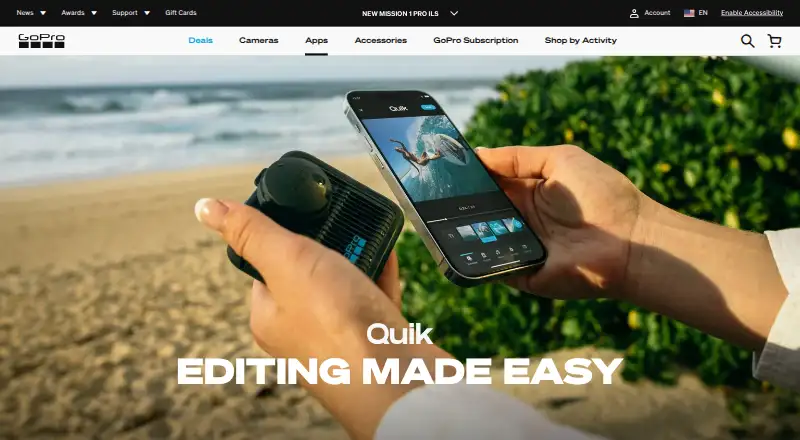
GoPro Quik is a mobile-focused video and photo editor for iOS and Android, with browser-based access to cloud media. It imports footage from GoPro cameras, phones, and other cameras, then supports trimming, cropping, speed changes, filters, exposure controls, themes, music synchronization, and automatic highlight videos. For 360 workflows, its most relevant tools are object tracking, keyframes, and reframing. It is best suited to GoPro users who want to turn 360 footage into conventional, shareable videos without relying on a desktop application.
The published plans show a paid model. The Quik plan includes unlimited mobile editing tools, automatic edits, and premium music, filters, and themes. GoPro Premium costs $59.99 USD per year with annual billing and adds unlimited GoPro cloud storage, 100 GB for non-GoPro footage, Quik premium editing tools, and automatic highlight videos. GoPro Premium+ costs $99.99 USD per year with annual billing, keeps unlimited GoPro cloud storage, raises non-GoPro storage to 500 GB, and adds HyperSmooth Pro. Automatic upload and backup, cloud-based editing, and cross-device media management make the subscriptions more relevant for users who want an ongoing media library rather than a one-off editor.
Quik covers web, iOS, and Android, while GoPro has discontinued its desktop applications and directs desktop users to a browser-based media library for cloud content. Editors can also move projects or media into Adobe Premiere Pro, Adobe After Effects, or DaVinci Resolve. That ecosystem makes Quik useful as an accessible reframing and organization layer, but it is not centered on stitching or full desktop post-production. Choose it for mobile-first 360 reframing, tracking, keyframes, automatic edits, and GoPro cloud storage. Choose another tool if a dedicated desktop workflow or deeper stitching capabilities are the priority.
Your product? Our editors can test GoPro Quik in depth and publish a review, labelled as paid · from $149/mo →
GoPro Quik pricing
All 3 GoPro Quik plans and prices →
GoPro Quik fact sheet
| Free plan | No |
|---|---|
| Paid from | Not verified |
| 360 editing | Not verified |
| 360 stitching | Not verified |
| 360 stabilization | Not verified |
| VR preview | Not verified |
| Max export resolution | Not verified |
| Desktop platforms | Not verified |
| 360 camera import | Not verified |
| Deployment | Cloud, Mobile |
| Platforms | Web, iOS, Android |
| Built for | Solo, Small business (editorial estimate) |
| Integrations | 3 integrations: Adobe Premiere Pro, Adobe After Effects, DaVinci Resolve |
| Pricing | Paid (source) |
| Website | gopro.com |
| Facts checked | 21 Sep 2026 |
GoPro Quik integrations
GoPro Quik lists 3 integrations on its own site.
- Adobe Premiere Pro
- Adobe After Effects
- DaVinci Resolve
Alternatives to GoPro Quik
- Garmin VIRB EditA focused, no-cost choice for Garmin 360 editing, stitching and telemetry overlays.8.8
- GoPro PlayerA capable free option for 8K 360 reframing, playback, and batch export.8.4
- Mistika VRA focused VR stitching tool with strong stereo 3D and render workflows.7.9



See all GoPro Quik alternatives →
GoPro Quik vs the competition
- GoPro Quik vs Garmin VIRB Edit
- GoPro Quik vs GoPro Player
- GoPro Quik vs Mistika VR
- GoPro Quik vs VideoStitch Studio
- GoPro Quik vs QooCam Studio
- GoPro Quik vs PIXPRO 360 VR Suite

Compare GoPro Quik with any tool side by side →
Also Ranked In
GoPro Quik is ranked in 5 of our directories.
Used GoPro Quik? Be the first to review it
The editor score above is our own research. What this page doesn't have yet is a reader's view — what you used GoPro Quik for, what worked and what didn't. No stars are seeded and no review is paid for; an editor reads every one before it appears.
Write a reviewTwo minutes · verified accounts only · read by an editor before it appears
Featured on iTechGuides

GoPro Quik is listed in our 360 Video Software directory. Add the badge to your site — it links back to this page.
<a href="https://www.itechguides.com/products/gopro-quik/"><img src="https://www.itechguides.com/best/badge/gopro-quik.svg" alt="Featured on iTechGuides" width="230" height="46"></a>
Reviewed by iTechGuides Editors · Editorial team · Updated Oct 2026
Advertiser disclosure: iTechGuides is reader-supported. Vendors can pay for top positions in our rankings and for a place on other products' pages, and we may earn a commission when you click some links. Bought places stand at the number bought; this page and our disclosure say so. Paying vendors may get a fuller, more detailed review from our editors, and that review can change their score. How we rank.
Last updated · How we research and update