
Piston
Piston: A focused Android OBD2 tool with useful free diagnostics and paid data analysis. Ranked #25 of 26 in Hardware Diagnostic Software by our editors (6.0/10); pricing: Free plan; best for android OBD2 vehicle diagnostics.
At a glance
- Editor score6.0 / 10
- PricingFree plan
- Best forAndroid OBD2 vehicle diagnostics
- Free planYes
- Facts checked22 Sep 2026
Where it wins
- Reads and clears fault codes, freeze-frame data, and live sensor readings
- Premium adds sensor charts, CSV export, readiness monitors, and VIN reading
- Shows ECU and OBD protocol details alongside local fault history
Where it doesn't
- Requires a separate ELM327 Bluetooth or Wi-Fi adapter
- Runs on Android only
- Designed for vehicle diagnostics, not general-purpose PC hardware checks
Our verdict on Piston
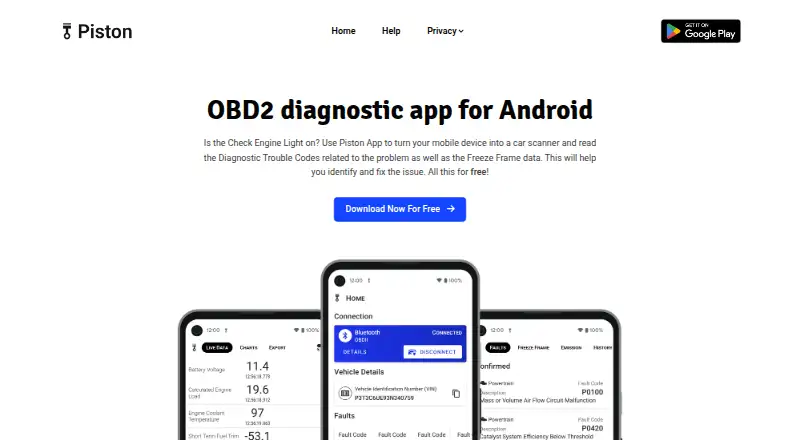
Piston is an Android OBD2 diagnostic app for vehicle owners, technicians, and other users who need access to fault codes and live vehicle data from a mobile device. It connects through a separate ELM327 Bluetooth or Wi-Fi adapter and the vehicle’s OBD2 port. The free plan covers core diagnostic work: reading and clearing fault codes, viewing freeze-frame data, and accessing real-time sensor data. It is a focused automotive tool rather than software for diagnosing computer hardware.
The plan structure gives Piston a clear entry point. Free users can handle code reading and clearing, inspect the conditions captured with a fault, and view live sensor readings. Premium is available as an in-app purchase and adds real-time sensor charts, live data export to CSV, readiness monitors, fault history, and VIN reading. The app also displays ECU and OBD protocol details. That split makes the free tier suitable for basic code checks, while Premium is aimed at users who need richer interpretation, recordkeeping, or exported data.
Its platform and hardware requirements define the main trade-offs. Piston is mobile software for Android, and it depends on compatible ELM327 hardware, so it is not a complete diagnostic setup by itself. Support is provided through email and documentation. Choose Piston if you want Android-based access to OBD2 codes, sensor data, readiness information, and vehicle identification, with optional charting and CSV export. Choose an alternative if you need iOS support, built-in diagnostic hardware, or general-purpose PC hardware diagnostics.
Your product? Our editors can test Piston in depth and publish a review, labelled as paid · from $149/mo →
Piston pricing
All 2 Piston plans and prices →
Piston fact sheet
| Free plan | Yes |
|---|---|
| Paid from | Not verified |
| Platform support | Not verified |
| Stress testing | Not verified |
| Memory testing | Not verified |
| Disk health checks | Not verified |
| GPU testing | Not verified |
| Bootable diagnostic media | Not verified |
| Diagnostic reports | Not verified |
| Deployment | Mobile |
| Platforms | Android |
| Support | Email, Docs |
| Pricing | Free plan (source) |
| Website | piston.app |
| Facts checked | 22 Sep 2026 |
Alternatives to Piston
- HP PC Hardware DiagnosticsFree Windows and UEFI diagnostics with stress tests, logs, and failure IDs.9.3
- Blackwire Hardware DiagnosticsBroad bootable hardware diagnostics with a free plan and optional reporting tiers.9.2
- PC-Doctor ToolboxA broad Windows diagnostic toolkit for technicians, with a low-cost commercial tier.9.0

Used Piston? Be the first to review it
The editor score above is our own research. What this page doesn't have yet is a reader's view — what you used Piston for, what worked and what didn't. No stars are seeded and no review is paid for; an editor reads every one before it appears.
Write a reviewTwo minutes · verified accounts only · read by an editor before it appears
Featured on iTechGuides

Piston is listed in our Hardware Diagnostic Software directory. Add the badge to your site — it links back to this page.
<a href="https://www.itechguides.com/products/piston/"><img src="https://www.itechguides.com/best/badge/piston.svg" alt="Featured on iTechGuides" width="230" height="46"></a>
Reviewed by iTechGuides Editors · Editorial team · Updated Oct 2026
Advertiser disclosure: iTechGuides is reader-supported. Vendors can pay for top positions in our rankings and for a place on other products' pages, and we may earn a commission when you click some links. Bought places stand at the number bought; this page and our disclosure say so. Paying vendors may get a fuller, more detailed review from our editors, and that review can change their score. How we rank.
Last updated · How we research and update