Photo Size Optimizer
Photo Size Optimizer: A free Mac batch optimizer with broad format support and dimension-based resizing. Ranked #7 of 28 in Photo Resizing Software by our editors (7.0/10); pricing: Free plan; best for free Mac batch optimization.
At a glance
- Editor score7.0 / 10
- PricingFree plan
- Best forFree Mac batch optimization
- Free planYes
- Paid fromNone
- Batch resizingYes
- Facts checked22 Sep 2026
Where it wins
- Batch-resizes hundreds of photos or entire folders
- Supports lossless and lossy optimization modes
- Works with more than 70 image formats
Where it doesn't
- Available only for macOS
- Resizing is based on dimensions rather than broader methods
- Version history in the App Store ends in 2016
Our verdict on Photo Size Optimizer
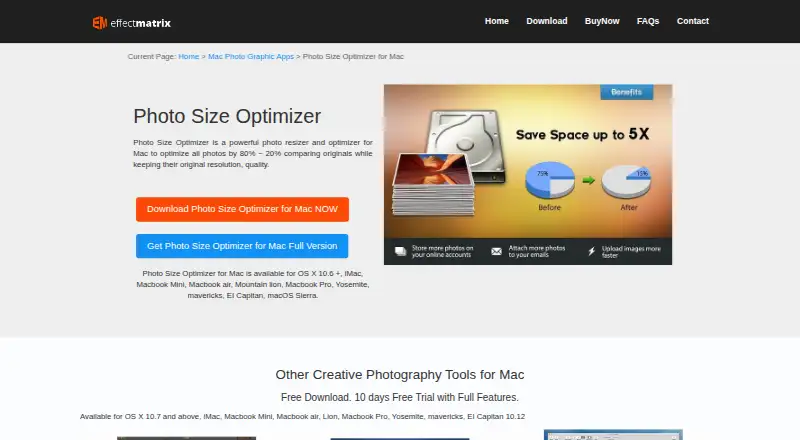
Photo Size Optimizer is a free Mac desktop application for resizing and optimizing individual images or folders. It is aimed at users preparing groups of photographs for storage, sharing, or web use, especially when reducing file sizes while preserving resolution or image quality matters. Folder drag-and-drop processing and batch resizing of hundreds of photos make it suited to repeatable image cleanup rather than one-off edits.
The Free plan includes batch resizing, lossless and lossy optimization, and support for more than 70 image formats. The published feature set includes JPG, PNG, GIF, TIFF, RAW, PDF, PSD, and other formats, giving the application broad file coverage for a desktop utility. Lossless optimization is relevant when preserving image data is the priority, while lossy optimization provides a separate option for reducing size more aggressively. One-click optimization and overwrite confirmation during export keep the workflow focused on processing rather than editing.
Its main limitation is scope: the documented resizing method is dimensions-based, and the application is available only on macOS. The vendor page documents OS X 10.6+, while the current App Store listing shows version history ending in 2016, so buyers should view it as a focused utility rather than a current, wide-platform photo workflow. Choose Photo Size Optimizer for free batch processing on a Mac with varied image formats. Choose an alternative if you need broader platform support, more verified resizing controls, or a more recently updated product history.
Photo Size Optimizer pricing
All 1 Photo Size Optimizer plans and prices →
Photo Size Optimizer fact sheet
| Free plan | Yes |
|---|---|
| Paid from | None |
| Batch resizing | Yes |
| Output formats | JPG, BMP, PNG, GIF, PDF, PSD, PNT, RGB, ARW, BMPF, CUR, CRW, CR2, DCR, DNG, EPSF, EPSI, EPI, EPS, EXR, EFX, ERF, FPX, FPIX, FAX, FFF, GIFF, G3, HDR, ICNS, ICO, JP2, JFX, JFAX, JPE, JFIF, JPF, MPO, MAC, MRW, MOS, NRW, NEF, ORF, PICT, PIC, PCT, PS, PNTG, PNGF, PEF, QTIF, QTI, RAW, RAF, RW2, RWL, SR2, SRF, SRW, SGI, TRIC, TIFF, TGA, TARGA, TIF, XBM, 3FR, 8BPS |
| Resize methods | Dimensions |
| Quality controls | Yes |
| Maximum batch size | Not verified |
| Supported platforms | Desktop |
| Deployment | Desktop |
| Platforms | macOS |
| Support | |
| Built for | Solo, Small business (editorial estimate) |
| Pricing | Free plan (source) |
| Website | effectmatrix.com |
| Facts checked | 22 Sep 2026 |
Alternatives to Photo Size Optimizer
- XnResizeA capable offline batch resizer with broad format support and detailed quality controls.9.0
- PhotoResize ProA capable desktop batch processor for creative teams handling large image collections.8.3
- ConverseenA capable free desktop tool for batch resizing, conversion, compression, and renaming.8.2


See all Photo Size Optimizer alternatives →
Photo Size Optimizer vs the competition
- Photo Size Optimizer vs XnResize
- Photo Size Optimizer vs PhotoResize Pro
- Photo Size Optimizer vs Converseen
- Photo Size Optimizer vs PixelMod
- Photo Size Optimizer vs BulkPic
- Photo Size Optimizer vs Light Image Resizer



Compare Photo Size Optimizer with any tool side by side →
Used Photo Size Optimizer? Be the first to review it
The editor score above is our own research. What this page doesn't have yet is a reader's view — what you used Photo Size Optimizer for, what worked and what didn't. No stars are seeded and no review is paid for; an editor reads every one before it appears.
Write a reviewTwo minutes · verified accounts only · read by an editor before it appears
Featured on iTechGuides

Photo Size Optimizer is listed in our Photo Resizing Software directory. Add the badge to your site — it links back to this page.
<a href="https://www.itechguides.com/products/photo-size-optimizer/"><img src="https://www.itechguides.com/best/badge/photo-size-optimizer.svg" alt="Featured on iTechGuides" width="230" height="46"></a>
Reviewed by iTechGuides Editors · Editorial team · Updated Sep 2026
Advertiser disclosure: iTechGuides is reader-supported. We may earn a commission when you click some links. How we rank.
Last updated · How we research and update