
Parallels Desktop
Parallels Desktop: A capable Mac virtualization suite for Windows apps, development, and managed deployments. Ranked #8 of 24 in Virtual Machine Software by our editors (7.9/10); pricing: 14-day trial; best for mac users running Windows and Linux.
At a glance
- Editor score7.9 / 10
- Pricing14-day trial
- Best forMac users running Windows and Linux
- Free planNo
- Host platformsmacOS
- Founded1999
- Facts checked20 Sep 2026
Where it wins
- Runs Windows, Linux, and macOS virtual machines alongside macOS
- Supports Apple silicon and Intel guests with virtualized 3D graphics
- Adds snapshots, nested virtualization, and business administration
Where it doesn't
- Requires macOS as the host platform
- No free plan; the free trial lasts 14 days
- Apple silicon Windows 11 guests do not support nested virtualization
Our verdict on Parallels Desktop
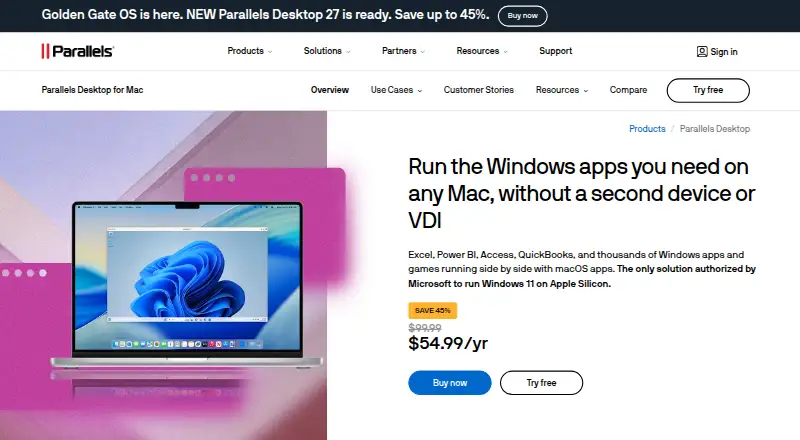
Parallels Desktop is desktop virtualization software for Mac users who need Windows, Linux, or macOS alongside macOS without restarting. It supports Apple silicon and Intel-based Macs, Windows applications, shared files and folders, clipboard access, networking, virtualized 3D graphics, VM snapshots, and selected nested virtualization workloads. The product spans home use, development, team deployment, and IT-managed environments, with Standard, Pro, Business, and Enterprise editions.
The published plans show a paid product with a 14-day free trial. Standard Edition offers 8 GB vRAM, 4 vCPUs, Windows application support, Linux and macOS virtual machines, and phone and email support; a separate Standard Edition option provides a one-time perpetual license. Pro Edition expands capacity to 128 GB vRAM and 32 vCPUs per VM, adds a command-line interface, and targets graphics-intensive applications plus development, automation, testing, and debugging across operating systems. Business and Enterprise focus on administration, provisioning, licensing, encrypted virtual machines, granular controls, and SSO/SAML with SCIM provisioning.
Its Mac-focused ecosystem includes Vagrant, Jamf, Microsoft Intune, GitHub, and Visual Studio. Automatic Windows 11 setup and configuration, shared host-guest resources, DirectX and OpenGL support, snapshots, and command-line lifecycle management give it broader coverage than a basic VM launcher. Business deployments can use centralized administration, Mac provisioning tools, volume licensing, golden image deployment, and a management portal. Parallels Desktop fits Mac users who need regular Windows applications, developers working across operating systems, and organizations managing virtual machines on Macs. Users who need a non-macOS host platform should choose another virtualization product.
Your product? Our editors can test Parallels Desktop in depth and publish a review, labelled as paid · from $149/mo →
Parallels Desktop pricing
All 4 Parallels Desktop plans and prices →
Parallels Desktop fact sheet
| Free plan | No |
|---|---|
| Paid from | Not verified |
| Host platforms | macOS |
| Guest architecture | Both |
| VM snapshots | Yes |
| Nested virtualization | Yes |
| GPU acceleration | Yes |
| Management interface | Desktop |
| Free trial | 14 days |
| Money-back guarantee | 30 days |
| Deployment | Desktop |
| Platforms | macOS |
| Compliance & security | SOC 2, SSO/SAML |
| Support | Email, Live chat, Phone, Community, Docs · 24/7 |
| Built for | Solo, Small business, Mid-market, Enterprise (editorial estimate) |
| Integrations | 5 integrations: Vagrant, Jamf, Microsoft Intune, GitHub, Visual Studio |
| Pricing | 14-day trial (source) |
| Website | parallels.com |
| Facts checked | 20 Sep 2026 |
Parallels Desktop integrations
Parallels Desktop lists 5 integrations on its own site.
- Vagrant
- Jamf
- Microsoft Intune
- GitHub
- Visual Studio
Alternatives to Parallels Desktop
- Proxmox VEA broad self-hosted virtualization stack with free core software and paid support options.9.3
- Oracle VirtualBoxA capable free desktop hypervisor with broad host support and advanced VM controls.8.9
- VMware Workstation ProA free desktop hypervisor with strong VM lifecycle, security, and developer tooling.8.8



See all Parallels Desktop alternatives →
Parallels Desktop vs the competition
- Parallels Desktop vs Proxmox VE
- Parallels Desktop vs Oracle VirtualBox
- Parallels Desktop vs VMware Workstation Pro
- Parallels Desktop vs QEMU
- Parallels Desktop vs KVM
- Parallels Desktop vs Xen Project Hypervisor


Compare Parallels Desktop with any tool side by side →
Also Ranked In
Parallels Desktop is ranked in 3 of our directories.
Used Parallels Desktop? Be the first to review it
The editor score above is our own research. What this page doesn't have yet is a reader's view — what you used Parallels Desktop for, what worked and what didn't. No stars are seeded and no review is paid for; an editor reads every one before it appears.
Write a reviewTwo minutes · verified accounts only · read by an editor before it appears
Featured on iTechGuides

Parallels Desktop is listed in our Virtual Machine Software directory. Add the badge to your site — it links back to this page.
<a href="https://www.itechguides.com/products/parallels-desktop/"><img src="https://www.itechguides.com/best/badge/parallels-desktop.svg" alt="Featured on iTechGuides" width="230" height="46"></a>
Reviewed by iTechGuides Editors · Editorial team · Updated Oct 2026
Advertiser disclosure: iTechGuides is reader-supported. Vendors can pay for top positions in our rankings and for a place on other products' pages, and we may earn a commission when you click some links. Bought places stand at the number bought; this page and our disclosure say so. Paying vendors may get a fuller, more detailed review from our editors, and that review can change their score. How we rank.
Last updated · How we research and update