
Paragon Hard Disk Manager
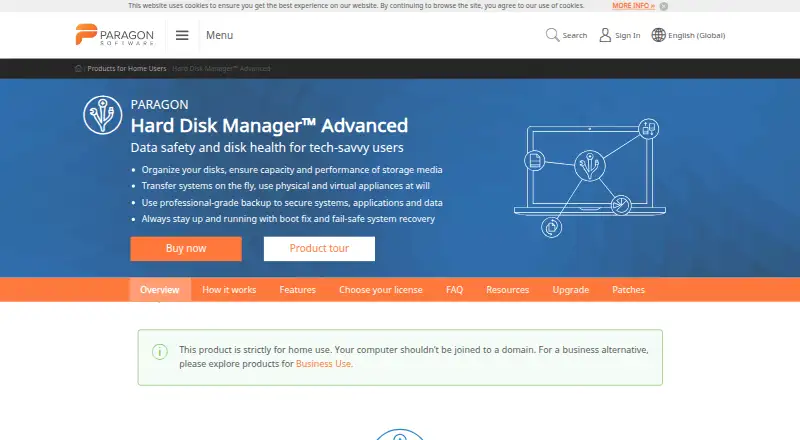
Paragon Hard Disk Manager: A Windows-focused imaging and partition tool with broad recovery and disk-management features. Ranked #7 of 32 in Disk Imaging Software by our editors (8.5/10); pricing: Paid; best for windows imaging plus partition management.
At a glance
- Editor score8.5 / 10
- PricingPaid
- Best forWindows imaging plus partition management
- Free planNo
- Paid from$24.95/yr
- Founded1994 · Freiburg, Germany
- Facts checked20 Sep 2026
Where it wins
- Full, incremental, differential, volume, and file imaging
- Bootable WinPE or Linux recovery media creation
- Partition resizing, cloning, wiping, and conversion tools
Where it doesn't
- Windows-only platform coverage
- No free plan
- Home edition excludes Windows Server and virtual-machine operations
Our verdict on Paragon Hard Disk Manager
Paragon Hard Disk Manager is a Windows desktop utility for home users who want system and data protection together with disk-management tools. It supports full-system, volume, and file backups, plus scheduled, incremental, and differential imaging. Restore options cover entire disks, partitions, files, and folders, while cloning and bootable recovery media support migration and recovery workflows. The home edition is aimed at tech-savvy users rather than server or virtual-machine environments.
Pricing is straightforward across two Advanced licenses. The Advanced 1 Year license costs $24.95 per license per year and includes Windows support and Recovery Media Builder on one device. The Advanced 3PC license costs $79.95 one-time, provides a perpetual license for Windows, and includes Recovery Media Builder on three devices. Across both options, the feature set includes encryption, compression, viability verification, email notifications, and scheduled operations. There is no free plan, so occasional users must choose a paid license for access to the product.
Its strongest distinction is the combination of imaging and partition work in one Windows utility. Users can resize, merge, convert, and edit sectors; securely wipe disks or free space; and create WinPE or Linux recovery media. That breadth suits people managing Windows upgrades, migrations, recovery, and local storage layouts. It is less suitable for mixed-platform households, Windows Server environments, or virtual-machine operations. Buyers needing Windows-focused disk imaging plus partition management should find the scope well matched; those needing broader platform or server coverage should choose another tool.
Your product? Our editors can test Paragon Hard Disk Manager in depth and publish a review, labelled as paid · from $149/mo →
Paragon Hard Disk Manager pricing
All 2 Paragon Hard Disk Manager plans and prices →
Paragon Hard Disk Manager fact sheet
| Free plan | No |
|---|---|
| Paid from | $24.95/yr |
| Bare-metal restore | Not verified |
| Bootable recovery media | Not verified |
| Incremental images | Not verified |
| Differential images | Not verified |
| Supported platforms | Not verified |
| Image encryption | Not verified |
| Cloud image destination | Not verified |
| Deployment | Desktop |
| Platforms | Windows |
| Support | Email, Docs |
| Built for | Solo, Small business (editorial estimate) |
| Pricing | Paid (source) |
| Website | paragon-software.com |
| Facts checked | 20 Sep 2026 |
Alternatives to Paragon Hard Disk Manager
- ClonezillaA capable free imaging toolkit for technical users and multi-computer deployment.9.3
- Macrium ReflectA Windows-focused imaging suite for detailed backup and resilient recovery.9.1
- Acronis True ImageA broad personal backup suite with cloning, recovery, mobile coverage and ransomware monitoring.9.0



See all Paragon Hard Disk Manager alternatives →
Paragon Hard Disk Manager vs the competition
- Paragon Hard Disk Manager vs Clonezilla
- Paragon Hard Disk Manager vs Macrium Reflect
- Paragon Hard Disk Manager vs Acronis True Image
- Paragon Hard Disk Manager vs EaseUS Todo Backup
- Paragon Hard Disk Manager vs Veeam Agent for Linux
- Paragon Hard Disk Manager vs Arcserve Unified Data Protection


Compare Paragon Hard Disk Manager with any tool side by side →
Also Ranked In
Paragon Hard Disk Manager is ranked in 3 of our directories.
Used Paragon Hard Disk Manager? Be the first to review it
The editor score above is our own research. What this page doesn't have yet is a reader's view — what you used Paragon Hard Disk Manager for, what worked and what didn't. No stars are seeded and no review is paid for; an editor reads every one before it appears.
Write a reviewTwo minutes · verified accounts only · read by an editor before it appears
Featured on iTechGuides

Paragon Hard Disk Manager is listed in our Disk Imaging Software directory. Add the badge to your site — it links back to this page.
<a href="https://www.itechguides.com/products/paragon-hard-disk-manager/"><img src="https://www.itechguides.com/best/badge/paragon-hard-disk-manager.svg" alt="Featured on iTechGuides" width="230" height="46"></a>
Reviewed by iTechGuides Editors · Editorial team · Updated Oct 2026
Advertiser disclosure: iTechGuides is reader-supported. Vendors can pay for top positions in our rankings and for a place on other products' pages, and we may earn a commission when you click some links. Bought places stand at the number bought; this page and our disclosure say so. Paying vendors may get a fuller, more detailed review from our editors, and that review can change their score. How we rank.
Last updated · How we research and update