Paket
Paket: Open-source NuGet management with lockfiles, explicit references, and flexible dependency sources. Ranked #37 of 92 in Package Managers by our editors (5.6/10); pricing: Open source; best for nuGet dependencies with explicit Paket files.
At a glance
- Editor score5.6 / 10
- PricingOpen source
- Best forNuGet dependencies with explicit Paket files
- Paid fromFree
- Lockfile supportYes
- Facts checked21 Sep 2026
Where it wins
- Resolves direct and transitive NuGet dependencies with paket.lock
- Supports Git, GitHub, Gist, HTTP, private feeds, and package caches
- Works across Windows, Linux, macOS, .NET Core, .NET Framework, and Mono
Where it doesn't
- Focused on .NET projects rather than broader package ecosystems
- Private feeds require authentication configuration
- Offline installs depend on populated local or network caches
Our verdict on Paket
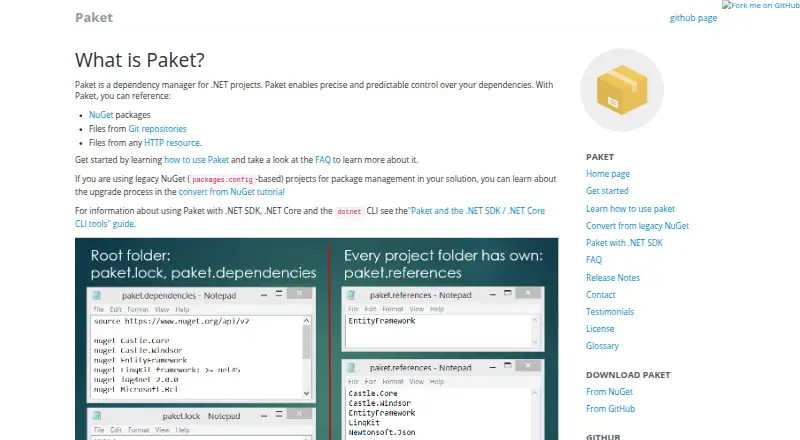
Paket is an open-source dependency manager for .NET projects that centers on NuGet package management while also supporting .NET CLI tools, Git repositories, GitHub, Gists, and HTTP files. It suits developers and teams that want explicit dependency declarations, direct and transitive resolution, version constraints, and reproducible builds across Windows, Linux, macOS, .NET Core, .NET Framework, and Mono. Project-specific references are recorded in paket.references, while concrete resolved versions are captured in paket.lock.
Its strongest differentiator is the control it gives over dependency sources and resolution. Paket can install, restore, update, and identify outdated dependencies, configure NuGet feeds, authenticate to private feeds, and use local, network-share, or machine package caches. That combination supports both connected and offline workflows, while Git, GitHub, Gist, and HTTP dependencies extend package management beyond standard NuGet packages. Teams with mixed legacy and modern .NET projects can use the same command-line-oriented workflow across those environments.
Paket is a good fit when dependency declarations and lockfile-based reproducibility matter, especially for projects that need explicit Paket files or more than one dependency source. Its scope is narrower than a general-purpose package manager because its supported formats and platforms are centered on .NET. Private-feed authentication and cache configuration also add operational steps for teams using secured or offline repositories. Choose Paket for controlled NuGet resolution and flexible .NET dependency sourcing; consider another tool when the project is outside the .NET ecosystem or does not need this level of dependency-file control.
Your product? Our editors can test Paket in depth and publish a review, labelled as paid · from $149/mo →
Paket pricing
Paket fact sheet
| Free plan | Not verified |
|---|---|
| Paid from | Free |
| Package formats | NuGet packages, .NET CLI tools, Git, GitHub/Gist, HTTP files |
| Supported platforms | Windows, Linux, macOS, .NET Core, .NET Framework, Mono |
| Dependency resolution | Yes |
| Lockfile support | Yes |
| Workspace support | Not verified |
| Private registry auth | Yes |
| Offline installation | Yes |
| Deployment | Desktop |
| Platforms | Windows, macOS, Linux |
| Support | Community, Docs |
| Built for | Solo, Small business, Mid-market, Enterprise (editorial estimate) |
| Pricing | Open source |
| Website | fsprojects.github.io |
| Facts checked | 21 Sep 2026 |
Alternatives to Paket
- npmA complete JavaScript package workflow with public access free and private packages at $7/month.9.4
- uvA broad, open-source toolkit for managing modern Python projects across three platforms.9.2
- YarnA capable JavaScript package manager for consistent installs and monorepositories.9.0


Used Paket? Be the first to review it
The editor score above is our own research. What this page doesn't have yet is a reader's view — what you used Paket for, what worked and what didn't. No stars are seeded and no review is paid for; an editor reads every one before it appears.
Write a reviewTwo minutes · verified accounts only · read by an editor before it appears
Featured on iTechGuides

Paket is listed in our Package Managers directory. Add the badge to your site — it links back to this page.
<a href="https://www.itechguides.com/products/paket/"><img src="https://www.itechguides.com/best/badge/paket.svg" alt="Featured on iTechGuides" width="230" height="46"></a>
Reviewed by iTechGuides Editors · Editorial team · Updated Oct 2026
Advertiser disclosure: iTechGuides is reader-supported. Vendors can pay for top positions in our rankings and for a place on other products' pages, and we may earn a commission when you click some links. Bought places stand at the number bought; this page and our disclosure say so. Paying vendors may get a fuller, more detailed review from our editors, and that review can change their score. How we rank.
Last updated · How we research and update