
OV
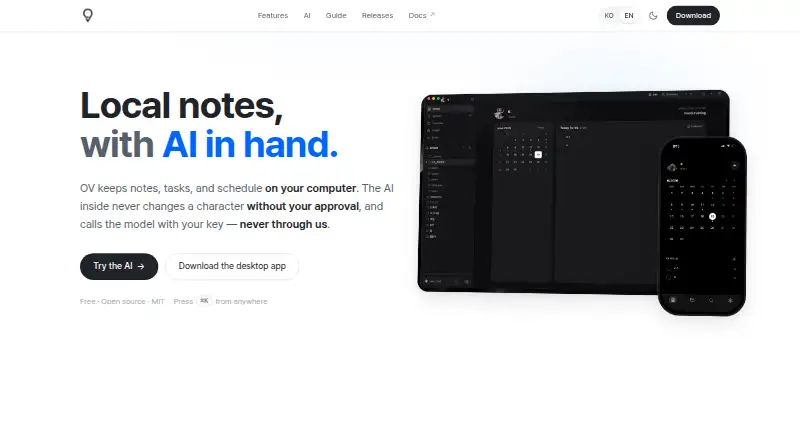
OV: A free, private Markdown workspace for offline notes and AI-assisted organization. Ranked #74 of 214 in Note-Taking Apps by our editors (3.0/10); pricing: Free plan; best for private local Markdown notes with AI actions.
At a glance
- Editor score3.0 / 10
- PricingFree plan
- Best forPrivate local Markdown notes with AI actions
- Free planYes
- Paid fromFree
- Offline accessYes
- Facts checked20 Sep 2026
Where it wins
- Stores plain Markdown files locally for offline access
- Combines boards, calendars, backlinks, search, and graph views
- AI actions propose changes for approval instead of applying them automatically
Where it doesn't
- Current apps are limited to macOS, Windows, and Linux
- Integrations center on iCloud Drive, OpenAI, and GitHub Releases
- iCloud Drive is the stated route for synchronization across devices
Our verdict on OV
OV is a free, local-first note-taking and organization app for individual users who want their notes stored as plain files on their computers. It supports Markdown notes, images, voice memos, tasks, and schedules, with desktop versions for macOS, Windows, and Linux. The core appeal is control over local files: OV combines offline operation with an open-source MIT license, while still offering structured views for tables, boards, calendars, and schedules.
Its feature depth goes beyond basic note capture. Full-text search, Wikilinks, backlinks, and graph view support connected knowledge work, while calendar and schedule management bring planning into the same workspace. AI-assisted note actions can propose changes for approval, giving users a review step before edits are applied. File-level AES-GCM-256 encryption adds a privacy-oriented option at the file level. For users who want local Markdown files alongside organization and AI assistance, this is a focused combination.
The platform fit is strongest for desktop workflows. OV currently covers macOS, Windows, and Linux, and iCloud Drive synchronization is intended for use across devices. Its listed integrations are iCloud Drive, OpenAI, and GitHub Releases, so it suits users who prefer a compact ecosystem over a broad integration catalog. Choose OV if local ownership, offline access, connected notes, and approval-based AI actions matter more than mobile availability or extensive integrations. Users seeking a wider platform and ecosystem footprint should consider an alternative.
Questions about OV
Does OV have a free plan? Yes, there is a free plan.
What does OV run on? macOS, Windows and Linux. It runs as a desktop app.
What does OV integrate with? 3 integrations: iCloud Drive, OpenAI and GitHub Releases.
Who is OV built for? Solo users and small businesses (our editorial estimate).
Your product? Our editors can test OV in depth and publish a review, labelled as paid · from $149/mo →
OV pricing
OV fact sheet
| Free plan | Yes |
|---|---|
| Paid from | Free |
| Offline access | Yes |
| Supported platforms | macos, windows, linux |
| Note sharing | Not verified |
| Real-time collaboration | Not verified |
| Storage limit | Not verified |
| Integrations | iCloud Drive, OpenAI, GitHub Releases |
| Deployment | Desktop |
| Platforms | macOS, Windows, Linux |
| Support | Docs |
| Built for | Solo, Small business (editorial estimate) |
| Integrations | 3 integrations: iCloud Drive, OpenAI, GitHub Releases |
| Pricing | Free plan (source) |
| Website | ovapp.io |
| Facts checked | 20 Sep 2026 |
OV integrations
OV lists 3 integrations on its own site.
- iCloud Drive
- OpenAI
- GitHub Releases
Alternatives to OV
- Microsoft OneNoteA broad, collaborative note system with strong Microsoft integration and a capable free option.9.3
- NotionA flexible workspace for teams that want notes and knowledge bases alongside databases and collaboration.9.2
- EvernoteA broad note-taking workspace for organizing information, tasks, calendars, and documents.9.0


Used OV? Be the first to review it
The editor score above is our own research. What this page doesn't have yet is a reader's view — what you used OV for, what worked and what didn't. No stars are seeded and no review is paid for; an editor reads every one before it appears.
Write a reviewTwo minutes · verified accounts only · read by an editor before it appears
Featured on iTechGuides

OV is listed in our Note-Taking Apps directory. Add the badge to your site — it links back to this page.
<a href="https://www.itechguides.com/products/ov/"><img src="https://www.itechguides.com/best/badge/ov.svg" alt="Featured on iTechGuides" width="230" height="46"></a>
Reviewed by iTechGuides Editors · Editorial team · Updated Nov 2026
Advertiser disclosure: iTechGuides is reader-supported. Vendors can pay for top positions in our rankings and for a place on other products' pages, and we may earn a commission when you click some links. Bought places stand at the number bought; this page and our disclosure say so. Paying vendors may get a fuller, more detailed review from our editors, and that review can change their score. How we rank.
Last updated · How we research and update