
Orca Desktop
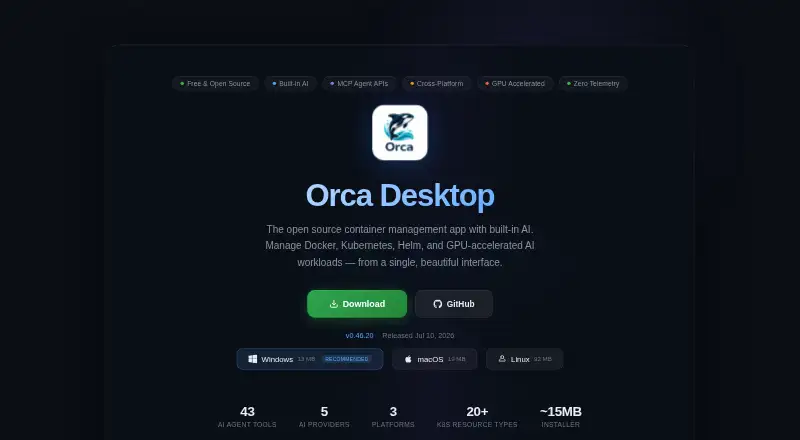
Orca Desktop: A free, open-source workspace for containers, Compose, Kubernetes, images, and hosts. Ranked #2 of 40 in Container Development Environments by our editors (9.2/10); pricing: Free plan; best for open-source all-in-one container workflows.
At a glance
- Editor score9.2 / 10
- PricingFree plan
- Best forOpen-source all-in-one container workflows
- Free planYes
- Paid fromFree
- Local KubernetesYes
- Facts checked22 Sep 2026
Where it wins
- Manages Docker and Podman containers, Compose stacks, and Kubernetes resources
- Includes one-click local k3s, Helm, YAML editing, logs, and port forwarding
- Adds image scanning, resource monitoring, AI providers, and remote host management
Where it doesn't
- Platform setup can involve Docker, Lima, or WSL2 configuration
- Remote host fleet management requires an Orca daemon
- Container resource editing focuses on CPU, memory, and restart-policy settings
Our verdict on Orca Desktop
Orca Desktop is an open-source desktop application for managing Docker and Podman containers, Compose stacks, Kubernetes resources, Helm releases, images, and local or remote hosts. It is aimed at developers and teams that want a single workspace across Linux, macOS, and Windows, with an API and self-hosted options also listed. The free plan and open-source model make it a fit for users who prefer an accessible desktop tool rather than separate utilities for each part of a container workflow.
Its strongest area is breadth within container development. Orca Desktop covers the container lifecycle, live CPU, memory, network, and resource monitoring, plus editing for selected container settings. Compose stacks can be detected, edited, validated, and managed through up, down, and pull workflows. Kubernetes support extends from a one-click local k3s cluster with Traefik ingress to YAML editing, Helm, logs, terminals, scaling, and port forwarding. Image workflows include Docker Hub search, private registry authentication, and Trivy vulnerability scanning, with integrations spanning Docker, Podman, Kubernetes, Docker Hub, GitHub Container Registry, GitLab, and Amazon ECR.
The platform also reaches into AI-assisted development through Claude, GPT, Gemini, Ollama, and OpenAI-compatible providers, alongside an MCP server and OpenAI-compatible agent API. Remote host fleet management is available through an Orca daemon, which adds a management path beyond the local desktop. That breadth suits open-source workflows that combine containers, Compose, Kubernetes, registries, and optional AI tools. It is less suitable for users seeking a narrowly focused container viewer, or for teams that do not want platform-specific environment setup or daemon-based remote management.
Your product? Our editors can test Orca Desktop in depth and publish a review, labelled as paid · from $149/mo →
Orca Desktop pricing
Orca Desktop fact sheet
| Free plan | Yes |
|---|---|
| Paid from | Free |
| Desktop platforms | Windows, macOS, Linux |
| Local Kubernetes | Yes |
| Compose workflows | Yes |
| Cluster mode | Not verified |
| IDE integration | Not verified |
| Resource controls | Yes |
| Deployment | Desktop, Self-hosted |
| Platforms | Windows, macOS, Linux |
| Built for | Solo, Small business, Mid-market, Enterprise (editorial estimate) |
| Integrations | 16 integrations: Docker, Docker Compose, Kubernetes, k3s, Helm, Docker Hub … |
| Pricing | Free plan |
| Website | orca-desktop.com |
| Facts checked | 22 Sep 2026 |
Orca Desktop integrations
Orca Desktop lists 16 integrations on its own site.
- Docker
- Docker Compose
- Kubernetes
- k3s
- Helm
- Docker Hub
- GitHub Container Registry
- GitLab Container Registry
- Amazon ECR
- Ollama
- Claude
- GPT
- Gemini
- MCP
- OpenAI-compatible endpoints
- Podman
Alternatives to Orca Desktop
- Docker DesktopA broad desktop container workspace with Docker Engine, Compose, Kubernetes, and team plans.9.4
- Podman DesktopA free, cross-platform desktop workspace for Podman-centered container and Kubernetes development.9.0
- Container DesktopA free, cross-platform workspace for managing multiple container engines.8.8

See all Orca Desktop alternatives →
Orca Desktop vs the competition
- Orca Desktop vs Docker Desktop
- Orca Desktop vs Podman Desktop
- Orca Desktop vs Container Desktop
- Orca Desktop vs OrbStack
- Orca Desktop vs DevPod
- Orca Desktop vs Garden


Compare Orca Desktop with any tool side by side →
Used Orca Desktop? Be the first to review it
The editor score above is our own research. What this page doesn't have yet is a reader's view — what you used Orca Desktop for, what worked and what didn't. No stars are seeded and no review is paid for; an editor reads every one before it appears.
Write a reviewTwo minutes · verified accounts only · read by an editor before it appears
Featured on iTechGuides

Orca Desktop is listed in our Container Development Environments directory. Add the badge to your site — it links back to this page.
<a href="https://www.itechguides.com/products/orca-desktop/"><img src="https://www.itechguides.com/best/badge/orca-desktop.svg" alt="Featured on iTechGuides" width="230" height="46"></a>
Reviewed by iTechGuides Editors · Editorial team · Updated Oct 2026
Advertiser disclosure: iTechGuides is reader-supported. Vendors can pay for top positions in our rankings and for a place on other products' pages, and we may earn a commission when you click some links. Bought places stand at the number bought; this page and our disclosure say so. Paying vendors may get a fuller, more detailed review from our editors, and that review can change their score. How we rank.
Last updated · How we research and update