OmniSave
OmniSave: A focused open-source tool for synchronizing saves across portable and remote paths. Ranked #24 of 26 in Game Save Managers by our editors (6.8/10); pricing: Open source; best for portable-path synchronization workflows.
At a glance
- Editor score6.8 / 10
- PricingOpen source
- Best forPortable-path synchronization workflows
- Paid fromFree
- Automatic backupYes
- Facts checked20 Sep 2026
Where it wins
- Synchronizes saves before launch and after a game session.
- Supports Windows, macOS compatibility layers, and Android GameHub.
- Uses locking and atomic writes to protect synchronization operations.
Where it doesn't
- Configuration relies on a user-edited INI file.
- Game detection is manual rather than automatic.
- No built-in cloud storage or scheduled backups.
Our verdict on OmniSave
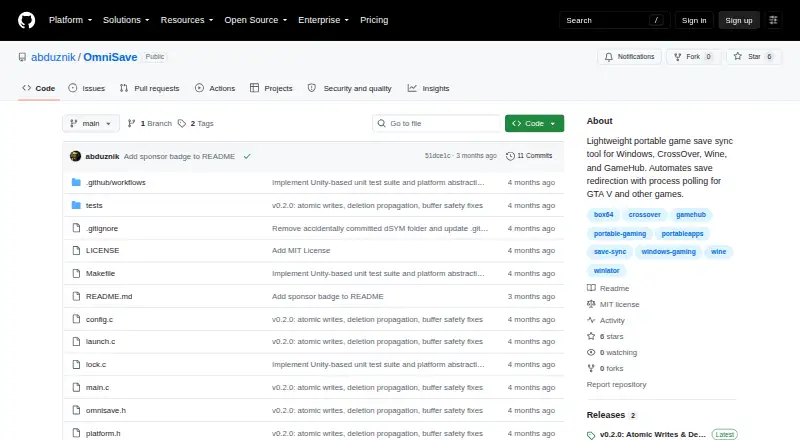
OmniSave is an open-source game-save synchronization tool for players who keep saves in portable or remote folders. It is designed primarily for Windows and environments using Wine, CrossOver, or GameHub, with documented use across Windows, macOS through compatibility layers, and a mobile GameHub environment. The workflow centers on a configured game executable, launch arguments, local save path, and remote backup path.
Its main strength is the pre- and post-session synchronization flow. OmniSave can copy saves from a remote or portable path before launch, poll the game process to detect session completion, and synchronize changes back afterward. Local and remote path resolution supports home and relative-path expansion, while mutex locking helps prevent simultaneous instances. Atomic temporary-file writes add a defined safeguard during file replacement. Automatic restore is part of the category workflow, while game detection remains manual.
OmniSave favors a focused, portable-path workflow over a broader backup platform. Setup requires editing an INI file and specifying the executable, launch arguments, and save locations, so it suits users comfortable managing paths and configuration directly. It does not provide built-in cloud storage or scheduled backups, and native Linux or Steam Deck support is described as a roadmap item rather than current native support. Choose OmniSave when synchronization across configured local and remote paths is the priority; choose an alternative if you need cloud integration, verified version history, scheduled backups, or native Linux support.
Your product? Our editors can test OmniSave in depth and publish a review, labelled as paid · from $149/mo →
OmniSave pricing
OmniSave fact sheet
| Free plan | Not verified |
|---|---|
| Paid from | Free |
| Automatic backup | Yes |
| Cloud synchronization | Not verified |
| Scheduled backups | Not verified |
| Version history | Not verified |
| Game detection | Manual |
| Supported platforms | Multi-platform |
| Restore options | Automatic |
| Deployment | Desktop, Mobile |
| Platforms | Windows, macOS, Android |
| Support | Docs |
| Built for | Solo, Small business (editorial estimate) |
| Pricing | Open source |
| Website | github.com |
| Facts checked | 20 Sep 2026 |
Alternatives to OmniSave
- LudusaviA free, open-source save manager with GUI, CLI, retention, and cloud-sync options.9.4
- Game Save GenieA free, open-source save manager with broad game detection and versioned cloud backups.9.3
- GSBSA capable open-source choice for self-hosted sync, versioning, and recovery.9.2
See all OmniSave alternatives →
Used OmniSave? Be the first to review it
The editor score above is our own research. What this page doesn't have yet is a reader's view — what you used OmniSave for, what worked and what didn't. No stars are seeded and no review is paid for; an editor reads every one before it appears.
Write a reviewTwo minutes · verified accounts only · read by an editor before it appears
Featured on iTechGuides

OmniSave is listed in our Game Save Managers directory. Add the badge to your site — it links back to this page.
<a href="https://www.itechguides.com/products/omnisave/"><img src="https://www.itechguides.com/best/badge/omnisave.svg" alt="Featured on iTechGuides" width="230" height="46"></a>
Reviewed by iTechGuides Editors · Editorial team · Updated Oct 2026
Advertiser disclosure: iTechGuides is reader-supported. Vendors can pay for top positions in our rankings and for a place on other products' pages, and we may earn a commission when you click some links. Bought places stand at the number bought; this page and our disclosure say so. Paying vendors may get a fuller, more detailed review from our editors, and that review can change their score. How we rank.
Last updated · How we research and update