
NTFS Undelete
NTFS Undelete: Windows recovery software for deleted files across FAT and NTFS drives and removable media. Ranked #100 of 129 in Data Recovery Software by our editors (3.0/10); pricing: Paid; best for windows users recovering deleted files from FAT or NTFS.
At a glance
- Editor score3.0 / 10
- PricingPaid
- Best forWindows users recovering deleted files from FAT or NTFS
- Free planNo
- Facts checked19 Sep 2026
Where it wins
- Supports FAT12, FAT16, FAT32, NTFS, and NTFS5 file systems
- DeepScan, SmartScan, file filters, and previews aid recovery workflows
- Works with hard drives, SSDs, USB storage, and camera cards
Where it doesn't
- Limited to Windows
- Paid product with no free plan
- DeepScan targets difficult cases, but recovery outcomes are not guaranteed
Our verdict on NTFS Undelete
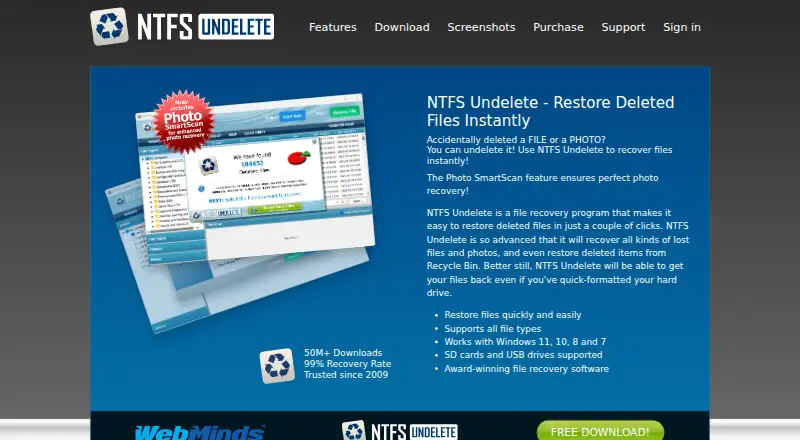
NTFS Undelete is Windows data-recovery software for people trying to restore deleted files from a hard drive, SSD, USB storage, flash drive, or digital camera card. Its file-system support covers FAT12, FAT16, FAT32, NTFS, and NTFS5, and it can recover files removed from the Recycle Bin. That range makes it relevant to Windows users dealing with both internal storage and removable media, including memory cards. It is a focused recovery utility rather than a cross-platform option.
Scanning options address different recovery situations. DeepScan is intended for difficult cases, including quick-formatted or partially overwritten files, while SmartScan focuses on photo recovery. File filters by type, name, path, size, date, and status can narrow results, and previews let users inspect files before recovery. A portable version runs from removable storage, which may suit workflows where installing the software on the affected computer is undesirable. These features make it a practical fit for targeted file retrieval, though the published feature set does not establish that every deleted or overwritten file can be restored.
NTFS Undelete is a paid product with no free plan, so it is best suited to buyers who specifically need Windows recovery across supported FAT and NTFS media rather than a free option. Its platform coverage spans Windows XP through Windows 11, including the listed intermediate Windows releases, but does not extend to other operating systems. Choose it if file previews, photo scanning, filters, and support for removable storage match the recovery task. Look elsewhere if you need software for a non-Windows system or require a free plan before committing.
Your product? Our editors can test NTFS Undelete in depth and publish a review, labelled as paid · from $149/mo →
NTFS Undelete pricing
NTFS Undelete fact sheet
| Free plan | No |
|---|---|
| Paid from | Not verified |
| Recovery sources | IDE/ATA/SCSI hard drives, SSD drives, flash drives, external USB storage devices, digital camera cards, CompactFlash, SmartMedia, MultiMedia, Secure Digital memory cards |
| Operating systems | Windows XP, Windows 2003, Windows Vista, Windows 2008, Windows 7, Windows 8, Windows 10, Windows 11 |
| Free recovery limit | Not verified |
| Memory card recovery | Yes |
| RAID recovery | Not verified |
| Bootable recovery | Not verified |
| File preview | Yes |
| Deployment | Desktop |
| Platforms | Windows |
| Pricing | Paid (source) |
| Website | ntfsundelete.com |
| Facts checked | 19 Sep 2026 |
Alternatives to NTFS Undelete
- R-StudioA broad recovery toolkit for professionals handling disks, RAID, images, and networks.9.3
- TestDiskA capable free choice for partition repair, filesystem recovery, and file undelete.9.1
- RecoveritA broad recovery toolkit with strong media repair and storage-device coverage.9.0


See all NTFS Undelete alternatives →
Used NTFS Undelete? Be the first to review it
The editor score above is our own research. What this page doesn't have yet is a reader's view — what you used NTFS Undelete for, what worked and what didn't. No stars are seeded and no review is paid for; an editor reads every one before it appears.
Write a reviewTwo minutes · verified accounts only · read by an editor before it appears
Featured on iTechGuides

NTFS Undelete is listed in our Data Recovery Software directory. Add the badge to your site — it links back to this page.
<a href="https://www.itechguides.com/products/ntfs-undelete/"><img src="https://www.itechguides.com/best/badge/ntfs-undelete.svg" alt="Featured on iTechGuides" width="230" height="46"></a>
Reviewed by iTechGuides Editors · Editorial team · Updated Oct 2026
Advertiser disclosure: iTechGuides is reader-supported. Vendors can pay for top positions in our rankings and for a place on other products' pages, and we may earn a commission when you click some links. Bought places stand at the number bought; this page and our disclosure say so. Paying vendors may get a fuller, more detailed review from our editors, and that review can change their score. How we rank.
Last updated · How we research and update