
NexusPad
NexusPad: A specialized Windows mapper for per-game profiles, mouse-to-stick input, and recoil controls. Ranked #25 of 27 in Game Controller Mapper Software by our editors (5.5/10); pricing: Paid; best for windows users needing specialized aim and recoil profiles.
At a glance
- Editor score5.5 / 10
- PricingPaid
- Best forWindows users needing specialized aim and recoil profiles
- Free planNo
- Virtual-controller outputYes
- Facts checked20 Sep 2026
Where it wins
- Maps keyboard and mouse input to Xbox 360 or DualShock 4 output
- Supports per-game switching, profile imports, exports, and hotkeys
- Includes aim-assist modes, ADS controls, and per-weapon recoil profiles
Where it doesn't
- Runs on Windows 10 and Windows 11 64-bit systems only
- No free plan is listed
- May violate some online games' terms of service
Our verdict on NexusPad
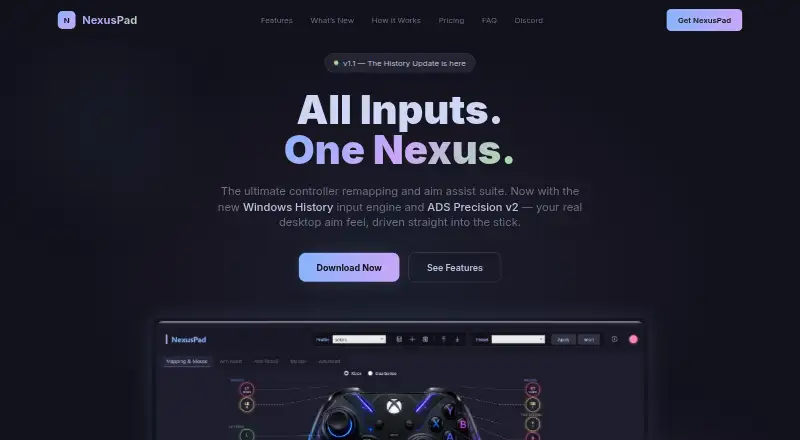
NexusPad is paid Windows software for PC gamers who want to map keyboard and mouse input to a virtual controller. It supports full controller-button remapping, mouse-to-stick input, aim-assist modes, ADS precision controls, macros, and game-specific presets. The software can emulate Xbox 360 and DualShock 4 controllers through ViGEm, so a physical controller is not required. Its focus is competitive PC play, especially for users who want detailed aim, recoil, and weapon configuration rather than a basic button-remapping utility.
Its strongest area is profile control. NexusPad supports profile import and export, hotkey switching, and automatic switching per game, allowing different configurations for different titles. Mouse-to-stick input includes three input engines, while per-weapon anti-recoil profiles and built-in Call of Duty presets target users who need specialized settings. The available plans—Day Pass, Weekly, Monthly, and Lifetime—include the product's feature set, with auto-updates and Discord support. Monthly and Lifetime add priority Discord support, while Lifetime includes features forever and lifetime updates.
NexusPad is a focused choice for Windows users who want virtual-controller output and granular aim or recoil profiles. It is less suitable for users seeking a free mapper, broader platform coverage, or a general-purpose tool without competitive-game features. The vendor states support for Windows 10 and Windows 11 64-bit systems. It also warns that NexusPad may violate some online games' terms of service, with use at the customer's own risk. Buyers should therefore consider each game's rules before using macros, aim-assist modes, or anti-recoil settings.
Your product? Our editors can test NexusPad in depth and publish a review, labelled as paid · from $149/mo →
NexusPad pricing
All 4 NexusPad plans and prices →
NexusPad fact sheet
| Free plan | No |
|---|---|
| Paid from | Not verified |
| Keyboard/mouse output | Yes |
| Virtual-controller output | Yes |
| Profile switching | Yes |
| Per-app profiles | Yes |
| Platform support | Windows |
| Maximum profiles | Not verified |
| Controller input types | Xbox, DualSense, DualShock 4 |
| Deployment | Desktop |
| Platforms | Windows |
| Support | Community |
| Built for | Solo, Small business (editorial estimate) |
| Pricing | Paid (source) |
| Website | nexus-pad.com |
| Facts checked | 20 Sep 2026 |
Alternatives to NexusPad
- Steam InputA free, mature mapper for per-game controller profiles across Windows, macOS, and Linux.8.6
- DS4WindowsA capable free mapper for PlayStation controllers, limited to Windows PCs.7.9
- JoyShockMapperA free, gyro-focused mapper for Windows and Linux with deep binding controls.7.8

See all NexusPad alternatives →
Used NexusPad? Be the first to review it
The editor score above is our own research. What this page doesn't have yet is a reader's view — what you used NexusPad for, what worked and what didn't. No stars are seeded and no review is paid for; an editor reads every one before it appears.
Write a reviewTwo minutes · verified accounts only · read by an editor before it appears
Featured on iTechGuides

NexusPad is listed in our Game Controller Mapper Software directory. Add the badge to your site — it links back to this page.
<a href="https://www.itechguides.com/products/nexuspad/"><img src="https://www.itechguides.com/best/badge/nexuspad.svg" alt="Featured on iTechGuides" width="230" height="46"></a>
Reviewed by iTechGuides Editors · Editorial team · Updated Oct 2026
Advertiser disclosure: iTechGuides is reader-supported. Vendors can pay for top positions in our rankings and for a place on other products' pages, and we may earn a commission when you click some links. Bought places stand at the number bought; this page and our disclosure say so. Paying vendors may get a fuller, more detailed review from our editors, and that review can change their score. How we rank.
Last updated · How we research and update