
MySamantha
MySamantha: A connected personal workspace with useful breadth, but Pro value depends on your needs. Ranked #39 of 55 in AI Personal Assistants by our editors (5.2/10); pricing: Free plan; best for personal organization with connected-service actions.
At a glance
- Editor score5.2 / 10
- PricingFree plan
- Best forPersonal organization with connected-service actions
- Free planYes
- Paid from$99 one-time
- Action automationYes
- Facts checked24 Sep 2026
Where it wins
- Combines notes, tasks, journaling, email and calendar in one workspace
- Assistant can search, summarize, draft and act across connected services
- Automations can run on schedules or events
Where it doesn't
- Lifetime Pro costs $99 upfront, with AI usage handled separately
- Lifetime Basic is described as free once earned through referrals
- The breadth may be more than needed for users seeking a focused assistant
Our verdict on MySamantha
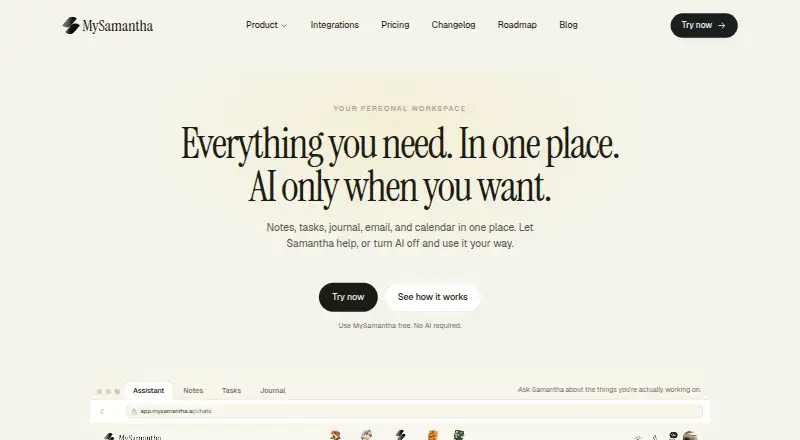
MySamantha brings notes, tasks, journaling, email, calendar and meeting capture into a personal productivity workspace, with an optional AI assistant called Samantha. It is aimed at people who want to organize their own work and take actions across connected services from one place. Notes support tables, backlinks, version history and web clipping; tasks include subtasks, priorities, reminders and recurrence. The assistant can search and summarize workspace content, draft material, and act on connected services. MySamantha can also be used without AI, which makes it relevant to people who want a central organizer without making an assistant the core of the workflow.
Its service connections are a notable part of the proposition: listed integrations include Gmail, Outlook, Slack, Google Calendar, Google Meet, Microsoft Teams, Zoom, Google Drive, Google Docs, OneDrive, Sheets, Notion, GitHub, Linear and HubSpot. Calendar features include creating, moving and updating events and checking conflicts. Email actions include reading threads, composing, replying, forwarding and handling attachments. Meeting tools cover recording, transcription with speaker identification, summaries and follow-up tasks. Scheduled and event-triggered automations extend this beyond a notes-and-tasks workspace. Choose MySamantha if those connected-service actions matter; a simpler organizer may be a better fit if they do not.
The published plans show Lifetime Basic at no cost once earned through referrals, with unlimited notes, tasks and journal, one email and calendar account, core integrations, and a Chrome extension and web clipper. Lifetime Pro is a $99 one-time purchase, adding more captures and workflows, unlimited YouDos, automatic backup and priority support. AI usage is handled separately, so the one-time price should not be read as including unlimited AI. Web, Chrome extension, iOS and Android are listed platforms, while email is the stated support channel. The price and referral condition make the value less straightforward than an immediately available free tier; consider alternatives if you need predictable AI costs or do not expect to use its range of personal-work tools.
Your product? Our editors can test MySamantha in depth and publish a review, labelled as paid · from $149/mo →
MySamantha pricing
All 2 MySamantha plans and prices →
MySamantha fact sheet
| Free plan | Yes |
|---|---|
| Paid from | $99 one-time |
| Action automation | Yes |
| Calendar management | Yes |
| Task management | Yes |
| Email management | Yes |
| Connected apps | 1 apps |
| Mobile apps | Yes |
| Browser extension | Yes |
| Deployment | Cloud, Browser extension, Mobile |
| Platforms | Web, Chrome extension, iOS, Android |
| Support | |
| Built for | Solo (editorial estimate) |
| Integrations | 18 integrations: Gmail, Outlook, Slack, Google Calendar, Google Meet, Microsoft Teams … See all → |
| Pricing | Free plan (source) |
| Website | mysamantha.ai |
| Facts checked | 24 Sep 2026 |
MySamantha integrations
MySamantha lists 18 integrations on its own site.
- Gmail
- Outlook
- Slack
- Google Calendar
- Google Meet
- Microsoft Teams
- Zoom
- Google Drive
- Google Docs
- Microsoft OneDrive
- Google Sheets
- Notion
- GitHub
- Linear
- HubSpot
- Cloudflare
- Eventbrite
- Maps
See all MySamantha integrations →
Alternatives to MySamantha
- ChatGPTA broad AI assistant spanning chat, research, creation, analysis, and teamwork.9.4
- GeminiA broad AI assistant for users who want Google services, research, and creation tools together.9.3
- Microsoft CopilotA broad Copilot experience with especially strong Microsoft 365 integration.9.1



See all MySamantha alternatives →
Used MySamantha? Be the first to review it
The editor score above is our own research. What this page doesn't have yet is a reader's view — what you used MySamantha for, what worked and what didn't. No stars are seeded and no review is paid for; an editor reads every one before it appears.
Write a reviewTwo minutes · verified accounts only · read by an editor before it appears
Featured on iTechGuides

MySamantha is listed in our AI Personal Assistants directory. Add the badge to your site — it links back to this page.
<a href="https://www.itechguides.com/products/mysamantha/"><img src="https://www.itechguides.com/best/badge/mysamantha.svg" alt="Featured on iTechGuides" width="230" height="46"></a>
Reviewed by iTechGuides Editors · Editorial team · Updated Oct 2026
Advertiser disclosure: iTechGuides is reader-supported. Vendors can pay for top positions in our rankings and for a place on other products' pages, and we may earn a commission when you click some links. Bought places stand at the number bought; this page and our disclosure say so. Paying vendors may get a fuller, more detailed review from our editors, and that review can change their score. How we rank.
Last updated · How we research and update