Mount-DiskImage
Mount-DiskImage: A focused, free Windows cmdlet for scripted ISO and virtual-disk mounting. Ranked #15 of 24 in Virtual Drive Software by our editors (7.7/10); pricing: Free; best for windows administrators scripting ISO and VHD mounts.
At a glance
- Editor score7.7 / 10
- PricingFree
- Best forWindows administrators scripting ISO and VHD mounts
- Paid fromNone
- Facts checked20 Sep 2026
Where it wins
- Supports ISO, VHD, VHDX, and VHDSet image types
- Offers read-only or read-write access for VHD images
- Supports CIM sessions, background jobs, and pass-through output
Where it doesn't
- Windows-only support limits cross-platform use
- Focused on mounting rather than broader virtual-drive management
- Requires PowerShell and Windows storage administration workflows
Our verdict on Mount-DiskImage
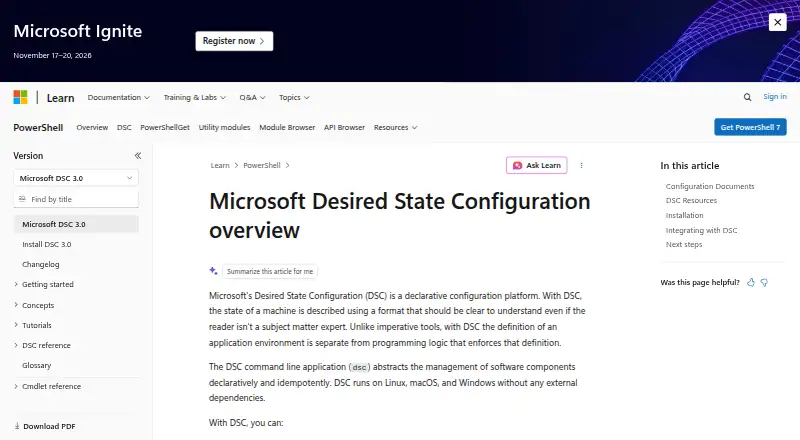
Mount-DiskImage is a Windows Storage PowerShell cmdlet for mounting previously created virtual hard-disk and ISO image files. It exposes mounted images as normal disks and is aimed at Windows administrators who script storage operations, manage disk images, or automate repeatable mounting workflows. The cmdlet accepts image paths or CIM disk-image objects, making it suitable for both direct command use and administration scripts.
The product is free and delivered as part of Windows' Storage module rather than as a separately priced application. Its platform fit is correspondingly narrow: it supports Windows and integrates with PowerShell-based administration. Remote CIM sessions, background jobs, throttling, confirmation prompts, and pass-through disk-image output extend its usefulness for scripted and remotely managed workflows. Administrators can also omit drive-letter assignment when a mounted image needs to be handled without the usual drive-letter mapping.
Its standout capability is focused image mounting across ISO, VHD, VHDX, and VHDSet storage types. VHD images can be mounted with read-only or read-write access, while ISO mounting covers optical-image workflows. That focus makes Mount-DiskImage a practical choice for Windows teams that already work in PowerShell and need automation-oriented access to disk images. Organizations seeking a cross-platform virtual-drive application or a broader graphical management suite should choose a different type of tool.
Mount-DiskImage pricing
Mount-DiskImage fact sheet
| Free plan | Not verified |
|---|---|
| Paid from | None |
| Image formats | ISO, VHD, VHDX, VHDSet |
| Max virtual drives | Not verified |
| Virtual disk files | Yes |
| Optical image mounting | Yes |
| Write images | Not verified |
| Supported platforms | Windows |
| Persistent mounts | Not verified |
| Deployment | Desktop |
| Platforms | Windows |
| Support | Docs |
| Pricing | Free |
| Website | learn.microsoft.com |
| Facts checked | 20 Sep 2026 |
Alternatives to Mount-DiskImage
- DAEMON Tools LiteA broad Windows virtual-drive toolkit with a capable free license and four-device limit.9.3
- WinCDEmuA flexible, free Windows utility for mounting and managing optical-image files.9.2
- ImDiskA free, flexible Windows driver for mounting images and creating virtual disks.9.1

See all Mount-DiskImage alternatives →
Used Mount-DiskImage? Be the first to review it
The editor score above is our own research. What this page doesn't have yet is a reader's view — what you used Mount-DiskImage for, what worked and what didn't. No stars are seeded and no review is paid for; an editor reads every one before it appears.
Write a reviewTwo minutes · verified accounts only · read by an editor before it appears
Featured on iTechGuides

Mount-DiskImage is listed in our Virtual Drive Software directory. Add the badge to your site — it links back to this page.
<a href="https://www.itechguides.com/products/mount-diskimage/"><img src="https://www.itechguides.com/best/badge/mount-diskimage.svg" alt="Featured on iTechGuides" width="230" height="46"></a>
Reviewed by iTechGuides Editors · Editorial team · Updated Oct 2026
Advertiser disclosure: iTechGuides is reader-supported. Vendors can pay for top positions in our rankings and for a place on other products' pages, and we may earn a commission when you click some links. How we rank.
Last updated · How we research and update