MiniTool Drive Copy
MiniTool Drive Copy: A focused free option for copying Windows disks or partitions between supported storage devices. Ranked #26 of 26 in Disk Cloning Software by our editors (5.2/10); pricing: Free plan; best for free basic Windows disk and partition copying.
At a glance
- Editor score5.2 / 10
- PricingFree plan
- Best forFree basic Windows disk and partition copying
- Free planYes
- Paid fromFree
- Supported operating systemsWindows
- Facts checked22 Sep 2026
Where it wins
- Copies entire disks or individual partitions
- Offers three partition-sizing approaches during copying
- Supports HDDs, SSDs, USB, SD, and CF storage
Where it doesn't
- Restricted to Windows computers
- Intended for private, non-commercial home use
- Focused feature set without scheduled cloning or bootable recovery
Our verdict on MiniTool Drive Copy
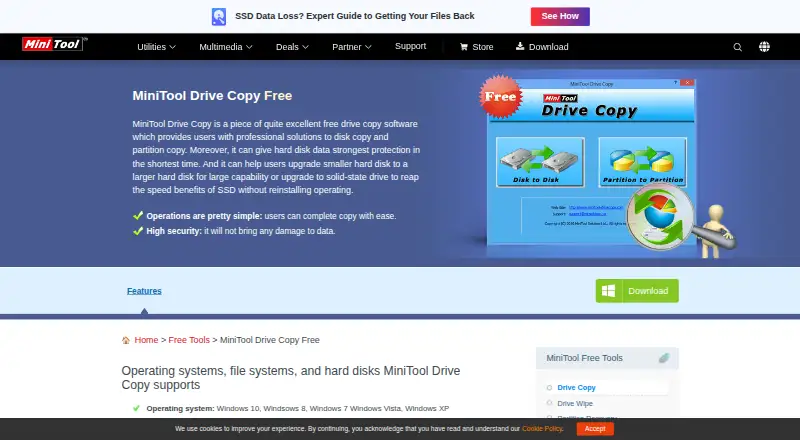
MiniTool Drive Copy is a free Windows utility for copying entire disks or individual partitions. It is aimed at private, non-commercial home-computer use, particularly when migrating data from a smaller hard drive to a larger drive or SSD. The core workflow covers disk-to-disk copying and partition-to-partition copying, giving users a focused way to move existing storage contents rather than a broad system-management suite.
Its strongest area is partition-copy flexibility. Users can fit partitions to the entire target disk, preserve the existing partition layout without resizing, or copy partitions using minimum size. The utility also supports resizing or moving partitions during partition copying, which gives more control when the source and target drives differ in capacity. Storage support spans HDDs, SSDs, USB flash drives, SD cards, and CF cards, so it fits several common migration scenarios. According to the published product information, the appeal is practical control over disk and partition transfers rather than a wide ecosystem of connected services.
The main trade-off is its narrow scope and usage boundary. MiniTool Drive Copy is presented as an older Windows utility for home users, not as a general-purpose, cross-platform cloning product. Its published feature set centers on direct copying and partition handling, while scheduled cloning and bootable recovery are outside the stated focus. Choose it if you need a free Windows tool for basic disk or partition migration and can work within private, non-commercial use. Consider another product if you need broader operating-system coverage, recurring clone jobs, or recovery-oriented workflows.
Your product? Our editors can test MiniTool Drive Copy in depth and publish a review, labelled as paid · from $149/mo →
MiniTool Drive Copy pricing
MiniTool Drive Copy fact sheet
| Free plan | Yes |
|---|---|
| Paid from | Free |
| Supported operating systems | Windows |
| Clone scope | Both |
| Bootable media | Not verified |
| Resize during cloning | Yes |
| Sector cloning modes | Not verified |
| Scheduled cloning | Not verified |
| Dissimilar-hardware restore | Not verified |
| Deployment | Desktop |
| Platforms | Windows |
| Support | Email, Phone |
| Built for | Solo (editorial estimate) |
| Pricing | Free plan |
| Website | minitool.com |
| Facts checked | 22 Sep 2026 |
Alternatives to MiniTool Drive Copy
- ClonezillaA capable free choice for cross-platform cloning, recovery, and multi-device deployment.9.4
- RescuezillaA free, cross-platform recovery toolkit for imaging, cloning, and restoring computers.9.2
- FOG ProjectA strong free choice for network-based imaging, with more deployment focus than general-purpose cloning.9.0


See all MiniTool Drive Copy alternatives →
Used MiniTool Drive Copy? Be the first to review it
The editor score above is our own research. What this page doesn't have yet is a reader's view — what you used MiniTool Drive Copy for, what worked and what didn't. No stars are seeded and no review is paid for; an editor reads every one before it appears.
Write a reviewTwo minutes · verified accounts only · read by an editor before it appears
Featured on iTechGuides

MiniTool Drive Copy is listed in our Disk Cloning Software directory. Add the badge to your site — it links back to this page.
<a href="https://www.itechguides.com/products/minitool-drive-copy/"><img src="https://www.itechguides.com/best/badge/minitool-drive-copy.svg" alt="Featured on iTechGuides" width="230" height="46"></a>
Reviewed by iTechGuides Editors · Editorial team · Updated Sep 2026
Advertiser disclosure: iTechGuides is reader-supported. Vendors can pay for top positions in our rankings and for a place on other products' pages, and we may earn a commission when you click some links. Bought places stand at the number bought; this page and our disclosure say so. Paying vendors may get a fuller, more detailed review from our editors, and that review can change their score. How we rank.
Last updated · How we research and update