
MHDD
MHDD: A free, technically demanding tool for low-level drive diagnostics and repair operations. Ranked #20 of 26 in Disk Diagnostic Software by our editors (6.8/10); pricing: Free plan; best for free low-level DOS drive testing.
At a glance
- Editor score6.8 / 10
- PricingFree plan
- Best forFree low-level DOS drive testing
- Free planYes
- Paid fromFree
- PlatformDos
- Facts checked20 Sep 2026
Where it wins
- Surface scans include configurable options and bad-block handling
- Supports SMART viewing, sector read/write, and low-level erasure
- Works with ATA, SATA, and SCSI drives using bootable media
Where it doesn't
- Its DOS-centered workflow demands technical experience
- Several operations can erase data or alter drive configuration
- USB access may require DOS USB-to-SCSI drivers
Our verdict on MHDD
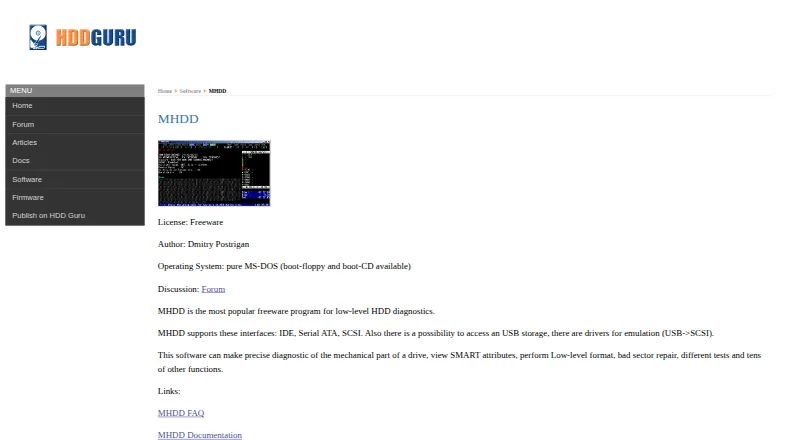
MHDD is a freeware disk diagnostic utility for low-level hard-drive work. It is aimed at technically experienced users who need more than a basic health check, including surface and sector scanning, SMART attribute viewing, sector transfers, bad-block handling, erasure, and drive-capacity configuration. The vendor describes operation through MS-DOS or DR-DOS, with bootable floppy and CD images, while the product listing identifies Linux as its stated platform. That combination makes the boot environment an important consideration before adoption.
Its strongest area is the depth of its low-level drive access. Scan options can be configured, bad blocks can be detected and handled through erase-delay processing and remapping, and sectors can be read to files or written from files. MHDD also supports low-level drive erasure and HPA configuration, giving experienced operators direct control over diagnostic and maintenance tasks. Interface coverage includes ATA, SATA, and SCSI drives. USB access is possible through DOS USB-to-SCSI drivers, adding flexibility but also another technical dependency.
MHDD is free, and the published offering includes bootable images rather than a conventional paid-plan structure. The trade-off is usability: the DOS-centered workflow, boot-media requirement, and potentially destructive operations make it a poor fit for users seeking a guided desktop diagnostic tool. Choose MHDD when low-level scanning, sector operations, SMART inspection, or bad-block handling are priorities and the operator understands drive-level risks. An alternative is more appropriate for routine checks, simpler onboarding, or a clearly defined modern operating-system workflow.
Your product? Our editors can test MHDD in depth and publish a review, labelled as paid · from $149/mo →
MHDD pricing
MHDD fact sheet
| Free plan | Yes |
|---|---|
| Paid from | Free |
| Bad-sector scan | Yes |
| Read/write testing | Yes |
| Surface scan | Yes |
| Bootable media | Yes |
| Platform | Dos |
| SMART tests | Yes |
| Maximum drive size | 8.38861e+06 TB |
| Deployment | Desktop |
| Platforms | Linux |
| Support | Docs, Community |
| Built for | Solo, Small business (editorial estimate) |
| Pricing | Free plan |
| Website | hddguru.com |
| Facts checked | 20 Sep 2026 |
Alternatives to MHDD
- DiskMasterA free, open-source diagnostic suite for monitoring and investigating drive health.9.4
- Hard Disk SentinelA broad disk-monitoring suite with free access and paid features for deeper diagnostics and management.9.2
- smartmontoolsA free, cross-platform SMART toolkit for technically proficient administrators.9.0

Used MHDD? Be the first to review it
The editor score above is our own research. What this page doesn't have yet is a reader's view — what you used MHDD for, what worked and what didn't. No stars are seeded and no review is paid for; an editor reads every one before it appears.
Write a reviewTwo minutes · verified accounts only · read by an editor before it appears
Featured on iTechGuides

MHDD is listed in our Disk Diagnostic Software directory. Add the badge to your site — it links back to this page.
<a href="https://www.itechguides.com/products/mhdd/"><img src="https://www.itechguides.com/best/badge/mhdd.svg" alt="Featured on iTechGuides" width="230" height="46"></a>
Reviewed by iTechGuides Editors · Editorial team · Updated Oct 2026
Advertiser disclosure: iTechGuides is reader-supported. Vendors can pay for top positions in our rankings and for a place on other products' pages, and we may earn a commission when you click some links. Bought places stand at the number bought; this page and our disclosure say so. Paying vendors may get a fuller, more detailed review from our editors, and that review can change their score. How we rank.
Last updated · How we research and update