DiskMaster
DiskMaster: A capable open-source desktop monitor for detailed local drive diagnostics. Ranked #4 of 30 in Disk Health Monitoring Software by our editors (8.8/10); pricing: Free plan; best for open-source desktop diagnostics.
At a glance
- Editor score8.8 / 10
- PricingFree plan
- Best forOpen-source desktop diagnostics
- Free planYes
- Paid fromFree
- SMART monitoringYes
- Facts checked23 Sep 2026
Where it wins
- Explained health scores combine SMART readings with itemized deductions.
- Tracks temperature, wear, and counters in SQLite history with charts.
- Supports scans, alerts, exports, and command-line health exit codes.
Where it doesn't
- Remote monitoring is not documented for broader fleet deployments.
- SMART reading is limited to supported SATA and USB drives.
- Repair tools are optional and can modify sectors or filesystems.
Our verdict on DiskMaster
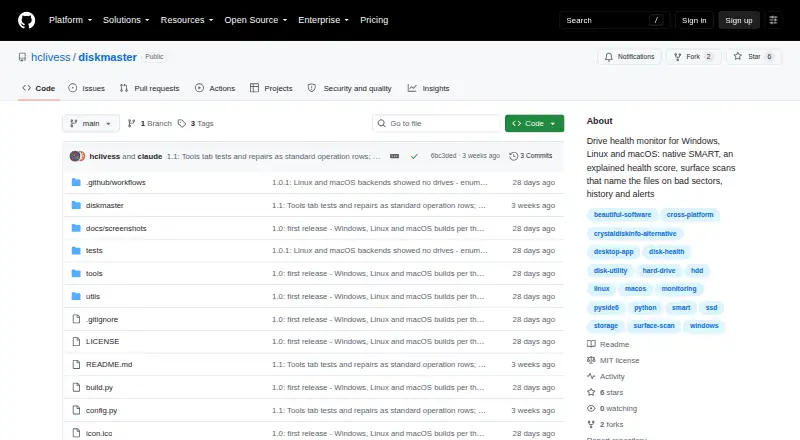
DiskMaster is an open-source desktop application for monitoring drive health across Windows, Linux, and macOS. It is aimed at users who want detailed local diagnostics rather than a remote fleet console. The application reads SMART data for supported SATA and USB drives, calculates a health score with itemized deductions, runs drive self-tests, and records self-test logs. It also tracks temperature, wear, and other counters over time, giving desktop users a way to inspect both current status and historical changes.
Its diagnostic depth is the main reason to consider it. Read-only surface scans and bad-sector mapping can identify problematic areas, while file identification for unreadable sectors adds useful context. The monitoring layer includes desktop, email, webhook, and command alerts, with integrations for Slack, Discord, ntfy, and SMTP email. Reports can be exported as HTML, JSON, CSV, or text, and command-line reports provide health-based exit codes for scripted workflows. These features make DiskMaster a practical fit for technically oriented users who need evidence they can review, export, or process outside the application.
DiskMaster is free and open source, with releases available across its three supported desktop platforms. Optional sector, filesystem, sanitize, and zero-fill repair tools broaden its scope beyond observation, but they also make it important to distinguish read-only diagnostics from actions that may alter a drive. The product is a strong choice for local monitoring, health history, self-tests, and alerting. Organizations that need centralized remote monitoring across multiple systems should choose a product built around that deployment model instead.
Your product? Our editors can test DiskMaster in depth and publish a review, labelled as paid · from $149/mo →
DiskMaster pricing
DiskMaster fact sheet
| Free plan | Yes |
|---|---|
| Paid from | Free |
| SMART monitoring | Yes |
| SSD wear tracking | Yes |
| Temperature alerts | Yes |
| Failure warnings | Yes |
| Remote monitoring | No |
| Drives on cheapest plan | Not verified |
| Supported platforms | Windows, Linux, macOS |
| Deployment | Desktop |
| Platforms | Windows, macOS, Linux |
| Built for | Solo, Small business (editorial estimate) |
| Integrations | 3 integrations: Slack, Discord, ntfy |
| Pricing | Free plan |
| Website | github.com |
| Facts checked | 23 Sep 2026 |
DiskMaster integrations
DiskMaster lists 3 integrations on its own site.
- Slack
- Discord
- ntfy
Alternatives to DiskMaster
- Hard Disk SentinelA full-featured Windows and Linux monitor with diagnostics, alerts, backups, and remote management.9.4
- smartmontoolsBroad, free disk-health monitoring for technical users comfortable with command-line tools.9.2
- DA Drive AnalyzerA low-cost, cross-platform drive monitor with AI predictions and NAS coverage.9.0


See all DiskMaster alternatives →
DiskMaster vs the competition
- DiskMaster vs Hard Disk Sentinel
- DiskMaster vs smartmontools
- DiskMaster vs DA Drive Analyzer
- DiskMaster vs Scrutiny
- DiskMaster vs HDD Health Monitor
- DiskMaster vs CrystalDiskInfo

Compare DiskMaster with any tool side by side →
Also Ranked In
DiskMaster is ranked in 2 of our directories.
Used DiskMaster? Be the first to review it
The editor score above is our own research. What this page doesn't have yet is a reader's view — what you used DiskMaster for, what worked and what didn't. No stars are seeded and no review is paid for; an editor reads every one before it appears.
Write a reviewTwo minutes · verified accounts only · read by an editor before it appears
Featured on iTechGuides

DiskMaster is listed in our Disk Health Monitoring Software directory. Add the badge to your site — it links back to this page.
<a href="https://www.itechguides.com/products/diskmaster/"><img src="https://www.itechguides.com/best/badge/diskmaster.svg" alt="Featured on iTechGuides" width="230" height="46"></a>
Reviewed by iTechGuides Editors · Editorial team · Updated Oct 2026
Advertiser disclosure: iTechGuides is reader-supported. Vendors can pay for top positions in our rankings and for a place on other products' pages, and we may earn a commission when you click some links. Bought places stand at the number bought; this page and our disclosure say so. Paying vendors may get a fuller, more detailed review from our editors, and that review can change their score. How we rank.
Last updated · How we research and update