memwatch
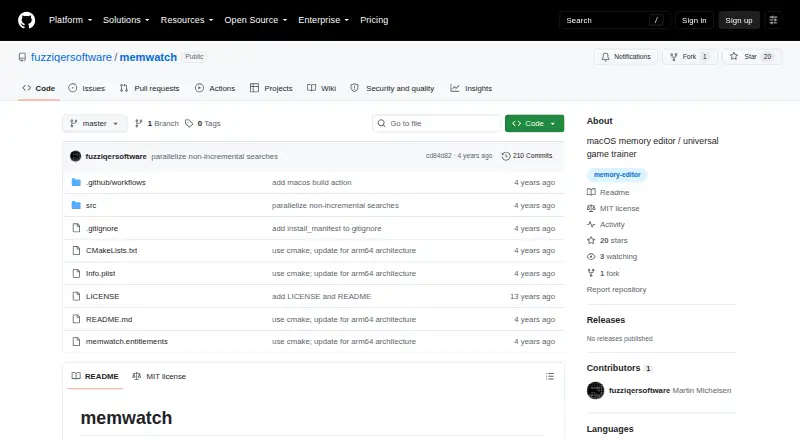
memwatch: A focused open-source tool for searching and changing process memory on macOS. Ranked #21 of 23 in Game Memory Editors by our editors (7.1/10); pricing: Open source; best for mac users wanting command-line memory control.
At a glance
- Editor score7.1 / 10
- PricingOpen source
- Best forMac users wanting command-line memory control
- Paid fromFree
- Operating systemsMacos
- Facts checked21 Sep 2026
Where it wins
- Searches and filters process memory using varied data formats
- Reads, writes, monitors, freezes, and unfreezes memory regions
- Lists, dumps, and changes virtual-memory regions
Where it doesn't
- Supports macOS only
- Requires building from source and macOS development dependencies
- No verified pointer scanning, debugger, or scripting support
Our verdict on memwatch
memwatch is an open-source command-line memory editor for macOS. It attaches to a running process, searches memory for values and patterns, and narrows results through changed-value comparisons. Users can read, write, monitor, freeze, and unfreeze memory regions, making it suited to game training and some general-purpose software debugging workflows. Its command-line design is aimed at Mac users who want direct control over process memory rather than a graphical editor.
The standout feature is the breadth of memory operations available from the command line. memwatch supports integer, floating-point, string, endian-reversed, and wildcard data formats, giving searches more flexibility than a tool limited to one value type. Repeated commands can monitor memory values, while repeated writes can freeze regions at selected values. The tool also lists, dumps, and changes virtual-memory regions and can pause, resume, or signal the target process. These capabilities make it a focused memory-control utility rather than a general development environment.
Setup requires building memwatch from source and installing the macOS development dependencies described in its repository documentation. That favors users comfortable with command-line installation and process-level debugging concepts. The published positioning does not include verified pointer scanning, debugger, or scripting features, so users who need those capabilities should choose a broader memory editor or debugger. Choose memwatch for open-source, macOS-based memory searching and manipulation through commands; avoid it if you need cross-platform support, a graphical workflow, or a fuller debugging toolkit.
Your product? Our editors can test memwatch in depth and publish a review, labelled as paid · from $149/mo →
memwatch pricing
memwatch fact sheet
| Free plan | Not verified |
|---|---|
| Paid from | Free |
| Operating systems | Macos |
| Pointer scanning | Not verified |
| Debugger | Not verified |
| Scripting support | Not verified |
| Architecture support | Not verified |
| Open source | Yes |
| Deployment | Desktop |
| Platforms | macOS |
| Support | Docs |
| Built for | Solo, Small business (editorial estimate) |
| Pricing | Open source |
| Website | github.com |
| Facts checked | 21 Sep 2026 |
Alternatives to memwatch
- Cheat EngineA broad, free desktop editor for inspecting and modifying single-player games.9.4
- MemDBGA broad open-source toolkit for memory scanning, debugging, patching, and trainer work.9.2
- Cheat Engine LinuxAn open-source Linux toolkit for memory editing, debugging, scripting, and Cheat Engine compatibility.9.1

See all memwatch alternatives →
Used memwatch? Be the first to review it
The editor score above is our own research. What this page doesn't have yet is a reader's view — what you used memwatch for, what worked and what didn't. No stars are seeded and no review is paid for; an editor reads every one before it appears.
Write a reviewTwo minutes · verified accounts only · read by an editor before it appears
Featured on iTechGuides

memwatch is listed in our Game Memory Editors directory. Add the badge to your site — it links back to this page.
<a href="https://www.itechguides.com/products/memwatch/"><img src="https://www.itechguides.com/best/badge/memwatch.svg" alt="Featured on iTechGuides" width="230" height="46"></a>
Reviewed by iTechGuides Editors · Editorial team · Updated Oct 2026
Advertiser disclosure: iTechGuides is reader-supported. Vendors can pay for top positions in our rankings and for a place on other products' pages, and we may earn a commission when you click some links. Bought places stand at the number bought; this page and our disclosure say so. Paying vendors may get a fuller, more detailed review from our editors, and that review can change their score. How we rank.
Last updated · How we research and update