MemPad
MemPad: A free, focused Windows outliner for hierarchical plain-text notes. Ranked #24 of 30 in Outliner Software by our editors (6.6/10); pricing: Free plan; best for windows users wanting a basic free notes tree.
At a glance
- Editor score6.6 / 10
- PricingFree plan
- Best forWindows users wanting a basic free notes tree
- Free planYes
- Paid fromFree
- Facts checked20 Sep 2026
Where it wins
- Free hierarchical index for organizing plain-text notes
- Search, replace, links, diary views, import and export
- Backups, autosave, encryption and page locking options
Where it doesn't
- Available only for Windows
- Focused on plain-text notes rather than rich editing
- Less outlining depth than higher-ranked options
Our verdict on MemPad
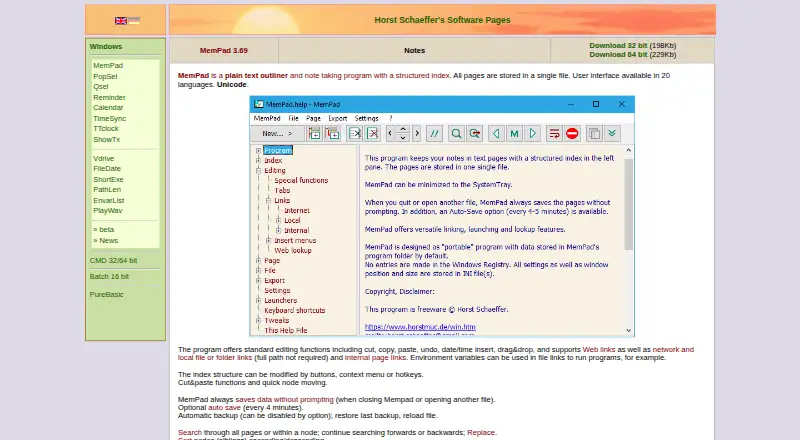
MemPad is a lightweight Windows desktop application for organizing plain-text notes in a hierarchical index. It is suited to users who want a basic, local note tree rather than a broad workspace for documents, collaboration or rich formatting. Notes support Unicode and are stored in a single file, while the portable design and 32-bit and 64-bit versions give Windows users flexible ways to run the software. The Freeware plan includes plain-text outlining, a structured index and password-protected encryption.
Its strongest feature set is the practical range around the outline itself. Search and replace can work across pages or nodes, and links can point to web locations, local files, folders or internal pages. A diary structure organizes entries by year, month and day, while import and export support pages, nodes and complete files. Automatic backups and optional autosave help protect ongoing notes, and page locking and read-only file handling provide additional control over editing.
MemPad’s narrow focus is also its main boundary. The Windows-only platform limits it to users working in that environment, and the plain-text approach will not suit people looking for rich document editing. Its outlining capabilities are less deep than those of higher-ranked options, so users with advanced outlining needs should consider a more specialized alternative. Choose MemPad for a free, portable and focused notes tree with useful local organization and protection features; choose elsewhere when cross-platform access, richer formatting or deeper outlining is central.
Your product? Our editors can test MemPad in depth and publish a review, labelled as paid · from $149/mo →
MemPad pricing
All 1 MemPad plans and prices →
MemPad fact sheet
| Free plan | Yes |
|---|---|
| Paid from | Free |
| App platforms | Not verified |
| Export formats | Not verified |
| Offline access | Not verified |
| Markdown support | Not verified |
| Real-time collaboration | Not verified |
| Backlinks | Not verified |
| Navigation modes | Not verified |
| Deployment | Desktop |
| Platforms | Windows |
| Support | Docs |
| Built for | Solo, Small business (editorial estimate) |
| Pricing | Free plan (source) |
| Website | horstmuc.de |
| Facts checked | 20 Sep 2026 |
Alternatives to MemPad
- CheckvistA flexible collaborative outliner with unlimited nesting, offline access, and low-cost task features.9.4
- DynalistDeep outlining and cross-platform access make Dynalist a strong fit for power users.9.2
- WorkflowyA mature outliner with broad platform coverage, sharing, exports, integrations, and AI tools.9.0



Also Ranked In
MemPad is ranked in 2 of our directories.
Used MemPad? Be the first to review it
The editor score above is our own research. What this page doesn't have yet is a reader's view — what you used MemPad for, what worked and what didn't. No stars are seeded and no review is paid for; an editor reads every one before it appears.
Write a reviewTwo minutes · verified accounts only · read by an editor before it appears
Featured on iTechGuides

MemPad is listed in our Outliner Software directory. Add the badge to your site — it links back to this page.
<a href="https://www.itechguides.com/products/mempad/"><img src="https://www.itechguides.com/best/badge/mempad.svg" alt="Featured on iTechGuides" width="230" height="46"></a>
Reviewed by iTechGuides Editors · Editorial team · Updated Oct 2026
Advertiser disclosure: iTechGuides is reader-supported. Vendors can pay for top positions in our rankings and for a place on other products' pages, and we may earn a commission when you click some links. Bought places stand at the number bought; this page and our disclosure say so. Paying vendors may get a fuller, more detailed review from our editors, and that review can change their score. How we rank.
Last updated · How we research and update