MajUSB Bootable Creator
MajUSB Bootable Creator: A focused Linux utility for writing Linux and customized Windows USB media. Ranked #32 of 38 in Bootable USB Software by our editors (5.6/10); pricing: Open source; best for linux users creating customized Windows USBs.
At a glance
- Editor score5.6 / 10
- PricingOpen source
- Best forLinux users creating customized Windows USBs
- Paid fromFree
- Facts checked21 Sep 2026
Where it wins
- Creates Windows USB media with FAT32 and NTFS partitions
- Offers TPM, Secure Boot, and RAM bypass flags
- Includes read-back verification, logging, and dependency guidance
Where it doesn't
- Native Windows support is not implemented
- Boot-time persistent storage is non-functional
- ISO downloads are local-only
Our verdict on MajUSB Bootable Creator
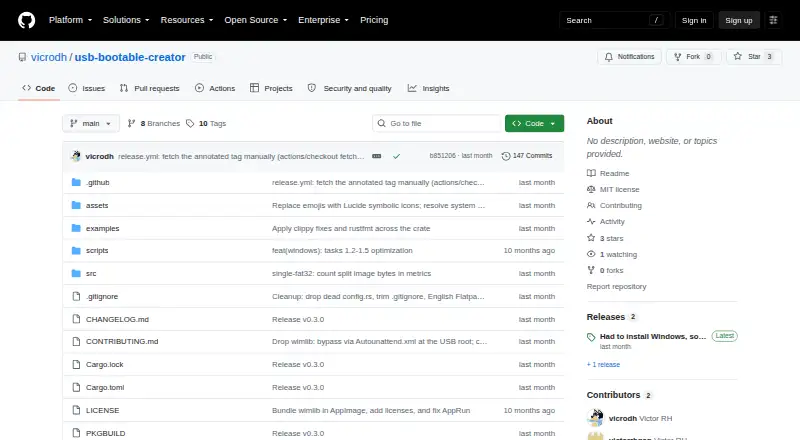
MajUSB Bootable Creator is an open-source Linux desktop application for writing Linux and Windows ISO images to USB drives. It is intended for Linux users who need a graphical workflow for standard Linux media or customized Windows installation media. The GTK4 interface provides progress tracking, logging, automatic USB device-list refresh, and dependency checks with distribution-specific installation instructions.
Its strongest area is Windows media creation from Linux. MajUSB can create FAT32 and NTFS partitions and provides flags for bypassing Windows TPM, Secure Boot, and RAM requirements. Optional direct dd writing supports a more direct image-writing workflow, while post-write read-back verification adds a way to check the written media. Installation options include AppImage, DEB, source, and Arch-related packages, giving Linux users several ways to install the application.
MajUSB remains focused on local ISO writing rather than serving as a full USB provisioning environment. Image downloads are local-only, so users need the ISO separately. Persistent-storage detection and partition creation exist, but boot-time persistence is documented as non-functional. Native Windows support is planned but not implemented, which makes MajUSB a fit for Linux users managing both Linux images and Windows media, but not for users who need a Windows-native creator or working persistent Linux sessions.
Your product? Our editors can test MajUSB Bootable Creator in depth and publish a review, labelled as paid · from $149/mo →
MajUSB Bootable Creator pricing
MajUSB Bootable Creator fact sheet
| Free plan | Not verified |
|---|---|
| Paid from | Free |
| Windows app | No |
| macOS app | Not verified |
| Linux app | Yes |
| Multiboot support | Not verified |
| Persistent storage | No |
| Image downloads | Local_only |
| Partition schemes | Not verified |
| Deployment | Desktop |
| Platforms | Linux |
| Support | Community, Docs |
| Built for | Solo, Small business (editorial estimate) |
| Pricing | Open source |
| Website | github.com |
| Facts checked | 21 Sep 2026 |
Alternatives to MajUSB Bootable Creator
- VentoyA free, open-source multiboot USB utility with broad image and boot-mode support.9.4
- Universal USB InstallerA free, broad USB creation toolkit with multiboot, persistence, downloads, and QEMU testing.9.2
- Easy2BootA free, format-flexible choice for advanced multiboot USB and hard-disk setups.9.1


See all MajUSB Bootable Creator alternatives →
Used MajUSB Bootable Creator? Be the first to review it
The editor score above is our own research. What this page doesn't have yet is a reader's view — what you used MajUSB Bootable Creator for, what worked and what didn't. No stars are seeded and no review is paid for; an editor reads every one before it appears.
Write a reviewTwo minutes · verified accounts only · read by an editor before it appears
Featured on iTechGuides

MajUSB Bootable Creator is listed in our Bootable USB Software directory. Add the badge to your site — it links back to this page.
<a href="https://www.itechguides.com/products/majusb-bootable-creator/"><img src="https://www.itechguides.com/best/badge/majusb-bootable-creator.svg" alt="Featured on iTechGuides" width="230" height="46"></a>
Reviewed by iTechGuides Editors · Editorial team · Updated Oct 2026
Advertiser disclosure: iTechGuides is reader-supported. Vendors can pay for top positions in our rankings and for a place on other products' pages, and we may earn a commission when you click some links. Bought places stand at the number bought; this page and our disclosure say so. Paying vendors may get a fuller, more detailed review from our editors, and that review can change their score. How we rank.
Last updated · How we research and update