
Magic Utilities
Magic Utilities: A focused Windows utility suite for configuring Apple keyboards, mice, and trackpads. Ranked #76 of 105 in Keyboard and Mouse Customization Software by our editors (5.3/10); pricing: 28-day trial; best for windows users with Apple input devices.
At a glance
- Editor score5.3 / 10
- Pricing28-day trial
- Best forWindows users with Apple input devices
- Free planNo
- Paid from$13.99/device/yr
- Supported operating systemsWindows
- Facts checked22 Sep 2026
Where it wins
- Supports Apple keyboards, mice, and trackpads on Windows 10 and 11
- Adds mappings, gestures, sensitivity controls, and battery alerts
- Works over Bluetooth, wired USB, and Apple Boot Camp
Where it doesn't
- Licenses are priced per device and billed annually
- Supports Windows only
- Licenses are locked to device serial numbers
Our verdict on Magic Utilities
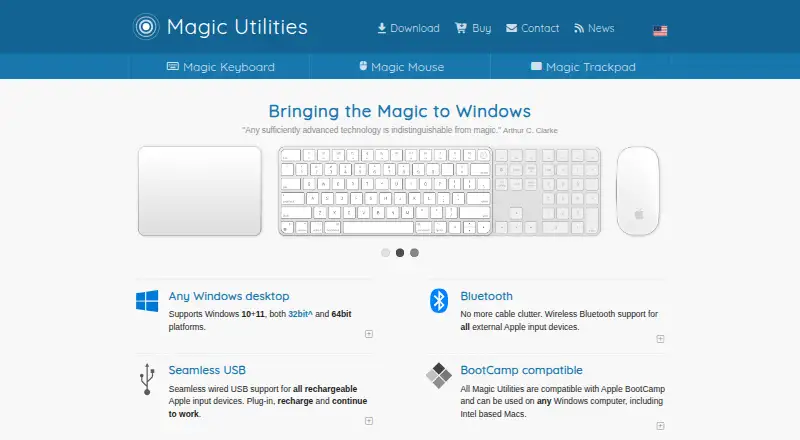
Magic Utilities is a Windows desktop software suite for individuals and small teams using Apple Magic Keyboard, Magic Mouse, or Magic Trackpad with Windows computers. It supports Windows 10 and 11, Bluetooth connections, wired USB for rechargeable devices, and Apple Boot Camp. The feature set covers keyboard media, volume, and modifier-key mappings; Magic Mouse scrolling and horizontal swipe navigation; Magic Trackpad gestures and custom button areas; adjustable scroll and swipe sensitivity; battery alerts; and high-DPI interfaces.
Pricing is organized around per-device annual licenses. The Base license costs $19.99 USD per device per year and covers a Magic Keyboard, Magic Mouse, or Magic Trackpad. The Two-year license lowers the annual price to $17.19 per device per year. The Multi-buy license costs $16.79 per device per year for each additional license bought together, while the Multi-buy two-year license combines both discounts at $13.99 per device per year. A 28-day free trial is available, and the licenses expire after one or two years without automatic renewal.
Magic Utilities is a good fit when Apple input hardware is central to a Windows setup and built-in controls do not provide enough mapping, gesture, sensitivity, or battery options. Its narrow Windows focus keeps the product relevant for that use case, but it is less suitable for mixed operating-system environments or buyers who want one license to cover multiple devices. Licenses are locked to device serial numbers, so purchasing decisions should account for the specific hardware being configured. Support is provided through email and documentation, with desktop deployment aimed at solo users and small teams.
Your product? Our editors can test Magic Utilities in depth and publish a review, labelled as paid · from $149/mo →
Magic Utilities pricing
All 4 Magic Utilities plans and prices →
Magic Utilities fact sheet
| Free plan | No |
|---|---|
| Paid from | $13.99/device/yr |
| Supported operating systems | Windows |
| Macro support | Not verified |
| Per-app profiles | Not verified |
| Onboard device memory | Not verified |
| Polling rate control | Not verified |
| Sensitivity controls | Yes |
| Profile slots | Not verified |
| Free trial | 28 days |
| Deployment | Desktop |
| Platforms | Windows |
| Support | Email, Docs |
| Built for | Solo, Small business (editorial estimate) |
| Pricing | 28-day trial (source) |
| Website | magicutilities.net |
| Facts checked | 22 Sep 2026 |
Alternatives to Magic Utilities
- Razer SynapseA free Razer-focused hub for remapping, macros, profiles, and Chroma lighting.9.2
- Logi Options+A broad free toolkit for remapping, automation, profiles, and multi-computer control.9.1
- Logitech G HUBA free desktop suite for Logitech G lighting, profiles, and device settings.9.0



See all Magic Utilities alternatives →
Used Magic Utilities? Be the first to review it
The editor score above is our own research. What this page doesn't have yet is a reader's view — what you used Magic Utilities for, what worked and what didn't. No stars are seeded and no review is paid for; an editor reads every one before it appears.
Write a reviewTwo minutes · verified accounts only · read by an editor before it appears
Featured on iTechGuides

Magic Utilities is listed in our Keyboard and Mouse Customization Software directory. Add the badge to your site — it links back to this page.
<a href="https://www.itechguides.com/products/magic-utilities/"><img src="https://www.itechguides.com/best/badge/magic-utilities.svg" alt="Featured on iTechGuides" width="230" height="46"></a>
Reviewed by iTechGuides Editors · Editorial team · Updated Oct 2026
Advertiser disclosure: iTechGuides is reader-supported. Vendors can pay for top positions in our rankings and for a place on other products' pages, and we may earn a commission when you click some links. Bought places stand at the number bought; this page and our disclosure say so. Paying vendors may get a fuller, more detailed review from our editors, and that review can change their score. How we rank.
Last updated · How we research and update