
MadMapper
MadMapper: A capable desktop mapper with broad live-control support and flexible licensing. Ranked #4 of 24 in Projection Mapping Software by our editors (8.2/10); pricing: Free plan · paid from €39/mo; best for artists and installations needing affordable mapping.
At a glance
- Editor score8.2 / 10
- PricingFree plan · paid from €39/mo
- Best forArtists and installations needing affordable mapping
- Free planYes
- 3D mappingYes
- Founded2010 · Paris, France and Geneva, Switzerland; development team in Brussels, Belgium
- Facts checked20 Sep 2026
Where it wins
- Supports multiple projectors, 3D surfaces, masking, warping, and blending
- Connects with MIDI, OSC, Art-Net, DMX, sACN, NDI, and more
- Includes timelines, cues, generative materials, and live video inputs
Where it doesn't
- The free edition adds watermarks and recurring DMX channel blackouts
- The Artist license applies to the current 6.xx version
- Desktop editions are limited to Windows and macOS
Our verdict on MadMapper
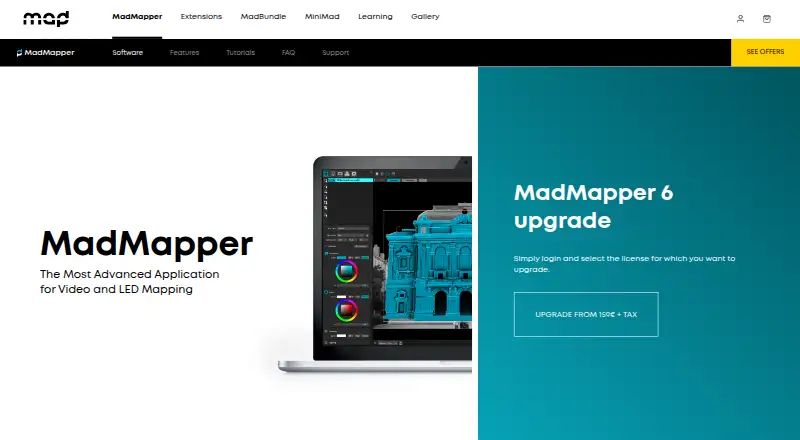
MadMapper is desktop software for projection mapping, LED mapping, and stage visuals. It is aimed at visual artists, scenographers, stage designers, VJs, installations, and live shows that need to shape video across physical or LED surfaces. Its workflow covers multiple projector outputs, Bezier masking, mesh warping, soft-edge blending, 3D object surfaces, camera calibration, live inputs, timeline animation, cue scheduling, audio, and generative materials with GLSL editing. Editions are available for Windows and macOS.
Pricing gives buyers three clear paths. Try MadMapper is free and includes all MadMapper features, but video output and input are watermarked, DMX channels black out every 30 seconds, and Space Scanner resolution is limited to one quarter. The Temporary installation plan costs €39 per month and includes all features with a temporary license compatible with current and future MadMapper versions. Artist costs €399 as a one-time purchase and includes all features, a perpetual license for the current 6.xx version, and one extra seat for a spare computer. Prices are displayed in euros excluding tax; rental licenses apply to one computer, while perpetual licenses start with two seats.
Its main advantage is the breadth of control and connectivity in a single mapping workflow. MIDI, OSC, Art-Net, sACN, DMX, Spout, Syphon, NDI, Ableton Live Link, Blackmagic, and USB cameras support live production setups, while generative materials and cue scheduling extend beyond basic playback. MadMapper suits artists and installations that need affordable mapping with advanced input and control options. Buyers needing a professional free edition, a perpetual license beyond the current 6.xx version, or a non-desktop edition should look elsewhere.
MadMapper pricing
All 3 MadMapper plans and prices →
MadMapper fact sheet
| Free plan | Yes |
|---|---|
| Paid from | Not verified |
| Workflow | Hybrid |
| Projection outputs | Not verified |
| Edge blending | Yes |
| Live video input | Yes |
| 3D mapping | Yes |
| Control protocols | Advanced |
| Deployment | Desktop |
| Platforms | Windows, macOS |
| Support | Tickets, Community |
| Built for | Solo, Small business, Mid-market, Enterprise (editorial estimate) |
| Integrations | 11 integrations: MIDI, OSC, Art-Net, sACN, Spout, Syphon … |
| Pricing | Free plan · paid from €39/mo (source) |
| Website | madmapper.com |
| Facts checked | 20 Sep 2026 |
MadMapper integrations
MadMapper lists 11 integrations on its own site.
- MIDI
- OSC
- Art-Net
- sACN
- Spout
- Syphon
- NDI
- Ableton Live Link
- Blackmagic
- USB cameras
- DMX
Alternatives to MadMapper
- VIOSOA broad professional toolkit for planning, aligning, controlling, and playing projection shows.9.8
- Christie MystiqueA focused choice for automating alignment and projection mapping across Christie systems.8.8
- ScreenberryA broad, control-focused choice for projection mapping and live visual shows.8.5



See all MadMapper alternatives →
MadMapper vs the competition
- MadMapper vs VIOSO
- MadMapper vs Christie Mystique
- MadMapper vs Screenberry
- MadMapper vs Ghost Arcade
- MadMapper vs Millumin
- MadMapper vs LightAct



Compare MadMapper with any tool side by side →
Used MadMapper? Be the first to review it
The editor score above is our own research. What this page doesn't have yet is a reader's view — what you used MadMapper for, what worked and what didn't. No stars are seeded and no review is paid for; an editor reads every one before it appears.
Write a reviewTwo minutes · verified accounts only · read by an editor before it appears
Featured on iTechGuides

MadMapper is listed in our Projection Mapping Software directory. Add the badge to your site — it links back to this page.
<a href="https://www.itechguides.com/products/madmapper/"><img src="https://www.itechguides.com/best/badge/madmapper.svg" alt="Featured on iTechGuides" width="230" height="46"></a>
Guides on projection mapping software
- 8 Best Projection Mapping Software Tools in 2026 (Paid & Free)Aug 2026
- Projection Mapping Software: 9 Best to Use in 2025 [Fresh List]Aug 2026
Reviewed by iTechGuides Editors · Editorial team · Updated Sep 2026
Advertiser disclosure: iTechGuides is reader-supported. We may earn a commission when you click some links. How we rank.
Last updated · How we research and update