Loop Email
Loop Email: A flexible shared inbox for Gmail and Outlook teams, with automation and native apps. Ranked #29 of 30 in Shared Inbox Software by our editors (5.9/10); pricing: 14-day trial; best for teams needing Gmail and Outlook with native apps.
At a glance
- Editor score5.9 / 10
- Pricing14-day trial
- Best forTeams needing Gmail and Outlook with native apps
- Free planNo
- Shared mailboxes3
- Facts checked19 Sep 2026
Where it wins
- Connects Gmail, Outlook, Exchange, IMAP, and Office 365
- Includes assignment, collision detection, SLAs, and workflow rules
- Supports web, Windows, macOS, iOS, and Android apps
Where it doesn't
- No permanent free plan
- Starter supports up to 3 shared inboxes
- Enterprise is needed for custom reports and custom migration
Our verdict on Loop Email
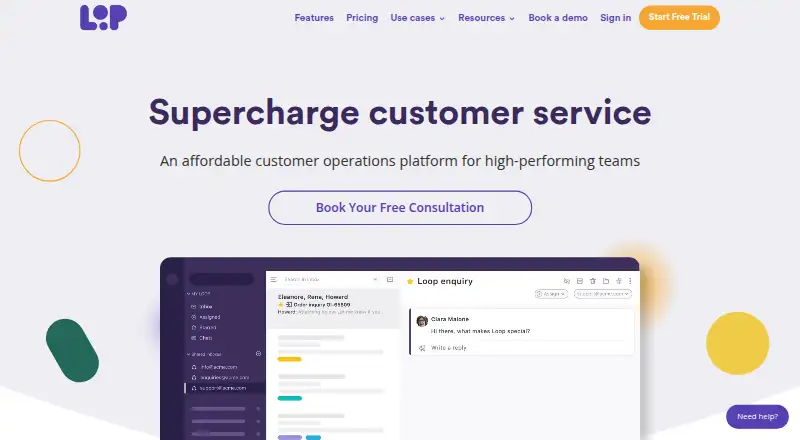
Loop Email is a shared inbox and team email platform for businesses managing customer and internal communications collaboratively. It connects existing Gmail, Outlook, Exchange, IMAP, and Office 365 accounts, then adds shared inboxes, email assignment and ownership, private side chats, collision detection, team channels, direct messages, templated responses, SLA notifications, and productivity reporting. It is available on the web, Windows, macOS, iOS, and Android, making it suitable for teams that need shared email access across desktop and mobile.
Loop Email offers three paid plans and a 14-day free trial, with no permanent free plan. Starter includes up to 3 shared inboxes, email channels, email reports, and in-app support. Pro raises the allowance to up to 10 shared inboxes and adds automated workflow rules while retaining email channels, email reports, and in-app support. Enterprise supports 10+ shared inboxes with additional inbox add-ons and adds automated workflow rules, custom reports, dedicated support, and custom migration. The plan structure separates core shared inbox work from larger deployments and more tailored support.
Loop Email falls short for teams seeking a permanent free option or a smaller shared inbox setup beyond Starter's limit. Custom reports, dedicated support, and custom migration are reserved for Enterprise, while Pro is required for automated workflow rules. Teams that need assignment, collision detection, SLAs, and reporting across Gmail and Outlook will find a focused fit. Teams prioritizing a free plan, simpler email collaboration, or different tier limits should choose an alternative.
Your product? Our editors can test Loop Email in depth and publish a review, labelled as paid · from $149/mo →
Loop Email pricing
All 3 Loop Email plans and prices →
Loop Email fact sheet
| Free plan | No |
|---|---|
| Paid from | Not verified |
| Shared mailboxes | 3 |
| Internal comments | Yes |
| Collision detection | Yes |
| Assignment automation | Yes |
| Mail platforms | Gmail and outlook |
| Mobile apps | Yes |
| Free trial | 14 days |
| Deployment | Cloud, Desktop, Mobile |
| Platforms | Web, Windows, macOS, iOS, Android |
| Integrations | 5 integrations: Gmail, Outlook, Exchange, IMAP, Office 365 |
| Pricing | 14-day trial (source) |
| Website | intheloop.io |
| Facts checked | 19 Sep 2026 |
Loop Email integrations
Loop Email lists 5 integrations on its own site.
- Gmail
- Outlook
- Exchange
- IMAP
- Office 365
Alternatives to Loop Email
- FrontA full-service support workspace with shared inboxes, ticketing, and omnichannel tools.9.4
- HiverHiver combines collaborative email, ticketing and helpdesk features, with a 7-day trial and paid tiers.9.2
- Help ScoutA free-to-paid support platform with strong collaboration, automation, and help-center depth.9.1



See all Loop Email alternatives →
Used Loop Email? Be the first to review it
The editor score above is our own research. What this page doesn't have yet is a reader's view — what you used Loop Email for, what worked and what didn't. No stars are seeded and no review is paid for; an editor reads every one before it appears.
Write a reviewTwo minutes · verified accounts only · read by an editor before it appears
Featured on iTechGuides

Loop Email is listed in our Shared Inbox Software directory. Add the badge to your site — it links back to this page.
<a href="https://www.itechguides.com/products/loop-email/"><img src="https://www.itechguides.com/best/badge/loop-email.svg" alt="Featured on iTechGuides" width="230" height="46"></a>
Reviewed by iTechGuides Editors · Editorial team · Updated Sep 2026
Advertiser disclosure: iTechGuides is reader-supported. Vendors can pay for top positions in our rankings and for a place on other products' pages, and we may earn a commission when you click some links. Bought places stand at the number bought; this page and our disclosure say so. Paying vendors may get a fuller, more detailed review from our editors, and that review can change their score. How we rank.
Last updated · How we research and update