
LockPass
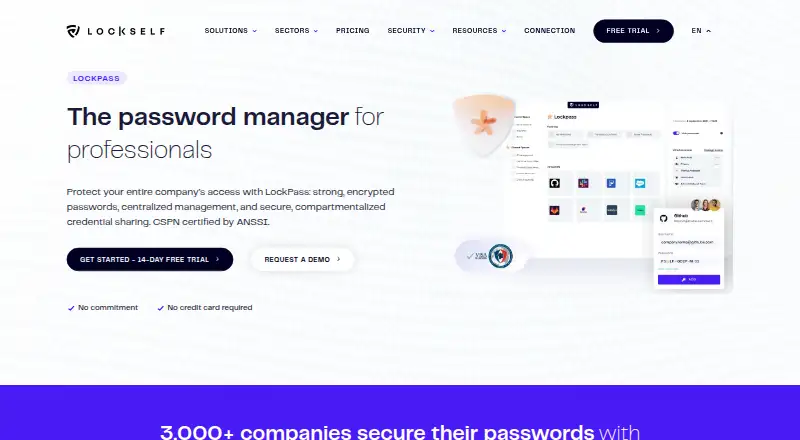
LockPass: A business-focused password manager with cloud and on-premises deployment options. Ranked #30 of 90 in Password Managers by our editors (6.1/10); pricing: 14-day trial; best for organizations needing on-premises deployment.
At a glance
- Editor score6.1 / 10
- Pricing14-day trial
- Best forOrganizations needing on-premises deployment
- Free planNo
- Facts checked16 Sep 2026
Where it wins
- On-premises deployment with user training included
- Audit logs, monitoring, and SIEM/SOC event forwarding
- Directory synchronization, policies, TOTP, and granular access controls
Where it doesn't
- No free plan is available
- Premium has a 25-user minimum
- On Premises has a 50-user minimum
Our verdict on LockPass
LockPass is a business password manager for organizations that need centralized control over credentials. It provides personal password spaces for individual use and shared spaces for team access, alongside password generation, bulk import, browser access, and two-click application access. Its audience includes institutions, small businesses, enterprises, and technical teams that need administrative oversight across web, desktop, mobile, and browser-extension environments.
The paid plans cover three deployment models. Starter provides shared cloud hosting in France, online support, ISO 27001 and HDS certifications, and a two-user minimum. Premium adds dedicated cloud hosting in France, ISO 27001, TISAX, and HDS certifications, with SecNumCloud hosting possible. It also supports SSO, API, and directory-group integration, subject to the plan's deployment options. On Premises runs on the customer's own servers, includes user training, and has a 50-user minimum. Each plan includes 100% of the features, while the deployment model, hosting arrangement, certifications, and minimum user count vary.
LockPass is particularly suited to teams that need directory-connected administration and operational visibility. Active Directory, Microsoft Entra ID, SSO, API, SMTP, SIEM/SOC, and Syslog integrations support identity, messaging, and monitoring workflows. Password policies, granular access controls, audit logs, TOTP management, and centralized user administration give security and IT teams control over shared credentials. Organizations that require customer-hosted infrastructure should consider On Premises; those comfortable with hosted environments can choose Starter or Premium based on hosting and integration needs. Smaller users seeking a free personal password manager are less aligned with its paid, business-oriented structure.
Questions about LockPass
Is there a free trial of LockPass? Yes: a 14-day free trial.
What does LockPass run on? Web, Windows, macOS, Linux, iOS, Android and Chrome extension. It runs in the cloud, as a desktop app, as a mobile app and as a browser extension.
What does LockPass integrate with? 7 integrations, including Active Directory, Microsoft Entra ID, SSO, API and SMTP.
Your product? Our editors can test LockPass in depth and publish a review, labelled as paid · from $149/mo →
LockPass pricing
All 3 LockPass plans and prices →
LockPass fact sheet
| Free plan | No |
|---|---|
| Paid from | Not verified |
| Passkey support | Not verified |
| Secure sharing | Yes |
| Business admin controls | Yes |
| Supported platforms | web, windows, macos, linux, ios, android, chrome_extension |
| Family plan | Not verified |
| Passwordless account login | Not verified |
| Free trial | 14 days |
| Deployment | Cloud, Desktop, Mobile, Browser extension |
| Platforms | Web, Windows, macOS, Linux, iOS, Android, Chrome extension |
| Integrations | 7 integrations: Active Directory, Microsoft Entra ID, SSO, API, SMTP, SIEM/SOC … |
| Pricing | 14-day trial (source) |
| Website | lockself.com |
| Facts checked | 16 Sep 2026 |
LockPass integrations
LockPass lists 7 integrations on its own site.
- Active Directory
- Microsoft Entra ID
- SSO
- API
- SMTP
- SIEM/SOC
- Syslog
Alternatives to LockPass
- Proton PassA broad free password manager with passkeys, sharing, and apps across major platforms.9.4
- 1PasswordBroad vault, passkey, sharing, and administration features, with no free plan.9.2
- NordPassA broad password manager with a capable free plan and clear business tiers.9.0


See all LockPass alternatives →
Used LockPass? Be the first to review it
The editor score above is our own research. What this page doesn't have yet is a reader's view — what you used LockPass for, what worked and what didn't. No stars are seeded and no review is paid for; an editor reads every one before it appears.
Write a reviewTwo minutes · verified accounts only · read by an editor before it appears
Featured on iTechGuides

LockPass is listed in our Password Managers directory. Add the badge to your site — it links back to this page.
<a href="https://www.itechguides.com/products/lockpass/"><img src="https://www.itechguides.com/best/badge/lockpass.svg" alt="Featured on iTechGuides" width="230" height="46"></a>
Reviewed by iTechGuides Editors · Editorial team · Updated Nov 2026
Advertiser disclosure: iTechGuides is reader-supported. Vendors can pay for top positions in our rankings and for a place on other products' pages, and we may earn a commission when you click some links. Bought places stand at the number bought; this page and our disclosure say so. Paying vendors may get a fuller, more detailed review from our editors, and that review can change their score. How we rank.
Last updated · How we research and update