Little Argyll GUI
Little Argyll GUI: A $5 GUI for ArgyllCMS calibration and profiling across Windows, macOS, and Linux. Ranked #16 of 24 in Display Calibration Software by our editors (6.8/10); pricing: Open source; best for low-cost GUI for ArgyllCMS workflows.
At a glance
- Editor score6.8 / 10
- PricingOpen source
- Best forLow-cost GUI for ArgyllCMS workflows
- Paid from$5 one-time
- ICC profile exportYes
- Facts checked20 Sep 2026
Where it wins
- Supports display, printer, camera, and scanner workflows
- Saves parameters and generated command lines for reuse
- Runs across Windows, macOS, and Linux
Where it doesn't
- Requires ArgyllCMS separately
- Also requires a Python 3 and GTK 3 environment
- Calibration depth depends on ArgyllCMS command-line tools
Our verdict on Little Argyll GUI
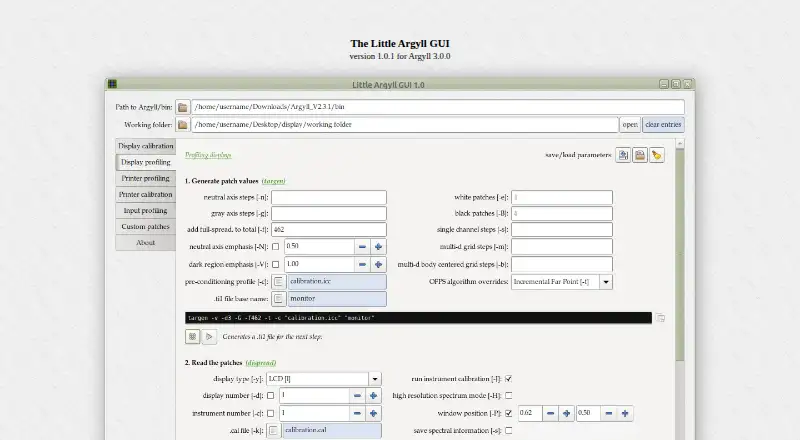
Little Argyll GUI is an open-source desktop graphical front end for ArgyllCMS. It is designed for people who want a graphical way to generate and run ArgyllCMS commands for display calibration, display profiling, printer profiling, camera profiling, and scanner profiling. It also supports ICC display-profile creation through ArgyllCMS, with workflows for custom spectrum files and color-patch sets. Windows, macOS, and Linux are supported.
Pricing is straightforward: the product has a requested one-time payment of $5 for the download. That amount is described as a requested payment rather than a mandatory license charge. The software is distributed as a Python 3 script with a GTK 3 interface, while ArgyllCMS is a separate dependency. This makes the product a low-cost GUI layer rather than a self-contained calibration suite. Saved parameter sets and generated command lines can reduce repeated configuration work, and links to relevant ArgyllCMS documentation are included.
Its main strength is breadth within the ArgyllCMS workflow: the interface covers displays, printers, cameras, and scanners instead of focusing only on monitor calibration. The published specifications also include ICC profile export, LUT calibration, multi-monitor support, and HDR support. However, the GUI does not replace the underlying command-line system, and its calibration depth depends on ArgyllCMS. Choose Little Argyll GUI if you want a cross-platform graphical interface around ArgyllCMS at a requested $5 payment. Choose a different tool if you need a standalone application without separate software and environment dependencies.
Your product? Our editors can test Little Argyll GUI in depth and publish a review, labelled as paid · from $149/mo →
Little Argyll GUI pricing
All 1 Little Argyll GUI plans and prices →
Little Argyll GUI fact sheet
| Free plan | Not verified |
|---|---|
| Paid from | $5 one-time |
| ICC profile export | Yes |
| LUT calibration | Yes |
| Multi-monitor calibration | Yes |
| HDR calibration | Yes |
| Monitor limit | Not verified |
| Supported platforms | Windows, macOS, Linux |
| Deployment | Desktop |
| Platforms | Windows, macOS, Linux |
| Support | Docs |
| Built for | Solo, Small business (editorial estimate) |
| Integrations | 1 integrations: ArgyllCMS |
| Pricing | Open source (source) |
| Website | russellcottrell.com |
| Facts checked | 20 Sep 2026 |
Little Argyll GUI integrations
Little Argyll GUI lists 1 integrations on its own site.
- ArgyllCMS
Alternatives to Little Argyll GUI
- X-Rite i1ProfilerA deep X-Rite workflow suite for precise display calibration, profiling, and QA.9.2
- EIZO ColorNavigator 7A capable free choice for hardware LUT calibration on compatible EIZO ColorEdge displays.8.9
- Datacolor SpyderSpyder builds custom display profiles across modern monitors, but requires a compatible sensor.8.7

See all Little Argyll GUI alternatives →
Used Little Argyll GUI? Be the first to review it
The editor score above is our own research. What this page doesn't have yet is a reader's view — what you used Little Argyll GUI for, what worked and what didn't. No stars are seeded and no review is paid for; an editor reads every one before it appears.
Write a reviewTwo minutes · verified accounts only · read by an editor before it appears
Featured on iTechGuides

Little Argyll GUI is listed in our Display Calibration Software directory. Add the badge to your site — it links back to this page.
<a href="https://www.itechguides.com/products/little-argyll-gui/"><img src="https://www.itechguides.com/best/badge/little-argyll-gui.svg" alt="Featured on iTechGuides" width="230" height="46"></a>
Reviewed by iTechGuides Editors · Editorial team · Updated Oct 2026
Advertiser disclosure: iTechGuides is reader-supported. Vendors can pay for top positions in our rankings and for a place on other products' pages, and we may earn a commission when you click some links. Bought places stand at the number bought; this page and our disclosure say so. Paying vendors may get a fuller, more detailed review from our editors, and that review can change their score. How we rank.
Last updated · How we research and update