X-Rite i1Profiler
X-Rite i1Profiler: A deep X-Rite workflow suite for precise display calibration, profiling, and QA. Ranked #1 of 24 in Display Calibration Software by our editors (9.2/10); pricing: Pricing on request; best for professional X-Rite instrument workflows.
At a glance
- Editor score9.2 / 10
- PricingPricing on request
- Best forProfessional X-Rite instrument workflows
- ICC profile exportYes
- Founded1958 · Grand Rapids, Michigan, United States
- Facts checked20 Sep 2026
Where it wins
- Basic and Advanced workflows support guided or user-defined calibration.
- Matches multiple displays and supports workgroup calibration workflows.
- Adds ambient-light, uniformity, QA, LUT, and iterative-profiling tools.
Where it doesn't
- Requires compatible X-Rite measurement instruments.
- i1Profiler v3.8.7 no longer supports i1Pro 2 or i1iO 2.
- Pricing is handled through contact-sales and sales/OEM channels.
Our verdict on X-Rite i1Profiler
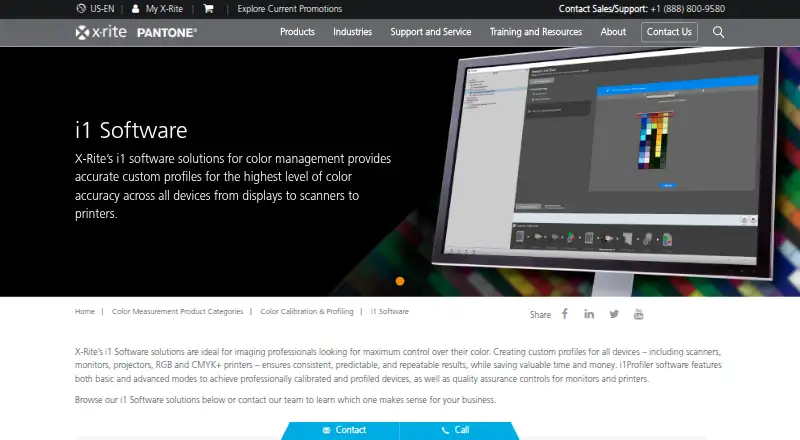
X-Rite i1Profiler is desktop color-management software for calibrating and profiling displays, projectors, scanners, and printers. It creates ICC display profiles and supports compatible X-Rite measurement instruments. For display work, it suits color professionals, creative teams, and workgroups that need control over white point, luminance, contrast ratio, gamma, ambient light, and display matching. Windows and macOS are supported, with category specifications covering Windows 11 and macOS 14.x through 26.x.
Its strongest differentiator is the depth of its calibration and analysis workflow. Basic wizard-driven workflows can guide users through setup, while Advanced workflows allow user-defined control. Display and projector profiling, Automatic Display Calibration, video-card LUT handling, custom patch sets, and Intelligent Iterative Profiling extend beyond basic target setting. Multiple-display matching supports consistent workgroup setups, while gamut, target-versus-achieved, LUT, and before-and-after views help review results. Display Quality Assurance and Display Uniformity Test features add checks after calibration, and Flare Correct plus ambient-light measurement address viewing-environment variables.
The product is positioned around professional X-Rite instrument workflows rather than a standalone software purchase. Pricing uses a contact-sales model, and the software is distributed through X-Rite support and sales/OEM channels. Compatibility should be considered before adoption: X-Rite states that i1Profiler v3.8.7 no longer supports i1Pro 2 and i1iO 2. Choose i1Profiler if you need ICC export, LUT calibration, multi-monitor matching, and detailed profiling controls within the X-Rite ecosystem. It is less suitable for buyers seeking instrument-independent software or a simple, standalone calibration utility.
Your product? Our editors can test X-Rite i1Profiler in depth and publish a review, labelled as paid · from $149/mo →
X-Rite i1Profiler pricing
X-Rite i1Profiler fact sheet
| Free plan | Not verified |
|---|---|
| Paid from | Not verified |
| ICC profile export | Yes |
| LUT calibration | Yes |
| Multi-monitor calibration | Yes |
| HDR calibration | Not verified |
| Monitor limit | Not verified |
| Supported platforms | Windows 11; macOS 14.x through 26.x |
| Deployment | Desktop |
| Platforms | Windows, macOS |
| Support | Phone, Docs |
| Built for | Solo, Small business, Mid-market, Enterprise (editorial estimate) |
| Pricing | Pricing on request |
| Website | xrite.com |
| Facts checked | 20 Sep 2026 |
Alternatives to X-Rite i1Profiler
- EIZO ColorNavigator 7A capable free choice for hardware LUT calibration on compatible EIZO ColorEdge displays.8.9
- Datacolor SpyderSpyder builds custom display profiles across modern monitors, but requires a compatible sensor.8.7
- NEC SpectraView IIA focused, one-time calibration tool for supported NEC displays.8.5


See all X-Rite i1Profiler alternatives →
X-Rite i1Profiler vs the competition
- X-Rite i1Profiler vs EIZO ColorNavigator 7
- X-Rite i1Profiler vs NEC SpectraView II
- X-Rite i1Profiler vs ColourSpace
- X-Rite i1Profiler vs QUBYX PerfectLum
- X-Rite i1Profiler vs ArgyllCMS
- X-Rite i1Profiler vs DisplayCAL



Compare X-Rite i1Profiler with any tool side by side →
Also Ranked In
X-Rite i1Profiler is ranked in 2 of our directories.
Used X-Rite i1Profiler? Be the first to review it
The editor score above is our own research. What this page doesn't have yet is a reader's view — what you used X-Rite i1Profiler for, what worked and what didn't. No stars are seeded and no review is paid for; an editor reads every one before it appears.
Write a reviewTwo minutes · verified accounts only · read by an editor before it appears
Featured on iTechGuides

X-Rite i1Profiler is listed in our Display Calibration Software directory. Add the badge to your site — it links back to this page.
<a href="https://www.itechguides.com/products/x-rite-i1profiler/"><img src="https://www.itechguides.com/best/badge/x-rite-i1profiler.svg" alt="Featured on iTechGuides" width="230" height="46"></a>
Reviewed by iTechGuides Editors · Editorial team · Updated Oct 2026
Advertiser disclosure: iTechGuides is reader-supported. Vendors can pay for top positions in our rankings and for a place on other products' pages, and we may earn a commission when you click some links. Bought places stand at the number bought; this page and our disclosure say so. Paying vendors may get a fuller, more detailed review from our editors, and that review can change their score. How we rank.
Last updated · How we research and update