
LimaxLock Secure Browser
LimaxLock Secure Browser: A focused Android kiosk browser for controlled web access and remote administration. Ranked #14 of 20 in Kiosk Browsers by our editors (7.5/10); pricing: Pricing on request · 14-day trial; best for android deployments needing remote policy control.
At a glance
- Editor score7.5 / 10
- PricingPricing on request · 14-day trial
- Best forAndroid deployments needing remote policy control
- Deployment modeCloud
- Founded2018 · Pune, Maharashtra, India
- Facts checked20 Sep 2026
Where it wins
- Blocks unauthorized URLs and limits access to approved websites
- Remote policies, URL management, monitoring and kiosk commands
- Clears history, cookies and cache automatically between sessions
Where it doesn't
- Supports Android deployments rather than multiple operating systems
- Pricing requires contacting sales for fleet details
- Cloud deployment may not suit offline-only kiosk environments
Our verdict on LimaxLock Secure Browser
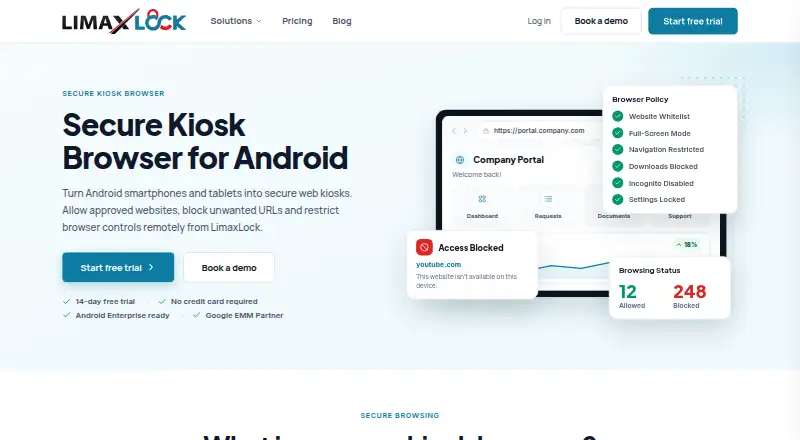
LimaxLock Secure Browser is a managed kiosk browser for Android phones, tablets, rugged handhelds and POS devices. It is intended for dedicated web-based deployments such as point-of-sale systems, self-service portals, check-in workflows, education, healthcare, warehousing and digital signage. Administrators can restrict browsing to approved websites, deliver full-screen web experiences and control navigation, downloads, browser settings and access to other browsers.
Its main strength is the depth of its browser and session controls. Website allowlisting and unauthorized URL blocking help keep users within defined workflows, while address bar and navigation controls limit route changes. Automatic session reset clears history, cookies and cache, which suits shared devices moving between users. Remote browser policy and URL management, device assignments, monitoring and kiosk commands extend administration beyond the device itself. These capabilities make it a focused option for organizations managing dedicated Android endpoints rather than general-purpose browsing.
LimaxLock uses cloud deployment and is available for Android. The published product details describe a 14-day free trial, while the pricing model directs buyers to contact sales for fleet pricing. That approach may fit organizations that need a managed rollout and remote control across assigned devices, but it offers less immediate price transparency for teams comparing self-service plans. Choose LimaxLock when website restriction, kiosk lockdown, session clearing and remote administration are central requirements. Organizations needing support for multiple operating systems or a general-purpose browser should consider a different category fit.
Your product? Our editors can test LimaxLock Secure Browser in depth and publish a review, labelled as paid · from $149/mo →
LimaxLock Secure Browser pricing
LimaxLock Secure Browser fact sheet
| Free plan | Not verified |
|---|---|
| Paid from | Not verified |
| Deployment mode | Cloud |
| Supported platforms | android |
| URL allowlisting | Yes |
| Remote management | Yes |
| Session reset | Yes |
| Digital signage support | Yes |
| Browser engine | Not verified |
| Free trial | 14 days · no card needed |
| Deployment | Cloud, Mobile |
| Platforms | Android |
| Compliance & security | 2FA |
| Support | Email, Phone |
| Built for | Small business, Mid-market, Enterprise (editorial estimate) |
| Pricing | Pricing on request · 14-day trial (source) |
| Website | limaxlock.com |
| Facts checked | 20 Sep 2026 |
Alternatives to LimaxLock Secure Browser
- SiteKioskA broad kiosk control suite for managed Windows and Android deployments.9.4
- KioWareA mature kiosk platform for multi-platform deployments with paid, per-device plans.9.1
- Hexnode Kiosk BrowserA paid, cross-platform kiosk browser with policy controls, resets, signage, and UEM management.8.9



See all LimaxLock Secure Browser alternatives →
Also Ranked In
LimaxLock Secure Browser is ranked in 3 of our directories.
Used LimaxLock Secure Browser? Be the first to review it
The editor score above is our own research. What this page doesn't have yet is a reader's view — what you used LimaxLock Secure Browser for, what worked and what didn't. No stars are seeded and no review is paid for; an editor reads every one before it appears.
Write a reviewTwo minutes · verified accounts only · read by an editor before it appears
Featured on iTechGuides

LimaxLock Secure Browser is listed in our Kiosk Browsers directory. Add the badge to your site — it links back to this page.
<a href="https://www.itechguides.com/products/limaxlock-secure-browser/"><img src="https://www.itechguides.com/best/badge/limaxlock-secure-browser.svg" alt="Featured on iTechGuides" width="230" height="46"></a>
Reviewed by iTechGuides Editors · Editorial team · Updated Oct 2026
Advertiser disclosure: iTechGuides is reader-supported. Vendors can pay for top positions in our rankings and for a place on other products' pages, and we may earn a commission when you click some links. Bought places stand at the number bought; this page and our disclosure say so. Paying vendors may get a fuller, more detailed review from our editors, and that review can change their score. How we rank.
Last updated · How we research and update