
Lesson Maker Pro
Lesson Maker Pro: A broad web-based lesson workspace for teachers who want AI-generated materials and planning. Ranked #3 of 23 in Lesson Planning Software by our editors (8.3/10); pricing: Free plan · paid from $7.99/user/mo (annual); best for AI-first teachers needing complete lesson materials.
At a glance
- Editor score8.3 / 10
- PricingFree plan · paid from $7.99/user/mo (annual)
- Best forAI-first teachers needing complete lesson materials
- Free planYes
- Paid from$7.99/user/mo
- Standards alignmentYes
- Facts checked20 Sep 2026
Where it wins
- AI generates lessons from topics, standards, and grade levels.
- Creates worksheets, assessments, guides, presentations, and sub-plans.
- Exports to PDF, Office files, Google tools, and Google Classroom.
Where it doesn't
- Access is web-only rather than mobile.
- The $7.99 monthly equivalent is billed annually.
- Its broad feature set may exceed the needs of basic planners.
Our verdict on Lesson Maker Pro
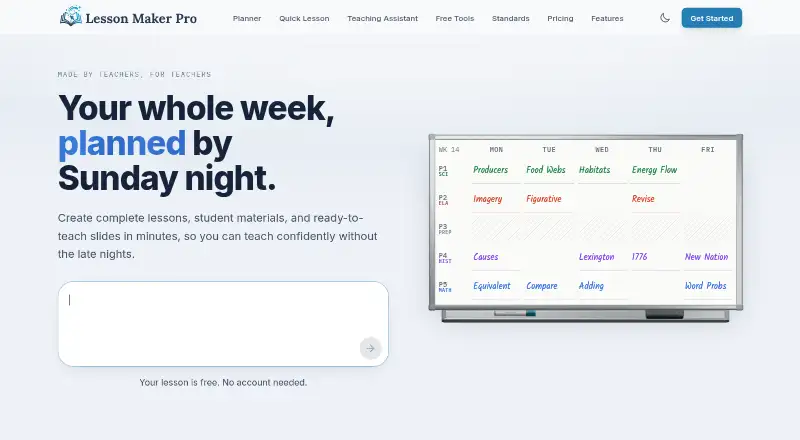
Lesson Maker Pro is a web-based planning tool for teachers who need more than a weekly calendar. It combines a drag-and-drop planner mapped to class periods with day views, timed activities, unit planning, standards alignment, and AI-generated lesson materials. Teachers can create lesson plans, presentations, worksheets, assessments, teacher guides, printable packets, and sub-plans. The product is particularly suited to educators who want AI assistance across planning and classroom preparation while keeping schedules, resources, and standards in one workspace.
The Free plan includes a weekly planner, AI-generated lesson plans, presentations and materials, and the Teaching Assistant. Pro costs $7.99 per user per month with annual billing, shown as $95.88 per user per year, and adds unlimited lesson plans, presentations and materials, unlimited Teaching Assistant messages, and five unit plans monthly. Schools costs $72.50 per seat per year and includes Pro for every educator, central seat management, invoice or purchase-order billing, and onboarding and rollout support. This structure gives individual teachers a low-commitment entry point, while paid plans expand usage and add school administration features.
Its strongest differentiator is breadth: Lesson Maker Pro covers weekly, daily, and unit planning, standards alignment for Common Core, NGSS, and state standards, learner-support adaptations, extensions, and resource generation. Google Drive, Google Docs, Google Slides, Google Forms, and Google Classroom integrations support common classroom workflows, while exports also include PDF, Word, and PowerPoint. The tradeoff is platform coverage, since access is web-only. Teachers seeking a complete AI-supported production workspace should find the feature range well matched; those wanting only a simple mobile planner may prefer a narrower tool.
Lesson Maker Pro pricing
All 3 Lesson Maker Pro plans and prices →
Lesson Maker Pro fact sheet
| Free plan | Yes |
|---|---|
| Paid from | $7.99/user/mo |
| Standards alignment | Yes |
| Calendar view | Yes |
| Plan collaboration | Not verified |
| AI lesson generation | Yes |
| Mobile access | Web_only |
| Export formats | PDF, Word, PowerPoint, Google Docs, Google Slides, Google Forms, Google Classroom |
| Deployment | Cloud |
| Platforms | Web |
| Support | |
| Built for | Solo, Small business, Mid-market, Enterprise (editorial estimate) |
| Integrations | 5 integrations: Google Drive, Google Docs, Google Slides, Google Forms, Google Classroom |
| Pricing | Free plan · paid from $7.99/user/mo (annual) (source) |
| Website | lessonmakerpro.com |
| Facts checked | 20 Sep 2026 |
Lesson Maker Pro integrations
Lesson Maker Pro lists 5 integrations on its own site.
- Google Drive
- Google Docs
- Google Slides
- Google Forms
- Google Classroom
Alternatives to Lesson Maker Pro
- PlanbookA mature planner with broad scheduling, collaboration, standards, and administration tools.9.6
- Common PlannerA broad, low-cost planner with AI, standards tools, collaboration, and integrations.9.2
- PlanbookEduA collaborative browser-based planner with standards tracking and flexible schedules.8.2



See all Lesson Maker Pro alternatives →
Lesson Maker Pro vs the competition
- Lesson Maker Pro vs Planbook
- Lesson Maker Pro vs Common Planner
- Lesson Maker Pro vs PlanbookEdu
- Lesson Maker Pro vs TeacherHero
- Lesson Maker Pro vs Planboard
- Lesson Maker Pro vs SchEDU


Compare Lesson Maker Pro with any tool side by side →
Used Lesson Maker Pro? Be the first to review it
The editor score above is our own research. What this page doesn't have yet is a reader's view — what you used Lesson Maker Pro for, what worked and what didn't. No stars are seeded and no review is paid for; an editor reads every one before it appears.
Write a reviewTwo minutes · verified accounts only · read by an editor before it appears
Featured on iTechGuides

Lesson Maker Pro is listed in our Lesson Planning Software directory. Add the badge to your site — it links back to this page.
<a href="https://www.itechguides.com/products/lesson-maker-pro/"><img src="https://www.itechguides.com/best/badge/lesson-maker-pro.svg" alt="Featured on iTechGuides" width="230" height="46"></a>
Reviewed by iTechGuides Editors · Editorial team · Updated Sep 2026
Advertiser disclosure: iTechGuides is reader-supported. We may earn a commission when you click some links. How we rank.
Last updated · How we research and update