Leo Editor
Leo Editor: An open-source desktop outliner for structured writing, code, research, and documentation. Ranked #20 of 30 in Outliner Software by our editors (5.5/10); pricing: Open source; best for programmable open-source outliners.
At a glance
- Editor score5.5 / 10
- PricingOpen source
- Best forProgrammable open-source outliners
- Paid fromNone
- App platformswindows, macos, linux
- Facts checked20 Sep 2026
Where it wins
- Cloned nodes create multiple synchronized views of the same data.
- Python scripting, programmable commands, and plugins extend workflows.
- Imports and exports Markdown, Org mode, reStructuredText, and Vim outlines.
Where it doesn't
- Its workflow centers on hierarchical outlines rather than freeform documents.
- Python scripting and plugins are better suited to technically inclined users.
- External-file workflows depend on @file and related directives.
Our verdict on Leo Editor
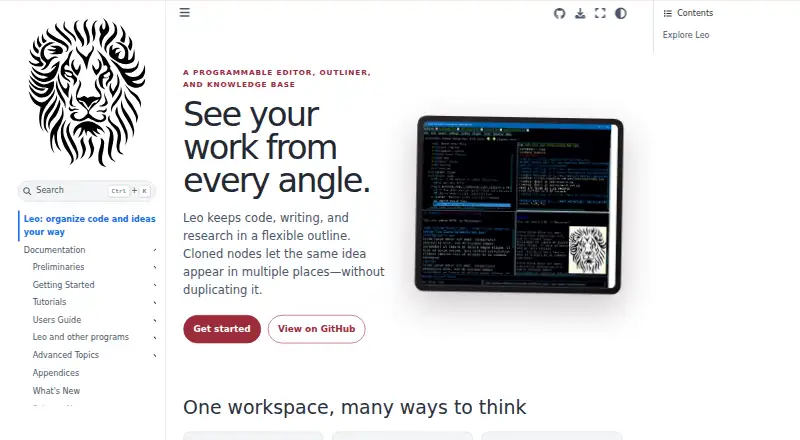
Leo Editor is an open-source desktop application for organizing code, writing, research, documentation, and other structured text in hierarchical outlines. It combines node headlines and body text with outline navigation, a text editor, Python scripting, plugins, clones, and external-file integration. The application runs on Windows, macOS, and Linux, making it a fit for programmers, writers, and people managing complex documents or projects locally.
Its standout feature is the way clones support multiple synchronized views of the same outline data. Navigation includes expand and collapse, hoist and dehoist, promote and demote, clickable headline- and gnx-based links, and backlinks. The programmable model adds Python commands and a plugin system, while imports and exports cover HTML, MORE, Markdown, Org mode, reStructuredText, and Vim outline files. Interactive HTML outline viewer export also supports sharing an outline view beyond the editor.
Leo Editor is distributed as open-source software rather than through paid subscription plans. Its combination of scripting, plugins, clones, and external-file directives makes it a strong choice for users who want an adaptable outline-centered workspace and are comfortable with technical configuration. It is less suitable for someone seeking a simple, lightweight writing app built around conventional documents or a nontechnical workflow. Choose Leo when programmable structure and multiple views matter more than a minimal interface.
Leo Editor pricing
Leo Editor fact sheet
| Free plan | Not verified |
|---|---|
| Paid from | None |
| App platforms | windows, macos, linux |
| Export formats | HTML, MORE, Markdown, Org mode, reStructuredText, Vim outline |
| Offline access | Not verified |
| Markdown support | Yes |
| Real-time collaboration | Not verified |
| Backlinks | Yes |
| Navigation modes | expand/collapse, hoist/dehoist, promote/demote, clones, clickable links |
| Deployment | Desktop |
| Platforms | Windows, macOS, Linux |
| Support | Community, Docs |
| Built for | Solo, Small business (editorial estimate) |
| Pricing | Open source |
| Website | leo-editor.github.io |
| Facts checked | 20 Sep 2026 |
Alternatives to Leo Editor
- CheckvistA flexible collaborative outliner with unlimited nesting, offline access, and low-cost task features.10.0
- DynalistDeep outlining and cross-platform access make Dynalist a strong fit for power users.9.2
- LegendA broad, offline-first outliner with collaboration, views, backlinks, and cross-platform apps.8.2



See all Leo Editor alternatives →
Also listed in
Used Leo Editor? Be the first to review it
The editor score above is our own research. What this page doesn't have yet is a reader's view — what you used Leo Editor for, what worked and what didn't. No stars are seeded and no review is paid for; an editor reads every one before it appears.
Write a reviewTwo minutes · verified accounts only · read by an editor before it appears
Featured on iTechGuides

Leo Editor is listed in our Outliner Software directory. Add the badge to your site — it links back to this page.
<a href="https://www.itechguides.com/products/leo-editor/"><img src="https://www.itechguides.com/best/badge/leo-editor.svg" alt="Featured on iTechGuides" width="230" height="46"></a>
Reviewed by iTechGuides Editors · Editorial team · Updated Sep 2026
Advertiser disclosure: iTechGuides is reader-supported. We may earn a commission when you click some links. How we rank.
Last updated · How we research and update