
LEA Extended Input
LEA Extended Input: A flexible mapper for touchscreen, keyboard, joystick, and multi-client PC control setups. Ranked #19 of 27 in Game Controller Mapper Software by our editors (6.2/10); pricing: Free plan; best for mobile-assisted multiplatform control layouts.
At a glance
- Editor score6.2 / 10
- PricingFree plan
- Best forMobile-assisted multiplatform control layouts
- Free planYes
- Virtual-controller outputYes
- Facts checked22 Sep 2026
Where it wins
- Supports Windows, iOS, and Android clients
- Combines touchscreen controls, macros, and emulated outputs
- Connects multiple clients to one Windows PC
Where it doesn't
- Requires a Windows server for PC game connections
- Setup spans separate clients and a standalone server
- Paid-version details are not straightforward
Our verdict on LEA Extended Input
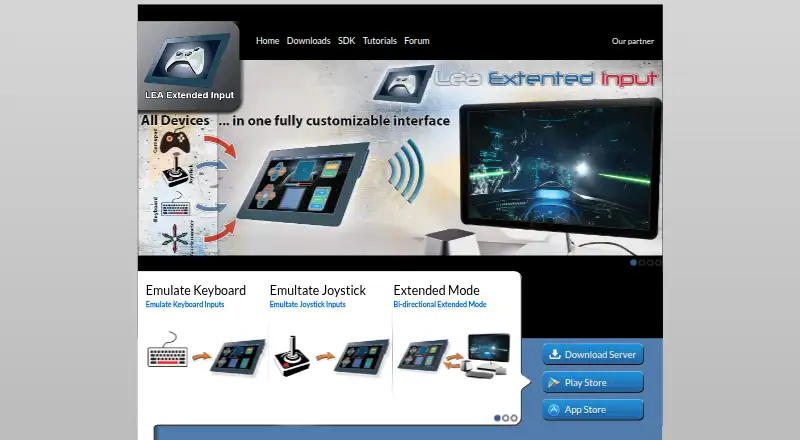
LEA Extended Input is a game controller mapper for PC gamers, modders, and users who want custom control layouts or tablet-based game interfaces. Android and iOS clients connect to a Windows server, while the server can redirect gamepad or joystick inputs to emulated joysticks and keyboard input. Its scope covers touchscreen controls, keyboard emulation, joystick emulation, macros, project-based configurations, and multiple clients connected to one PC.
The product’s strongest angle is control-layout depth. Users can create and import or export control templates, organize projects and games, switch profiles, and build macros with an advanced editor. Touchscreen controls make phones and tablets part of the input setup, while keyboard and virtual-controller output support different PC game control requirements. The standalone Windows server can also operate independently, which gives the Windows side of the setup a defined central component.
Platform coverage is broader than a Windows-only mapper, but the arrangement still centers on Windows: iOS and Android act as clients, and PC game connections depend on the Windows server. The published offering describes free clients and server access, along with a paid ad-free version. LEA Extended Input fits users who value mobile-assisted layouts, emulated joystick output, profile organization, and multi-client configurations. Users seeking a simpler single-device mapper or a setup without a Windows server should consider a more focused alternative.
Your product? Our editors can test LEA Extended Input in depth and publish a review, labelled as paid · from $149/mo →
LEA Extended Input pricing
LEA Extended Input fact sheet
| Free plan | Yes |
|---|---|
| Paid from | Not verified |
| Keyboard/mouse output | Yes |
| Virtual-controller output | Yes |
| Profile switching | Yes |
| Per-app profiles | Yes |
| Platform support | Multiplatform |
| Maximum profiles | Not verified |
| Controller input types | gamepads, joysticks, touchscreen controls |
| Deployment | Desktop, Mobile |
| Platforms | Windows, iOS, Android |
| Support | Community, Docs |
| Built for | Solo, Small business (editorial estimate) |
| Pricing | Free plan |
| Website | leaextendedinput.com |
| Facts checked | 22 Sep 2026 |
Alternatives to LEA Extended Input
- Steam InputA free, mature mapper for per-game controller profiles across Windows, macOS, and Linux.8.6
- DS4WindowsA capable free mapper for PlayStation controllers, limited to Windows PCs.7.9
- JoyShockMapperA free, gyro-focused mapper for Windows and Linux with deep binding controls.7.8


See all LEA Extended Input alternatives →
Used LEA Extended Input? Be the first to review it
The editor score above is our own research. What this page doesn't have yet is a reader's view — what you used LEA Extended Input for, what worked and what didn't. No stars are seeded and no review is paid for; an editor reads every one before it appears.
Write a reviewTwo minutes · verified accounts only · read by an editor before it appears
Featured on iTechGuides

LEA Extended Input is listed in our Game Controller Mapper Software directory. Add the badge to your site — it links back to this page.
<a href="https://www.itechguides.com/products/lea-extended-input/"><img src="https://www.itechguides.com/best/badge/lea-extended-input.svg" alt="Featured on iTechGuides" width="230" height="46"></a>
Reviewed by iTechGuides Editors · Editorial team · Updated Oct 2026
Advertiser disclosure: iTechGuides is reader-supported. Vendors can pay for top positions in our rankings and for a place on other products' pages, and we may earn a commission when you click some links. Bought places stand at the number bought; this page and our disclosure say so. Paying vendors may get a fuller, more detailed review from our editors, and that review can change their score. How we rank.
Last updated · How we research and update