
Klaat Code
Klaat Code: A low-cost coding agent with broad terminal tools and a free entry tier. Ranked #45 of 103 in AI Coding Assistants by our editors (4.8/10); pricing: Free plan; best for budget-conscious VS Code agent users.
At a glance
- Editor score4.8 / 10
- PricingFree plan
- Best forBudget-conscious VS Code agent users
- Free planYes
- Paid from$5/mo
- Coding agentYes
- Facts checked22 Sep 2026
Where it wins
- Free plan includes chat, CLI, VS Code and session memory
- Semantic code graph, sub-agents, MCP and diagnostics
- Headless mode supports CI and scripting workflows
Where it doesn't
- AI requests depend on a hosted KlaatAI routing service
- Verified IDE support is limited to VS Code
- Free Code Graph access is capped at 1,000 files
Our verdict on Klaat Code
Klaat Code is a terminal-native AI coding agent for developers who want an interactive command-line workflow. It reads codebases, edits files, searches files, runs shell commands, executes tests and verifies changes through post-edit typechecker and linter diagnostics. Headless mode extends the workflow to CI and scripting, while deployment options include cloud and self-hosted use. It fits solo developers and small to mid-market teams, particularly those working in VS Code or from the terminal.
Pricing is unusually accessible for an agent with this feature set. The Free plan includes Nano, Flash and Core access, a Code Graph covering up to 1,000 files, web chat, KlaatCode CLI, VS Code and session memory. Starter costs $5 per month with 80 units per day, free-floor model access and KlaatCode access. Pro is $15 per month with all six model tiers, 150 units per day and 2,250 requests per month. Scale costs $32 per month, while Team costs $30 per seat per month. Apex and Apex Max cost $99 and $200 per month, respectively, adding higher request ceilings and broader capacity.
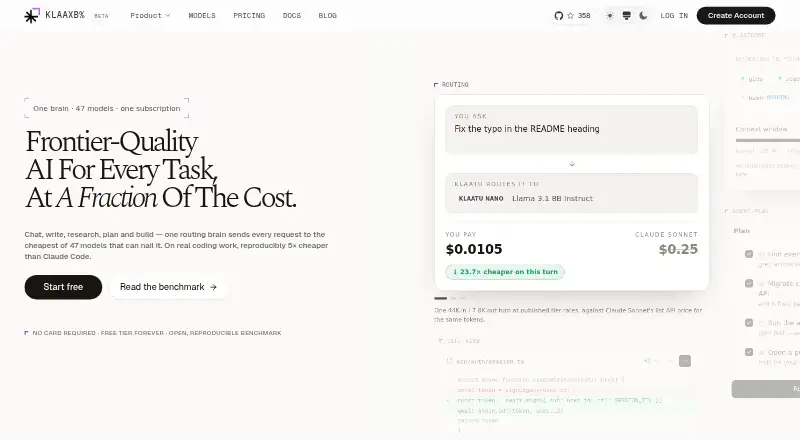
The standout capability is the combination of automatic routing across six model tiers and a semantic code knowledge graph. File operations, shell commands, background sub-agents and MCP support give the agent a broad operating surface, with integrations including GitHub, Postgres, Puppeteer, Brave Search and Fetch. Klaat Code is open source, but AI requests depend on the hosted KlaatAI routing service and an account subscription. Developers seeking a terminal-centered agent with low entry pricing should consider it; those requiring broader verified IDE coverage or support beyond documentation should look elsewhere.
Questions about Klaat Code
Does Klaat Code have a free plan? Yes, there is a free plan; paid plans start at $5/mo (Starter).
How much does Klaat Code cost? Klaat Code lists 6 paid plans; the lowest is Starter at $5/mo.
What does Klaat Code run on? Windows, macOS and Linux. It runs in the cloud and self-hosted.
What does Klaat Code integrate with? 7+ integrations, including MCP servers, GitHub, Postgres, Puppeteer and Brave Search.
Who is Klaat Code built for? Solo users, small businesses and mid-market companies (our editorial estimate).
Your product? Our editors can test Klaat Code in depth and publish a review, labelled as paid · from $149/mo →
Klaat Code pricing
All 7 Klaat Code plans and prices →
Klaat Code fact sheet
| Free plan | Yes |
|---|---|
| Paid from | $5/mo |
| Code completion | Yes |
| Chat assistance | Yes |
| Coding agent | Yes |
| Supported IDEs | VS Code |
| Codebase indexing | Yes |
| Terminal access | Yes |
| Deployment | Cloud, Self-hosted |
| Platforms | Windows, macOS, Linux |
| Support | Docs |
| Built for | Solo, Small business, Mid-market (editorial estimate) |
| Integrations | 7+ integrations: MCP servers, GitHub, Postgres, Puppeteer, Brave Search, Fetch |
| Pricing | Free plan (source) |
| Website | klaatai.com |
| Facts checked | 22 Sep 2026 |
Klaat Code integrations
Klaat Code lists 7+ integrations on its own site — the 6 named here are the ones its pages call out.
- MCP servers
- GitHub
- Postgres
- Puppeteer
- Brave Search
- Fetch
Alternatives to Klaat Code
- GitHub CopilotA broad coding assistant with a free entry point and agent workflows.9.3
- Claude CodeA strong fit for multi-step coding work across codebases, tools, and pull requests.9.2
- DevinA broad autonomous coding workspace with usage-based plan differences.9.1


See all Klaat Code alternatives →
Used Klaat Code? Be the first to review it
The editor score above is our own research. What this page doesn't have yet is a reader's view — what you used Klaat Code for, what worked and what didn't. No stars are seeded and no review is paid for; an editor reads every one before it appears.
Write a reviewTwo minutes · verified accounts only · read by an editor before it appears
Featured on iTechGuides

Klaat Code is listed in our AI Coding Assistants directory. Add the badge to your site — it links back to this page.
<a href="https://www.itechguides.com/products/klaat-code/"><img src="https://www.itechguides.com/best/badge/klaat-code.svg" alt="Featured on iTechGuides" width="230" height="46"></a>
Reviewed by iTechGuides Editors · Editorial team · Updated Nov 2026
Advertiser disclosure: iTechGuides is reader-supported. Vendors can pay for top positions in our rankings and for a place on other products' pages, and we may earn a commission when you click some links. Bought places stand at the number bought; this page and our disclosure say so. Paying vendors may get a fuller, more detailed review from our editors, and that review can change their score. How we rank.
Last updated · How we research and update